13
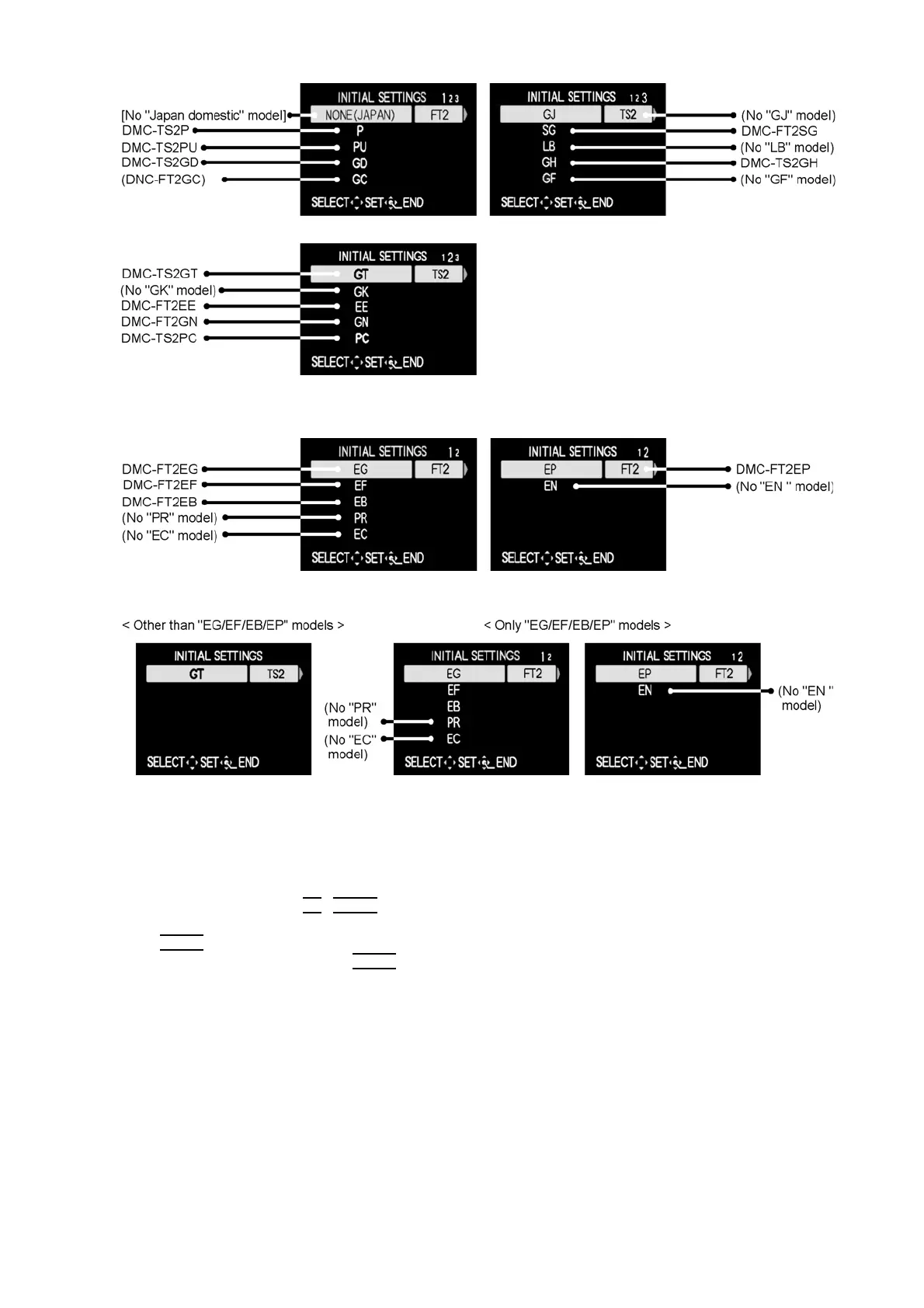
[Only for "EG, EF, EB and EP" models : (VEP56096B is used as a Main P.C.B.)]
When MAIN P.C.B. has just been replaced, the following model suffix list is displayed as follows. (Two pages in total)
[CASE 2. Other than "After replacing MAIN P.C.B."]
• Step 5. Chose the model suffix in "INITIAL SETTINGS": (Refer to "CAUTION 1")
[Caution: After replacing MAIN P.C.B.]
(Especially, other than "EG, EF, EB and EP" models : (VEP56096B is used as a Main P.C.B.))
The model suffix can be chosen, JUST ONE TIME.
Once one of the model suffix have been chosen, the model suffix lists will not be displayed, thus, it can be changed.
Therefore, select the area carefully.
Select the area with pressing "UP
/ DOWN of Cursor buttons".
• Step 6. Set the model suffix at "INITIAL SETTINGS":
Press the "RIGHT
of Cursor buttons".
The only set area is displayed. Press the "RIGHT
of Cursor buttons" after confirmation.
(The unit is powered off automatically.)





 To Next Page