215
Playback/Editing
To allow easy posting to web pages, attachment to e-mail etc., picture size (number of
pixels) is reduced.
1 Select the menu.
•
You can set up to 100 pictures at one time in [Multi].
• The picture quality of the resized picture will deteriorate.
Not available in these cases:
•
It may not be possible to resize pictures recorded with other equipment.
• You cannot use [Resize] for the following pictures.
– Motion pictures
– Pictures taken in Panorama Shot Mode
– Group Pictures
– Pictures stamped with [Text Stamp]
– Pictures taken with [ ], [ ] or [ ]
[Resize]
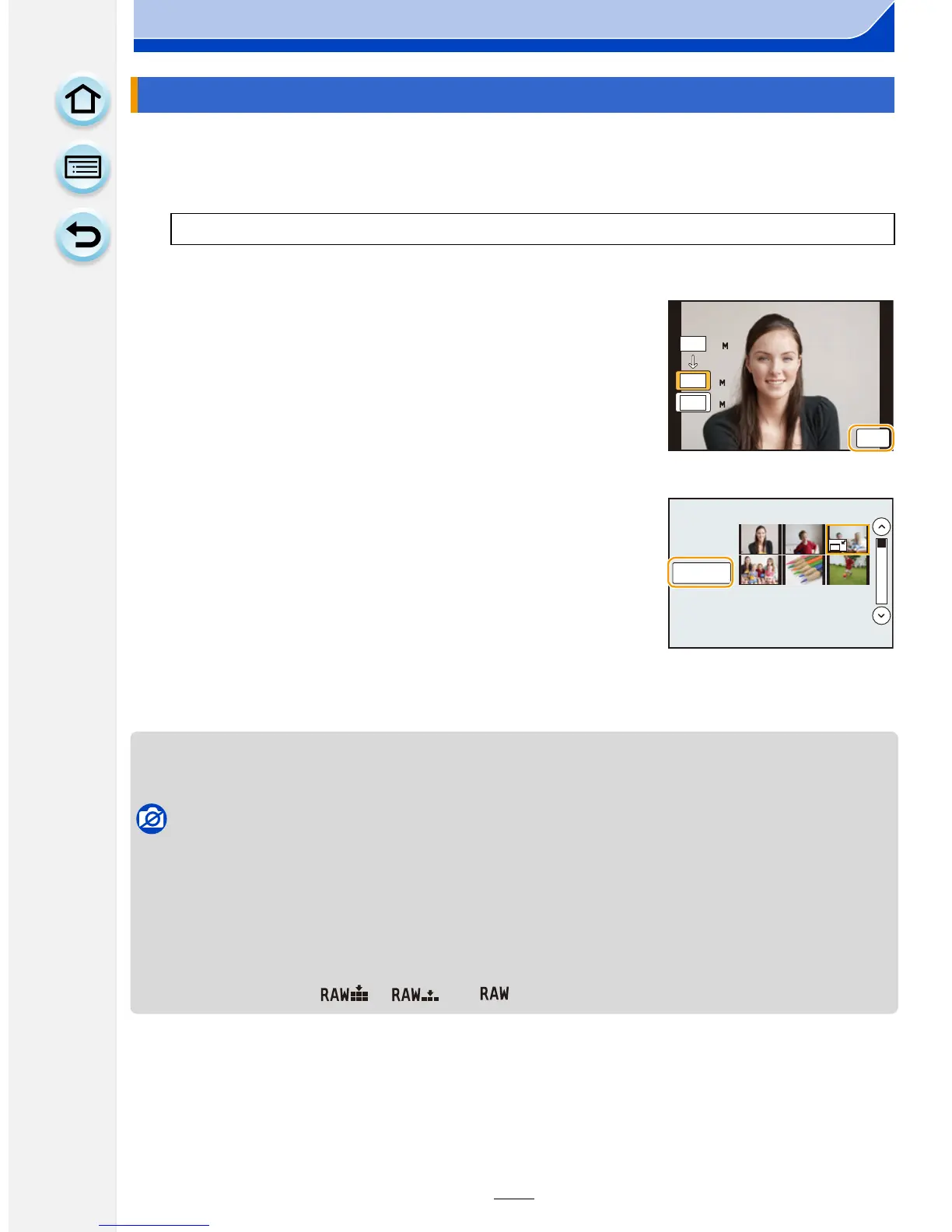
[MENU] > [Playback]>[Resize]>[Single]/[Multi]
2 Select the picture and size.
[Single] setting
1 Drag the screen horizontally to select an image, and
then touch [Set].
2 Touch the size you wish to change, and then touch
[Set].
•
Confirmation screen is displayed. It is executed when
[Yes] is selected.
Exit the menu after it is executed.
[Multi] setting
1 Touch the size you wish to change.
2 Touch a picture (repeat).
•
Selection will be canceled by touching the same picture
again.
3 Touch [OK].
•
Confirmation screen is displayed. It is executed when
[Yes] is selected.
Exit the menu after it is executed.
16
16
8
4
L
4:3
M
4:3
S
4:3
6HW






 To Next Page