Advanced (Recording pictures)
64
VQT1C52
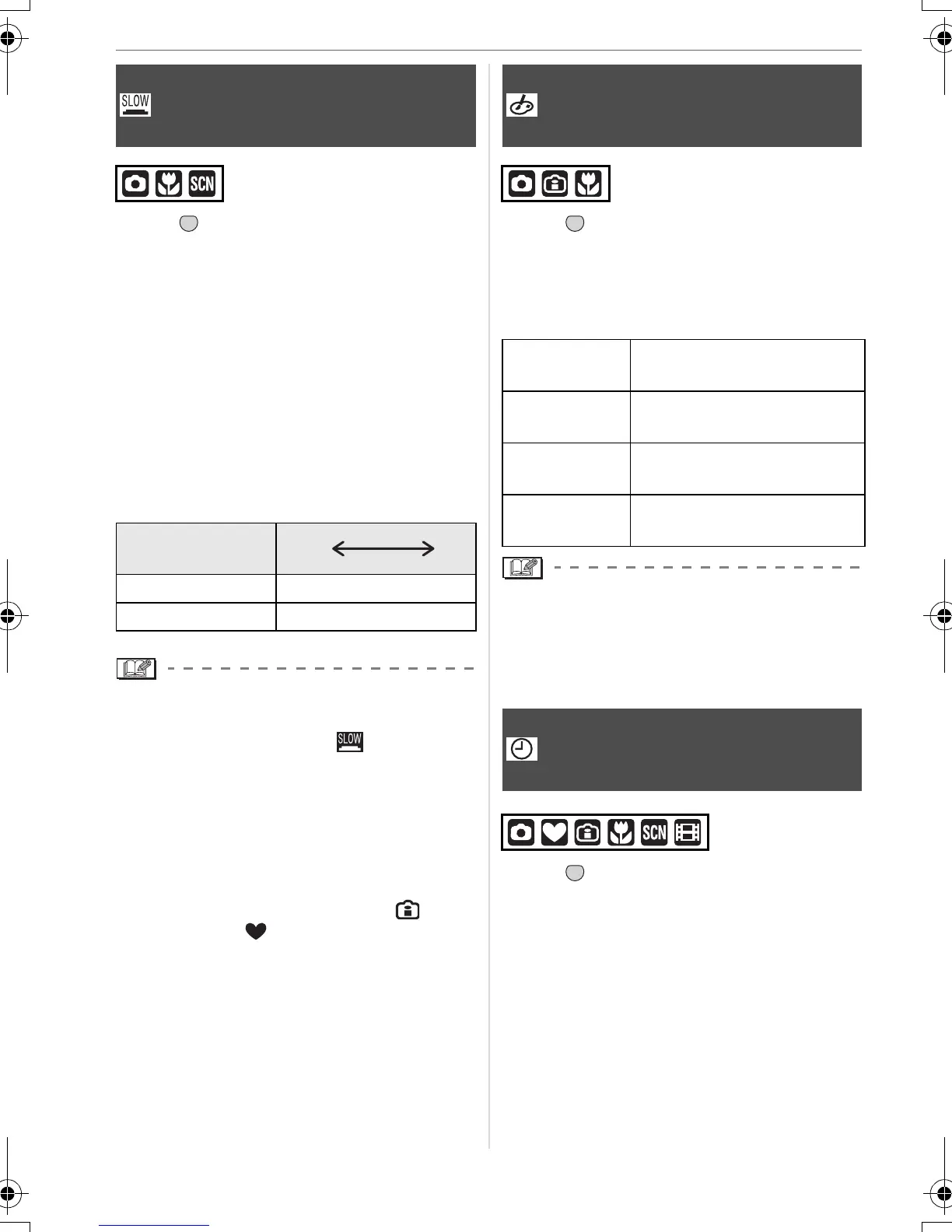
Press [ ] to display the [REC] mode
menu and select the item to set. (P56)
When taking pictures in dark places with
low light, you can take pictures which are
brighter than normal by selecting a setting
even slower than the slowest setting of the
shutter speed.
• The slow shutter speeds you can select
are: [1/8–], [1/4–], [1/2–] and [1–].
• This is effective if you want to take bright
pictures of both a night landscape and a
subject using [NIGHT PORTRAIT] (P46)
in scene mode.
• This should usually be set to [1/8–] to take
pictures. (When you select a slow shutter
speed other than [1/8–], [ ] appears on
the screen.)
• When the shutter speed is made slower
using [SLOW SHUTTER], jitter is likely to
occur. We recommend using a tripod and
the self-timer (P40) for taking pictures.
• You cannot set the slow shutter in
Intelligent ISO sensitivity mode [ ] and
simple mode [ ] and [SPORTS],
[NIGHT SCENERY], [BABY1]/[BABY2],
[PET], [STARRY SKY] and [FIREWORKS]
in scene mode.
Press [ ] to display the [REC] mode
menu and select the item to set. (P56)
Select a colour mode that matches the
recording conditions and your image of the
recording.
• When you take pictures in dark places,
noise may become visible. To avoid noise,
we recommend setting [COL.MODE] to
[NATURAL].
Press [ ] to display the [REC] mode
menu and select the item to set. (P56)
Change date and time. (P16)
[SLOW SHUTTER]
Recording bright pictures in dark
places
Slow shutter
setting
1/8– 1–
Brightness Darker Brighter
Jitter Less More
MENU
SET
[COL.MODE]
Setting
colour
effects and picture
quality for the recorded pictures
[NATURAL] The picture becomes
softer.
[VIVID] The picture becomes
sharper.
[B/W] The picture becomes black
and white.
[SEPIA] The picture becomes
sepia.
[CLOCK SET]
Set the display order for the date
and time
MENU
SET
MENU
SET
VQT1C52ENG.book 64 ページ 2006年12月29日 金曜日 午後2時14分





 To Next Page