Preparation
9
VQT1C52
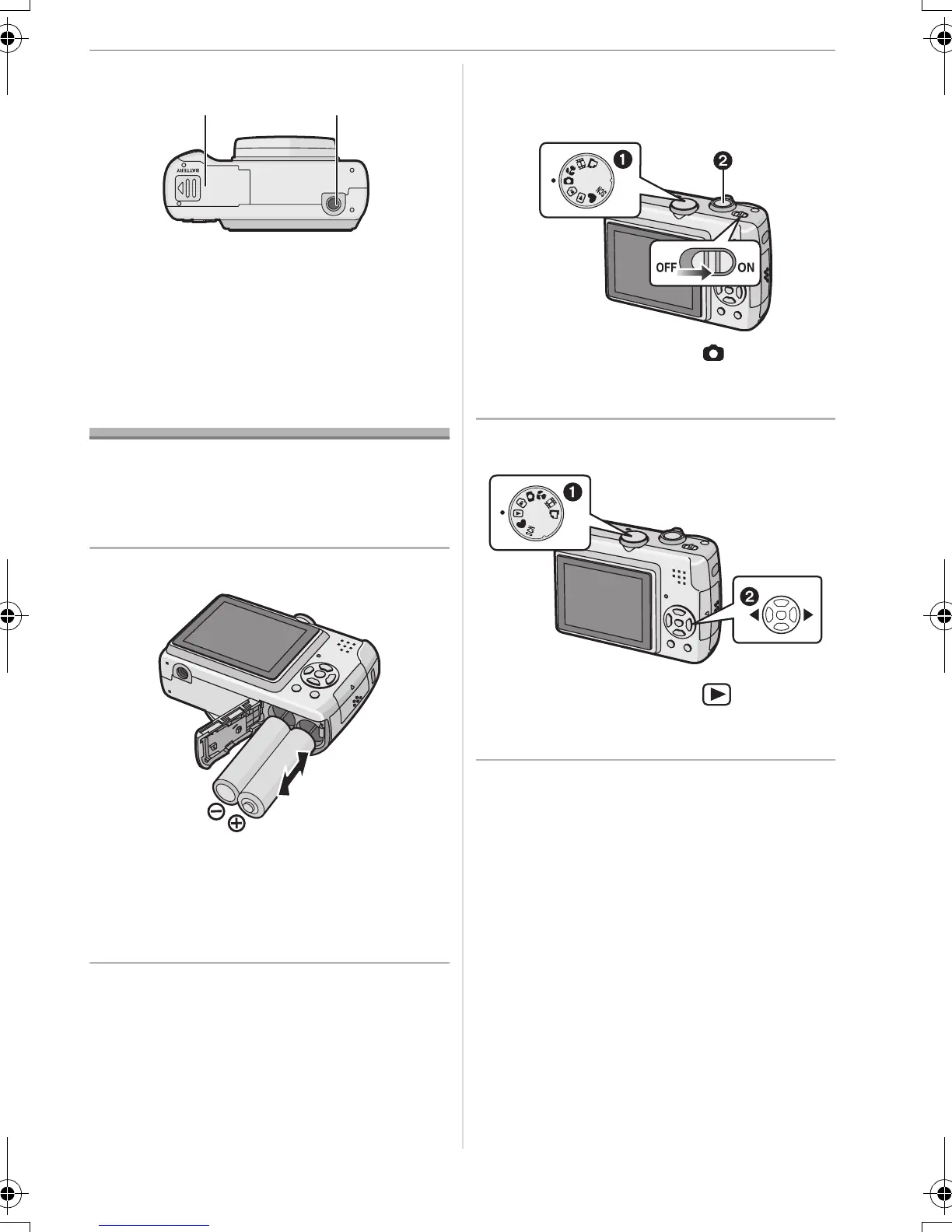
21 Battery door (P14)
22 Tripod receptacle
• When you use a tripod, make sure the
tripod is stable when the camera is
attached to it.
Quick Guide
This is an overview of how to record and
playback pictures with the camera. For
each step, be sure to refer to the pages
indicated in brackets.
1 Insert the batteries. (P14)
• When you do not use the card
(optional), you can record or play
back pictures on the built-in memory
(P15). Refer to P15 when you use a
card.
2 Turn the camera on to take
pictures.
• Set the clock. (P16)
• Select the type of battery in use on
[BATTERY TYPE] in the [SETUP]
menu. (P19)
1 Set the mode dial to [ ].
2 Press the shutter button to take
pictures. (P23)
3 Play back the pictures.
1 Set the mode dial to [ ].
2 Select the picture you want to view.
(P31)
21 22
VQT1C52ENG.book 9 ページ 2006年12月29日 金曜日 午後2時14分





 To Next Page