8
VQT3W08
Using the touchpad
The touchpad of the remote control is used for
various operations such as moving the highlight
or pointer, confirming the selection, playback
control, entering characters, etc.
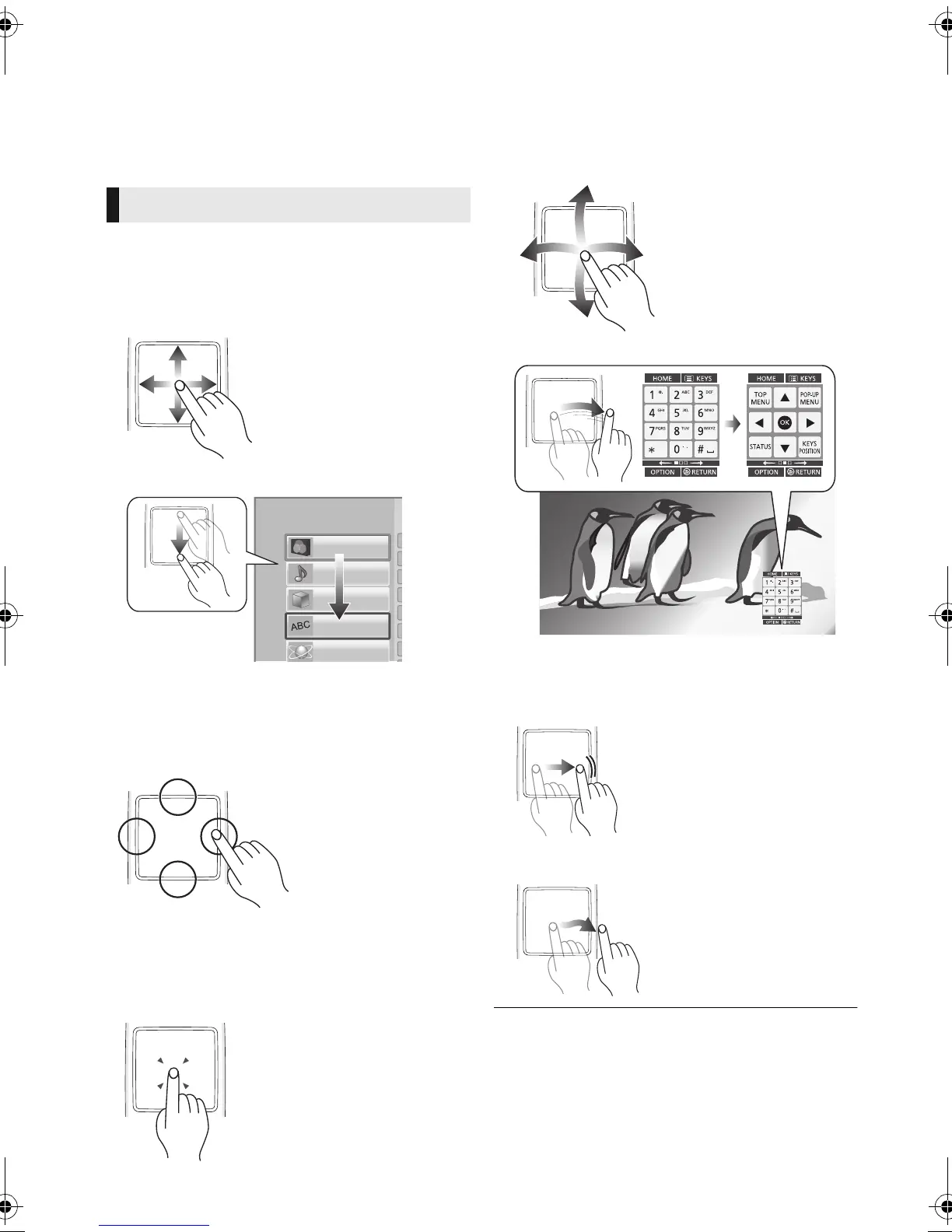
∫ Move the highlight or the pointer
While touching the touchpad, the highlight or
pointer will move according to the movement of
your finger.
e.g.,
You can move the highlight continuously to up,
down, left and right, by touching and holding an
edge of the touchpad.
≥ It may not work depending on the screen.
∫ Confirm the selection
Tap the touchpad to confirm the selection.
Release your finger as soon as it touches the
touchpad.
∫ Switching the screen
Some screens can be switched by lightly flicking
your finger horizontally or vertically on the
touchpad.
Flick your finger quickly and release from the
touchpad.
e.g.,
Bad example of flicking
Finger stops on the touchpad
Movement is too slow
≥ It may not operate correctly in following cases:
– Operation with your fingernails
– Operation wearing gloves
– Operation with wet hand
≥ Do not press the touchpad with pointed objects such as
ballpoint pen, etc., or press with excessive force.
Basic touchpad operation
Player Settings
Network
Language
3D
Audio
Video
DMP-BBT01_VQT3W08 _eng.book 8 ページ 2012年4月6日 金曜日 午後3時0分








 To Next Page