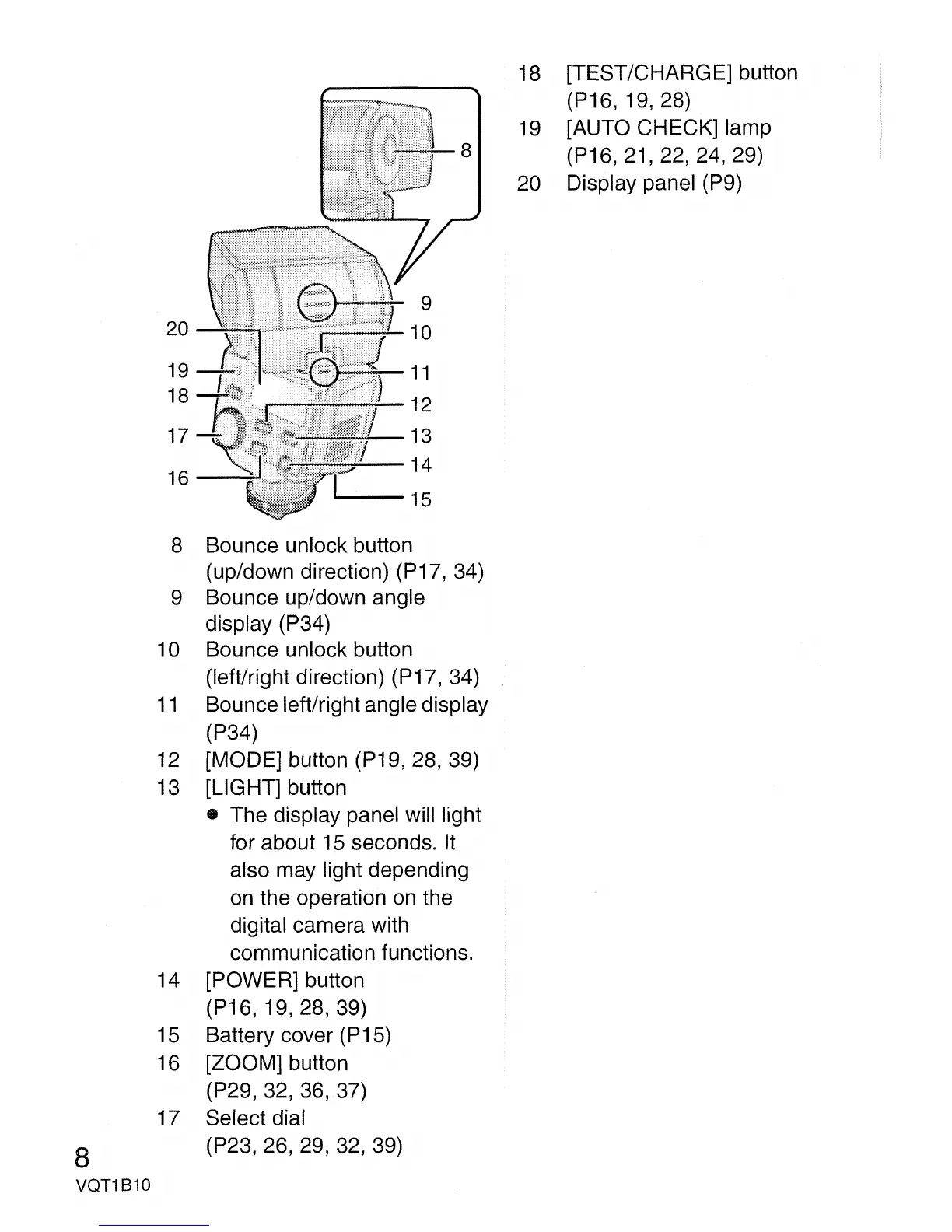
18 [TEST/CHARGE] button
(P16,
19,28)
19
[AUTO CHECK] lamp
(P16,21,22,24,29)
20 Display panel (P9)
8
VQT1810
8 Bounce unlock button
(up/down direction) (P17, 34)
9 Bounce up/down angle
display (P34)
10 Bounce unlock button
(left/right direction) (P17, 34)
11
Bounce left/right angle display
(P34)
12 [MODE] button (P19, 28, 39)
13 [LIGHT] button
• The display panel will light
for about
15
seconds.
It
also may light depending
on
the operation
on
the
digital camera with
communication functions.
14 [POWER] button
(P16, 19, 28, 39)
15 Battery cover (P15)
16 [ZOOM] button
(P29, 32, 36, 37)
17 Select dial
(P23,26,29,
32,
39)


 To Next Page