Displays Appearing on the Display Panel
1 2 3
~
.....
ID........
1...
iP
.•••••.•.
•.·
.•.
·
.••.••.•.•.
M
.•.••.•...•.•.
1
.•..
:
..•..•.•.•.
1
.••.•.•.•.•.•.•.•.••.•.••.•.
·
.•.
1
.•.••.•.•.•.•.•
·.:
.••.•.•.••.••.
·
•.•.•.•.•
:.:.........................
I
I=BI
••
I.I.~Mm·illi.
I
13
--)11I:) rz:+;l
····~···.···i"!l'1"I.·.·.···.·.····~,
,t·
..
tt
•••....•
12 1."..;16
~
.•
·L
!
.•..•
·
•.
·.·.t
•..•..
:
..•.
~.:
..
::
·•·.·
.•
~.:'.
t.:.··
••.•..
~I
•.
:.·.:.:
..
::
.••..
y._.'.·:·
..
-.·
..
•
•..
·
•.
•
•.
•
•.
•
•.•···
..
·.·
••.
•
••.
•
•.
L.··.·
.•..
·
..
:
..
r.I.·.··
..
:.·.·.·
..
:.·.·~.:···.·
..
:
..
··:.··
.••..•..•.••.•••.
~..........................
I
I -
...........I~?i._'
_I
"""'
II}III
11GIJI...
••
<'I·t·>············
·······rl·i
ir-,
····rl·········ii···········rl··t·rli········
'···I·I···
10 9
5
6
7
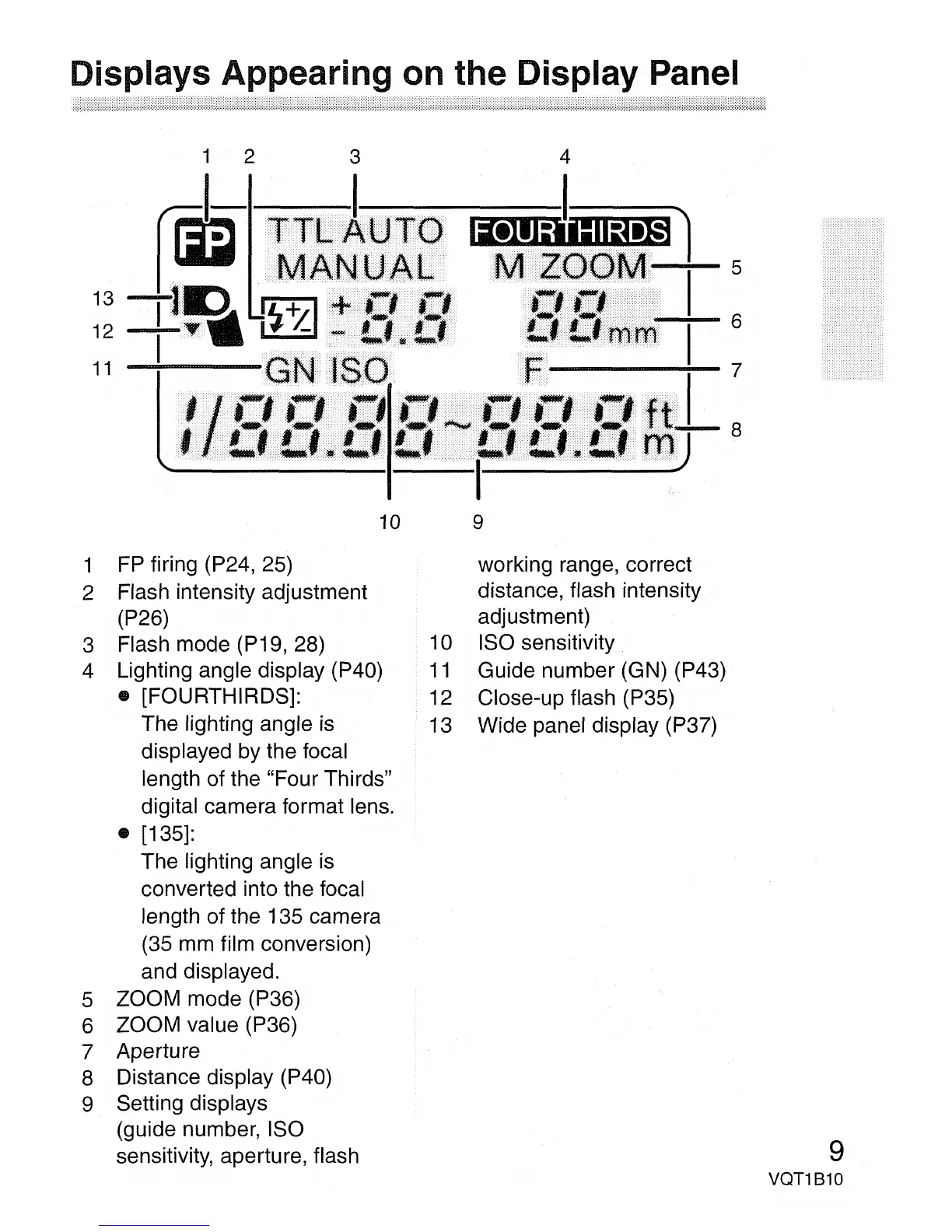
1
FP
firing (P24, 25)
2 Flash intensity adjustment
(P26)
3 Flash mode (P19, 28)
4 Lighting angle display (P40)
• [FOURTHIRDS]:
The lighting angle
is
displayed by the focal
length of the "Four Thirds"
digital camera format lens.
• [135]:
The lighting angle
is
converted into the focal
length of the 135 camera
(35
mm
film conversion)
and displayed.
5 ZOOM mode (P36)
6 ZOOM value (P36)
7 Aperture
8 Distance display (P40)
9 Setting displays
(guide number, ISO
sensitivity, aperture, flash
working range, correct
distance, flash intensity
adjustment)
10 ISO sensitivity
11
Guide number (GN) (P43)
12 Close-up flash (P35)
13 Wide panel display (P37)
9
VQT1810


 To Next Page