8
RQT7682
Play
≥
While stopped, the unit automatically turns off once 15 minutes (after approximately 5 minutes when
using the battery pack) have elapsed.
≥
Discs continue to rotate while menus are displayed. Press [∫, –OFF] when you finish to preserve
the unit’s motor.
Main unit operations
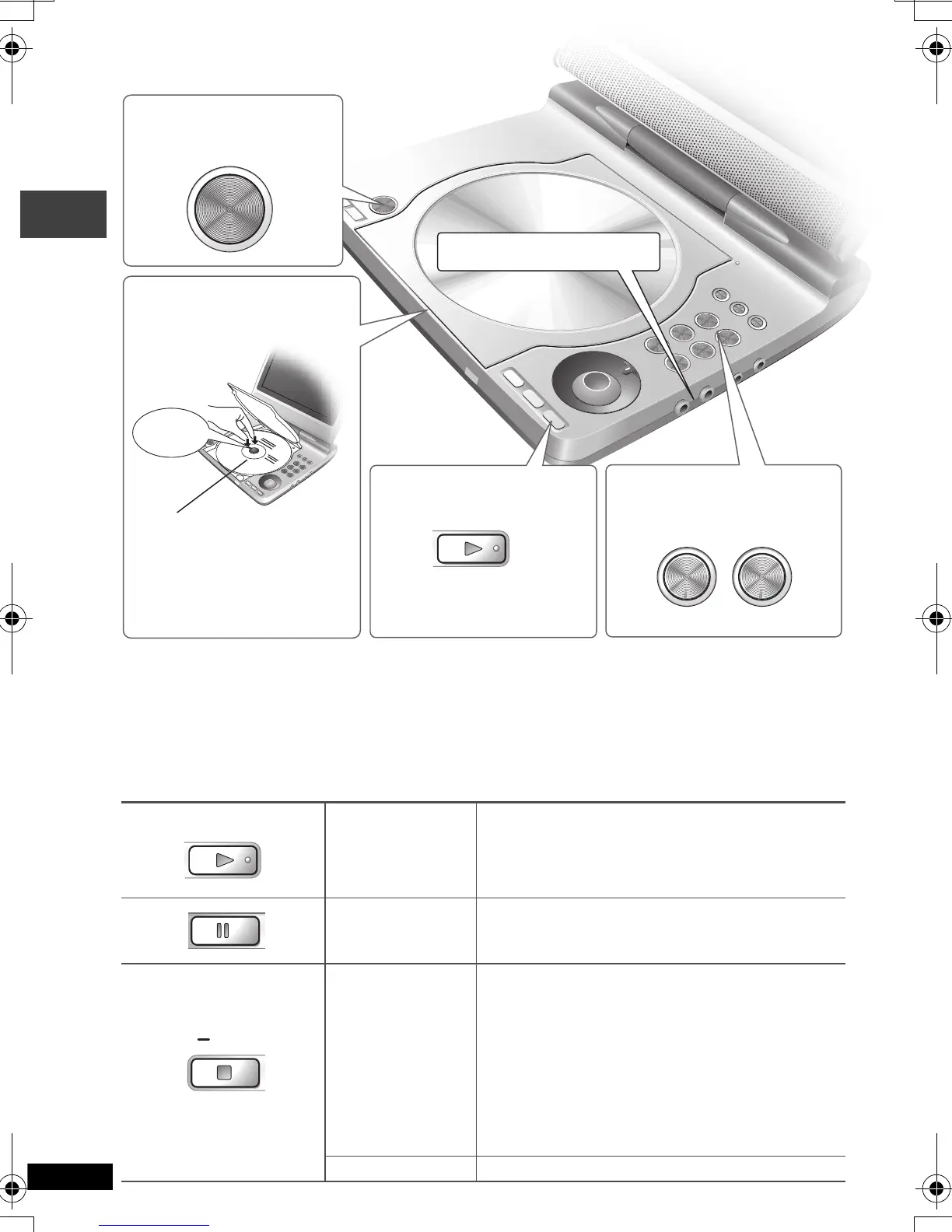
Turn unit on/play
Press and hold and the power comes on and play
begins.
Pause Press [
1
, ON] to re-start play.
Stop
While “!” is flashing, press [1,
ON] and play
begins from the position where play stopped.
≥
[DVD-V] While the message is displayed,
press [1,
ON] and the previous chapters are
reviewed.
Opening the lid, or pressing [∫, –OFF] while “!”
is flashing cancels the memorized position where
play stopped.
Turn unit off Press and hold until “OFF” is displayed.
1 Open the lid.
2
Insert a disc and
close the lid
.
Click into
place
For two sided discs, insert
the side you want to play with
the label facing up.
For DVD-RAM, remove the
disc from the cartridge.
Headphone terminals
[
Ë
]
3.5 mm (1/8
q
) Stereo
3 Press and hold.
The unit turns on and play
begins.
OPEN
㧙VOL 㧗
4
Adjust the volume.
OFF
Play
P2-35 e.fm 8 ページ 2004年4月1日 木曜日 午前9時6分


 To Next Page