9
RQT7682
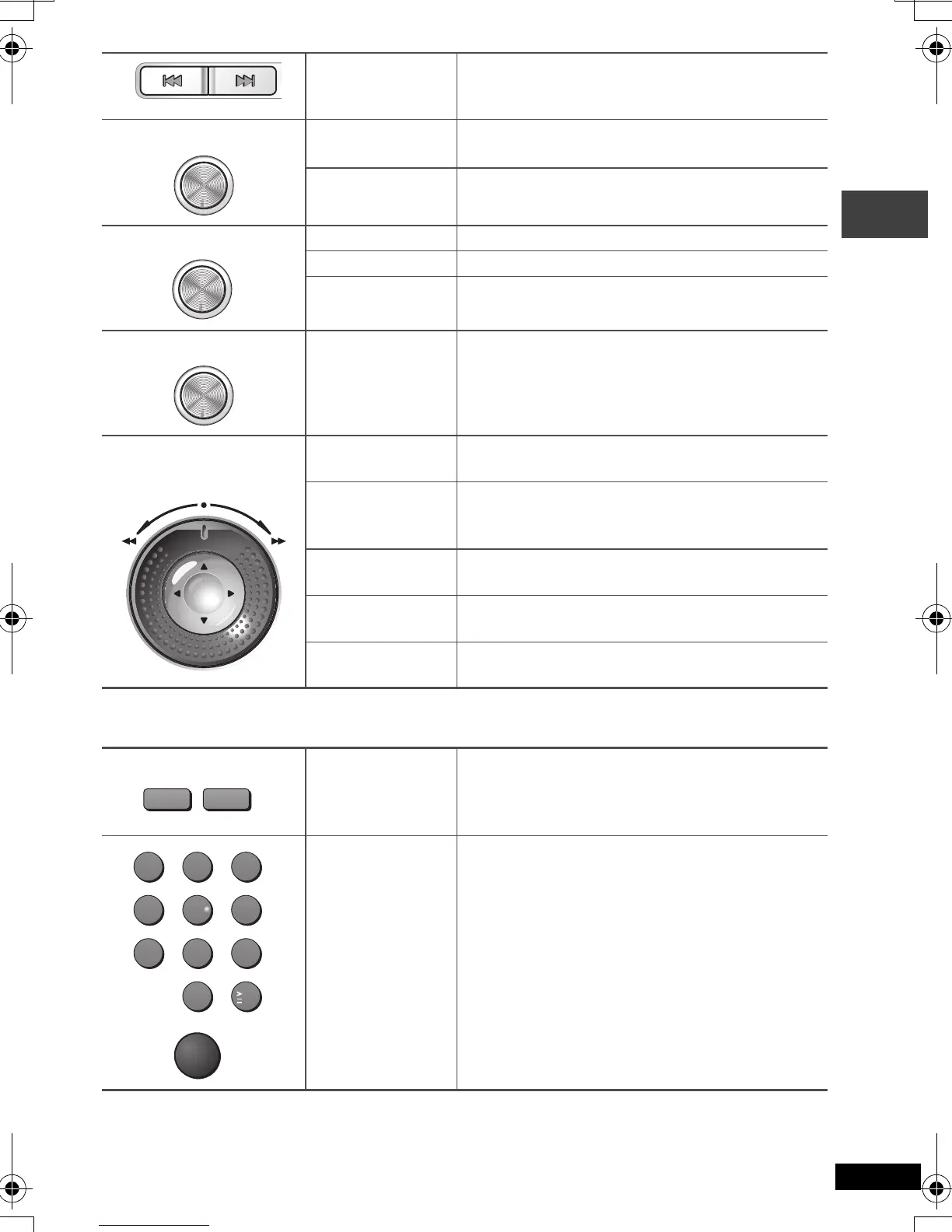
Remote control operations
Skip Skips items.
Top menu [DVD-A] [DVD-V]
Direct navigator [RAM] (➜ page 15)
Menu [DVD-V]
Playlist play [RAM] (➜ page 15)
Navigation menu [WMA] [MP3] [JPEG] (➜ page 16)
Return
Returns to the previous screen.
[VCD] (with PBC) Returns to the menu.
Search
Turn the shuttle dial.
Release the shuttle dial to return to normal play.
Slow play
Turn the shuttle dial while paused.
Press [
1
, ON
] to return to normal play.
[VCD] [
5
] only.
Menu operation
Use [3 42 1] to select an item and press
[ENTER] to confirm.
Frame by Frame
While paused, use [
2
1
].
[VCD] [
1
] only.
Group skip
[WMA] [MP3] [JPEG]
Use [
3
4
].
Search (During
play)/Slow play
(While paused)
(➜ above)
j
Enter number
[RAM] [DVD-A] [DVD-V] [VCD] [CD]
e.g. To select 12:
[S10] ➜ [1] ➜ [2]
[VCD] with playback control
While stopped, press the numbered buttons.
[WMA] [MP3] [JPEG]
e.g. To select 123:
[1] ➜ [2] ➜ [3] ➜ [ENTER]
TOP MENU
MENU
RETURN
SEARCH
ENTER
123
456
789
0
10
ENTER
Play
SLOW/SEARCH
65
P2-35 e.fm 9 ページ 2004年4月1日 木曜日 午前9時6分


 To Next Page