18
RQT8791
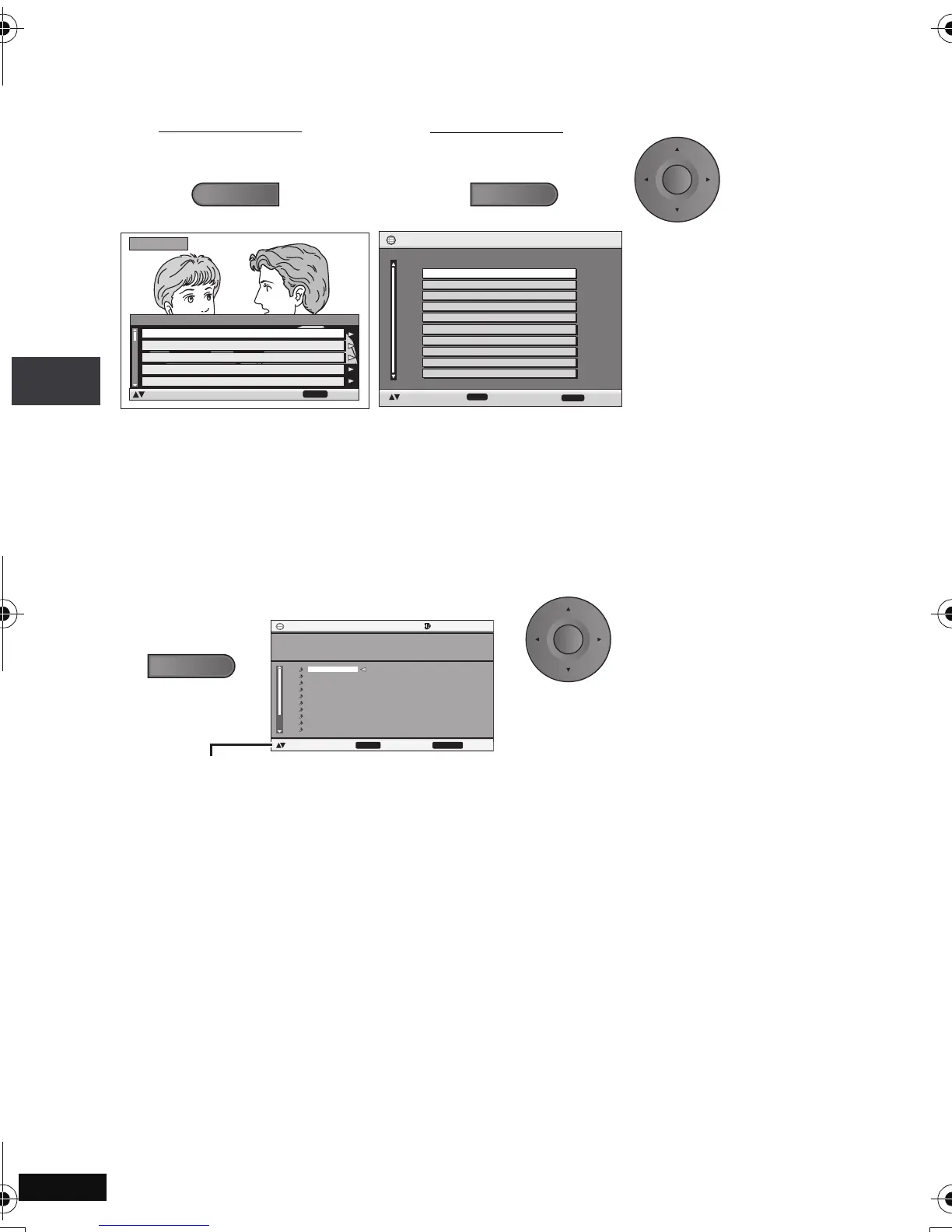
Playing programs/playlists [DVD-VR]
≥ Titles appear only if they have been entered.
≥ You cannot edit playlists and titles.
Playing CD using menus [CD]
Titles appear with CD text playback.
Direct Navigator
11/ 1(WED) 0:05 Monday feature1
1/ 1 (MON) 1:05 Auto action2
2/ 2 (TUE) 2:21 Cinema3
3/ 3 (WED) 3:37 Music4
4/10(THU) 11:05 Baseball5
Date
No.
On
Contents
RETURN
to select
to exit
Title
TOP MENU
1/ 2 0:00:01 City Penguin1
2/ 3 0:01:20 Ashley at Prom2
3/ 4 1:10:04 Formula one3
4/ 5 0:10:20 Soccer4
5/ 6 0:00:01 Baseball5
DateNo. Total Time T i t l e
Playlist
RETURN
to exit
6/ 7 0:00:01 City Penguin6
7/ 8 0:01:10 Ashley at Prom7
8/ 9 0:13:22 Formula one8
9/10 0:05:30 Soccer9
10/11 0:07:29 Baseball10
ENTER
to select and press
ENTER
1
To play programs:
2
Press [34] to select the
program or playlist and
press [ENTER].
≥ Press [1] to show the contents of the program (Only when playing the program).
≥ To exit the screen: Press [RETURN].
To play playlists:
≥ Only when the disc contains a playlist.
MENU
CD
Content title
1
001 Kanenonaiyoru
No.
1 / 17 2:21
to select and press ENTER
to exit
RETURN
Disc Title
Disc Artist
Track Title
Track Artist
All By Artist
BLAZE
AFTER THE RAIN
BRAZE
:
:
:
:
1.
2.
3.
4.
5.
6.
7.
8.
9.
10.
AFTER THE RAIN
NEVER MORE
EAT ME
RAT RACE
Garasu No Jealousy
BAD BOY
SHOUT MY LOUD VOICE
RUN TO THE SKY
YOU SEND ME
DO THE NIGHT
1 Press [34] to select the
tracks and press
[ENTER].
Press [DISPLAY] to switch between guide messages and the playback condition indicator.
e.g. CD text
≥ To exit the screen: Press [RETURN].
ENTER
2
MENU
Playing programs/playlists/Playing CD using menus
p2-31.fm Page 18 Monday, January 22, 2007 4:49 PM



 To Next Page