EasyManua.ls Logo

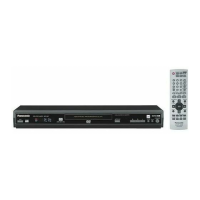
Panasonic DVD-S47 - User Manual

Panasonic DVD-S47
20 pages
Print Icon
To Next Page IconTo Next Page
Loading...
P PC
RQT7553-P
Operating Instructions
DVD/CD PLAYER
Model No. DVD-S47
®
Dear customer
T
hank you for purchasing this product. For optimum performance and
safety, please read these instructions carefully before connecting,
operating or adjusting this product. Please keep this manual for future
reference.
IMPORTANT SAFETY INSTRUCTIONS . . . . . . . . . . . . . . . . . 2
Accessories/Discs that can be played . . . . . . . . . . . . . . . . . 3
Disc handling. . . . . . . . . . . . . . . . . . . . . . . . . . . . . . . . . . . . . . 5
Basic Play . . . . . . . . . . . . . . . . . . . . . . . . . . . . . . . . . . . . . . . . 6
Enjoying higher quality audio and video . . . . . . . . . . . . . . . 7
Changing the play sequences . . . . . . . . . . . . . . . . . . . . . . . . 7
Using navigation menus
. . . . . . . . . . . . . . . . . . . . . . . . . . . . . . 8
Convenient functions . . . . . . . . . . . . . . . . . . . . . . . . . . . . . . . 9
Using On-Screen Menus. . . . . . . . . . . . . . . . . . . . . . . . . . . . 10
Changing the player settings . . . . . . . . . . . . . . . . . . . . . . . . 12
Specifications . . . . . . . . . . . . . . . . . . . . . . . . . . . . . . . . . . . . 13
Troubleshooting guide . . . . . . . . . . . . . . . . . . . . . . . . . . . . . 14
Maintenance. . . . . . . . . . . . . . . . . . . . . . . . . . . . . . . . . . . . . . 15
Limited Warranty (ONLY FOR U.S.A.) . . . . . . . . . . . . . . . . . 16
Product Service . . . . . . . . . . . . . . . . . . . . . . . . . . . . . . . . . . . 17
Main feature index. . . . . . . . . . . . . . . . . . . . . . . . . Back cover
Region number
The player plays DVD-Video marked with labels containing the
region number “1” or “ALL”.
Example:
2
4
1
ALL
1
This manual was printed with soy based ink.
Table of contents
Getting started
STEP 1 The remote control . . . . . . . . . . . . . . . . . . . . . 4
STEP 2 Connection to a television. . . . . . . . . . . . . . . 4
STEP 3 QUICK SETUP . . . . . . . . . . . . . . . . . . . . . . . . . 5
Operations
Reference
Referencia rápida en español . . . . . . . . . . . . . . . . . . 18
7553En.fm1ページ2003年12月26日 金曜日 午前10時32分

Questions and Answers

  • C
    Cindy TaylorAug 22, 2025
    Why does my Panasonic DVD Player have no power?
    • L
      ldayAug 22, 2025
      If your Panasonic DVD Player is not getting power and automatically switches to standby mode, ensure the AC power supply cord is securely inserted into the household AC outlet. Also, when “Auto Power Off” is set to “On”, the unit automatically switches to standby after approximately 30 minutes in the stop mode. The Sleep timer may have also functioned.
  • J
    Jamie Cooper MDAug 25, 2025
    How to adjust subtitles on Panasonic DVD Player?
    • K
      Katherine SmithAug 25, 2025
      If the subtitle position is wrong, there are no subtitles, or the subtitles overlap closed captions on discs with your Panasonic DVD Player: * Adjust the position via “Subtitle Position” in the Display Menu. * Display the subtitles. * Clear the subtitles.
  • E
    Erica CampbellAug 26, 2025
    Why is the picture incorrect on my Panasonic DVD Player?
    • W
      Wendy CrawfordAug 26, 2025
      If you're experiencing issues with the picture quality on your Panasonic DVD Player, ensure it's directly connected to the television and not through a video cassette recorder. Try adjusting the 'TV Aspect' in the 'Video' tab or using your television to change the aspect ratio. You can also modify the '4:3 Aspect' in the Display Menu, experiment with the Zoom setting, restore the zoom ratio to a1.00, set 'Subtitle Position' in Display Menu to '0', set '4:3 Aspect' in Display Menu to 'Normal', or turn off the TV’s zoom function. If the system used on the disc doesn’t match your television, use a multi-system or NTSC television. Also, the unit and television might be using different video systems. Additionally, use the other preset aspect ratios or manual adjustment.
  • T
    Teresa BrownAug 27, 2025
    Why is the sound incorrect on my Panasonic DVD Player?
    • J
      jenniferhudsonAug 28, 2025
      If your Panasonic DVD Player isn't producing any sound, try the following: Select 'Off' in 'Advanced Surround' in Audio Menu. If you experience distortion with AUDIO OUT connections, select 'On' in 'Attenuator' in Audio Menu. If you have connected a digital amplifier which does not include decoder, be sure to select 'PCM' in 'Dolby Digital', 'DTS Digital Surround' or 'MPEG§' in 'Audio' tab. If the 'D.MIX' indicator on the display goes out while playing a multi-channel DVD-Audio disc, sound will only be output from speakers specified by the disc. Also, connect with the AUDIO OUT terminal if none of the audio effects work when the unit is outputting bitstream signals from the DIGITAL AUDIO OUT terminal.
  • S
    Stephen CookAug 30, 2025
    How to fix no power on Panasonic DVD-S47?
    • P
      Patrick JonesAug 30, 2025
      If your Panasonic DVD player isn't powering on or seems to be in standby mode, make sure the AC mains lead is securely inserted into the household mains socket. Also, if “Auto Power Off” is set to “On”, the unit automatically switches to standby after approximately 30 minutes in the stop mode. The Sleep timer might also be functioning.
  • J
    jeffery92Aug 31, 2025
    How to fix subtitle position on Panasonic DVD-S47 DVD Player?
    • S
      stefanie30Aug 31, 2025
      If the subtitle position is wrong or there are no subtitles on your Panasonic DVD Player, adjust the position using the ‘Subtitle Position’ option in the Display Menu. Also, make sure that the subtitles are enabled to display.
  • E
    Edward PittsSep 2, 2025
    What to do if my Panasonic DVD-S47 DVD Player says NOPLAY or NODISC?
    • L
      lindanelsonSep 2, 2025
      If the Panasonic DVD Player displays error messages like “NOPLAY,” “U11,” “U15,” “H??” or “NODISC”, it could be due to several reasons: * The disc inserted is not supported by the unit. Try inserting a compatible disc. * The disc is blank. Ensure a disc with content is inserted. * The disc is dirty. Clean the disc and reinsert. * The DVD-R has not been finalized. Finalize the DVD-R before playing. If trouble occurred, turn the unit off and then back on. If the issue persists, contact a qualified service person, noting the service number.
  • J
    James WatkinsSep 6, 2025
    Why does my Panasonic DVD Player say 'This disc may not be played in your region'?
    • M
      Mr. Calvin JonesSep 6, 2025
      If the Panasonic DVD Player shows messages like “/”, “Cannot display group xx, content xx”, “The progressive out is set to “Disable””, “This disc may not be played in your region” or no on-screen display, it could be due to: * The operation is prohibited by the unit or disc. * You are trying to display incompatible contents. * Select “Enable” in “Progressive Out (Component)” in “Video” tab. * You can only play DVD-Video if their region number is “1”, “ALL” or multiple region number including “1.” * Select “On” in “On-Screen Messages” in “Display” tab.
  • S
    Sarah SuarezSep 8, 2025
    What to do if my Panasonic DVD-S47 says “NOPLAY” “U11” “U15” “H??” “NODISC”?
    • A
      amy95Sep 8, 2025
      If your Panasonic DVD Player shows “NOPLAY”, “U11”, “U15”, “H??” or “NODISC”, it might be due to several reasons. First, ensure that you have inserted a disc that the unit is capable of playing. If the disc is dirty, wipe it clean. Also, make sure that you have correctly inserted the disc. If you inserted a DVD-R, it may need to be finalized. For trouble, turn the unit off and then back on. As an alternative, turn the unit off, disconnect the AC mains lead, and then reconnect it. If the service numbers fail to clear, note the service number and contact a qualified service person.
  • J
    jaymckaySep 10, 2025
    What to do if my Panasonic DVD-S47 cannot record to digital recording equipment?
    • S
      sotokimSep 10, 2025
      If you are unable to record to digital recording equipment with your Panasonic DVD player (resulting in incorrect sound recorded), note that you cannot record WMA/MP3 files, DVDs that have protection preventing digital recording, or DVDs if the recording equipment cannot handle signals with a sampling frequency of 48 kHz. To resolve this, make the following settings: Advanced Surround: Off, PCM Digital Output: Up to 48 kHz, Dolby Digital/DTS Digital Surround/MPEG§: PCM.

Summary

Getting Started

Important Safety Instructions

Essential safety guidelines for operating the DVD player.

Accessories and Disc Compatibility

Lists included accessories and playable disc types.

Remote Control and Connections

Explains remote control usage and TV connection steps.

Quick Setup Procedure

Guides through the initial player setup process.

Operations and Playback

Basic Playback Functions

Covers powering on, loading discs, and starting playback.

Enhanced Audio and Video Quality

Explains features like AV Enhancer and audio enhancement.

Playback Control and Sequencing

Details options for group, program, and random playback.

Navigation and Data Disc Playback

Guides on navigating menus for WMA, MP3, and JPEG files.

Convenient Playback Features

Covers speed change, zoom, and position memory functions.

On-Screen Menu Navigation

Explains on-screen menus for audio, subtitles, and settings.

Player Settings Configuration

Details various settings for audio, video, and system preferences.

Reference and Support

Technical Specifications

Provides detailed technical specifications of the DVD player.

Troubleshooting Common Issues

Offers solutions for common operational problems.

Maintenance and Care

Instructions on how to clean and maintain the unit.

Limited Warranty Information (USA)

Details the limited warranty coverage for USA purchases.

Product Service and Assistance

Information on when and how to get product service.

Spanish Quick Reference

A quick reference guide for operation in Spanish.

Main Feature Index

An index highlighting main features and their page numbers.

Panasonic DVD-S47 Specifications

General IconGeneral
TypeDVD Player
Audio D/A Converter192 kHz/24-bit
Audio FormatDolby Digital, DTS
Output Resolution480p, 720p, 1080i
Progressive ScanYes
UpscalingYes
Remote ControlYes
Disc formatsDVD-R, DVD-RW, CD, CD-R, CD-RW
ConnectivityComposite video output, Component video output
Audio OutputDigital Audio Coaxial

Related product manuals