EasyManua.ls Logo

Panasonic DVDF61P - User Manual

Panasonic DVDF61P
24 pages
Print Icon
To Next Page IconTo Next Page
Loading...
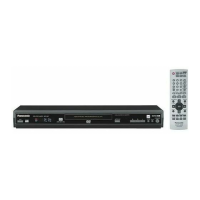
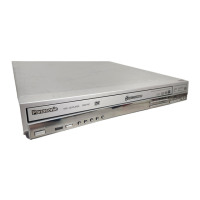
The illustration shows the unit for U.S.A. and Canada.
DVD/CD PLAYER
Operating Instructions
Model No. DVD-F65/DVD-F61
PRELIMINARY
123
456
789
0
10
SLEEP
DISC DISC1 DISC2 DISC3
SETUP
OPEN/CLOSE
SEQUENTIAL
FL SELECT
GROUP
DIRECT NAVIGATOR
TOP
MENU
DISPLAY
SUBTITLE
PLAY MODE
ZOOM
POSITION
MEMORY
DOUBLE
RE-MASTER
AUDIO
ANGLE/PAGE
QUICK REPLAY
RETURN
MENU
ENTER
PLAY LIST
CANCEL
DISC4 DISC5
S
K
I
P
S
L
O
W
/
S
E
A
R
C
H
S
T
O
P
P
L
A
Y
P
A
U
S
E
POWER Í /I
CD SEQUENTIAL
DISC
DOUBLE RE-MASTER
;∫
1
:/65/9
DISC EXCHANGE DISC SKIP
<
OPEN/CLOSE
1
2 3 4 5
®
Dear customer
Thank you for purchasing this product. For optimum performance and
safety, please read these instructions carefully before connecting,
operating or adjusting this product. Please keep this manual for future
reference.
[For\U.S.A.]
IMPORTANT SAFETY INSTRUCTIONS . . . . . . . . . . . . . . . . . 3
Control reference guide . . . . . . . . . . . . . . . . . . . . . . . . . . . . . 3
Accessories. . . . . . . . . . . . . . . . . . . . . . . . . . . . . . . . . . . . . . . 4
Connection . . . . . . . . . . . . . . . . . . . . . . . . . . . . . . . . . . . . . . . 4
Disc information . . . . . . . . . . . . . . . . . . . . . . . . . . . . . . . . . . . 6
The remote control . . . . . . . . . . . . . . . . . . . . . . . . . . . . . . . . . 7
Quick setup . . . . . . . . . . . . . . . . . . . . . . . . . . . . . . . . . . . . . . . 7
Basic play . . . . . . . . . . . . . . . . . . . . . . . . . . . . . . . . . . . . . . . . 8
Navigation menus. . . . . . . . . . . . . . . . . . . . . . . . . . . . . . . . . 10
Convenient features . . . . . . . . . . . . . . . . . . . . . . . . . . . . . . . 12
Changing play sequence . . . . . . . . . . . . . . . . . . . . . . . . . . . 14
Using On-Screen Menu Icons . . . . . . . . . . . . . . . . . . . . . . . 15
Changing settings . . . . . . . . . . . . . . . . . . . . . . . . . . . . . . . . 18
Troubleshooting guide. . . . . . . . . . . . . . . . . . . . . . . . . . . . . 20
Maintenance . . . . . . . . . . . . . . . . . . . . . . . . . . . . . . . . . . . . . 21
Limited Warranty (ONLY FOR U.S.A.). . . . . . . . . . . . . . . . . 22
Product Service . . . . . . . . . . . . . . . . . . . . . . . . . . . . . . . . . . 22
Guía de referencia rápida en español. . . . . . . . . . . . . . . . . 23
(Spanish Quick Reference)
Glossary . . . . . . . . . . . . . . . . . . . . . . . . . . . . . . . . .Back cover
Specifications . . . . . . . . . . . . . . . . . . . . . . . . . . . . .Back cover
The warranty for the U.S.A. is on page 22.
En la página 23 hay una guía de referencia rápida en
español.
RQT6726-P
As an ENERGY STAR Partner,
Panasonic has determined that
this product meets the
ENERGY STAR
guidelines for energy efficiency.
®
®
Table of contents
Getting started
Basic operations
Advanced operations
Reference
These operating instructions are applicable to models DVD-F65
and DVD-F61 for a variety of regions.
Unless otherwise indicated, illustrations in these operating
instructions are of the unit for U.S.A. and Canada.
Region numbers
Are allocated to DVD players and software according to where they
are sold. See page 6 for the region number for your unit.
The model number and serial number of this product can be found
on either the back or the bottom of the unit. Please note them in the
space provided below and keep for future reference.
MODEL NUMBER ______________________________________
SERIAL NUMBER ______________________________________
P PC UP GN
GCS

Questions and Answers

  • B
    Brian KennedyAug 11, 2025
    What to do if my Panasonic DVDF61P DVD Player has no sound?
    • M
      Mary DavisAug 11, 2025
      If your Panasonic DVD Player has no sound or distorted sound, check the connections and the volume on the connected equipment. Ensure the input settings on the other equipment are correct. If distortion occurs, try turning Advanced surround off. Note that when Advanced surround is on, the output will be in stereo (two channels). If you are using three or more speakers, turn Advanced surround off. Also, if you have connected this unit to other equipment through the DIGITAL AUDIO OUT terminal, ensure you have selected the correct settings for 'Dolby Digital', 'DTS Digital Surround' and 'MPEG' in the SETUP menus’ Audio menu.
  • D
    Donna LopezAug 29, 2025
    Why does my Panasonic DVDF61P DVD Player have no power?
    • M
      Mr. Michael SextonAug 29, 2025
      If your Panasonic DVD Player has no power and automatically switches to standby mode, ensure the AC mains lead is securely inserted into the household mains socket. The unit automatically switches to standby after approximately 30 minutes in the stop mode, so turn the power back to ON. Also, check if the SLEEP timer functioned.
  • H
    Holly KimSep 4, 2025
    Why does my Panasonic DVD Player display "NOPLAY" "CHECK" "H??"?
    • J
      johnathan12Sep 4, 2025
      If your Panasonic DVD Player displays "NOPLAY" "CHECK" "H??", it could be due to several reasons. You may have inserted a disc the unit cannot play, in which case, insert one it can. If the disc is dirty, wipe it clean. To attempt a reset, press the power button to switch the unit to standby mode and then back on. Alternatively, press the power button to switch the unit to the standby mode, disconnect the AC mains lead, and then reconnect it. If the service numbers fail to clear, note the service number and contact a qualified service person.
  • S
    Spencer HortonNov 16, 2025
    What to do if my Panasonic DVDF61P is not responding to buttons?
    • C
      Cheryl WelchNov 16, 2025
      If your Panasonic DVD Player is not responding when buttons are pressed, or the remote control isn't working, first ensure the batteries are installed correctly or replace them with new ones if depleted. Point the remote control at the remote control sensor and operate. If the issue persists, the unit may not be operating properly due to lightning, static electricity, or some other external factor. In this case, reset the unit by pressing the power button to switch it to standby mode and then back on. Alternatively, disconnect the AC mains lead, and then reconnect it. Also, some operations may be prohibited by the disc. If condensation has formed, wait 1 to 2 hours for it to evaporate. If Sequential Mode is on, press [SEQUENTIAL] to turn Sequential Mode off. Finally, while stopped, press a...
  • K
    Krista ConleyNov 21, 2025
    How to fix a distorted picture on a Panasonic DVD Player?
    • S
      Sarah JacksonNov 21, 2025
      If the picture is distorted, the menu is not displayed correctly, or there is no picture on your Panasonic DVD Player, some distortion is normal during SEARCH. Restore the zoom ratio to a1.00. Set the subtitle position to 0. Set 4:3 Aspect to “Normal.” Check the connection and ensure the television is on and set to the correct video input. Go to Video in the SETUP menus, and change 'TV Aspect' to suit your television. Use the television to change the aspect to the correct one. If your television cannot change the aspect when input is progressive, try changing 4:3 Aspect with the GUI screen. Turn off the zooming feature of your television if you are using Variable Zoom. Ensure that the unit is connected directly to the television, and is not connected through a video cassette recorder. Chan...

Panasonic DVDF61P Specifications

General IconGeneral
TypeDVD player
Progressive ScanYes
Remote ControlYes
Playable MediaDVD, DVD-R, DVD-RW, CD, CD-R, CD-RW
Video OutputComponent, Composite
Audio OutputOptical, Coaxial

Related product manuals