18
Creating a Number
1 In Idle mode enter the numbers you would like to save and press Save.
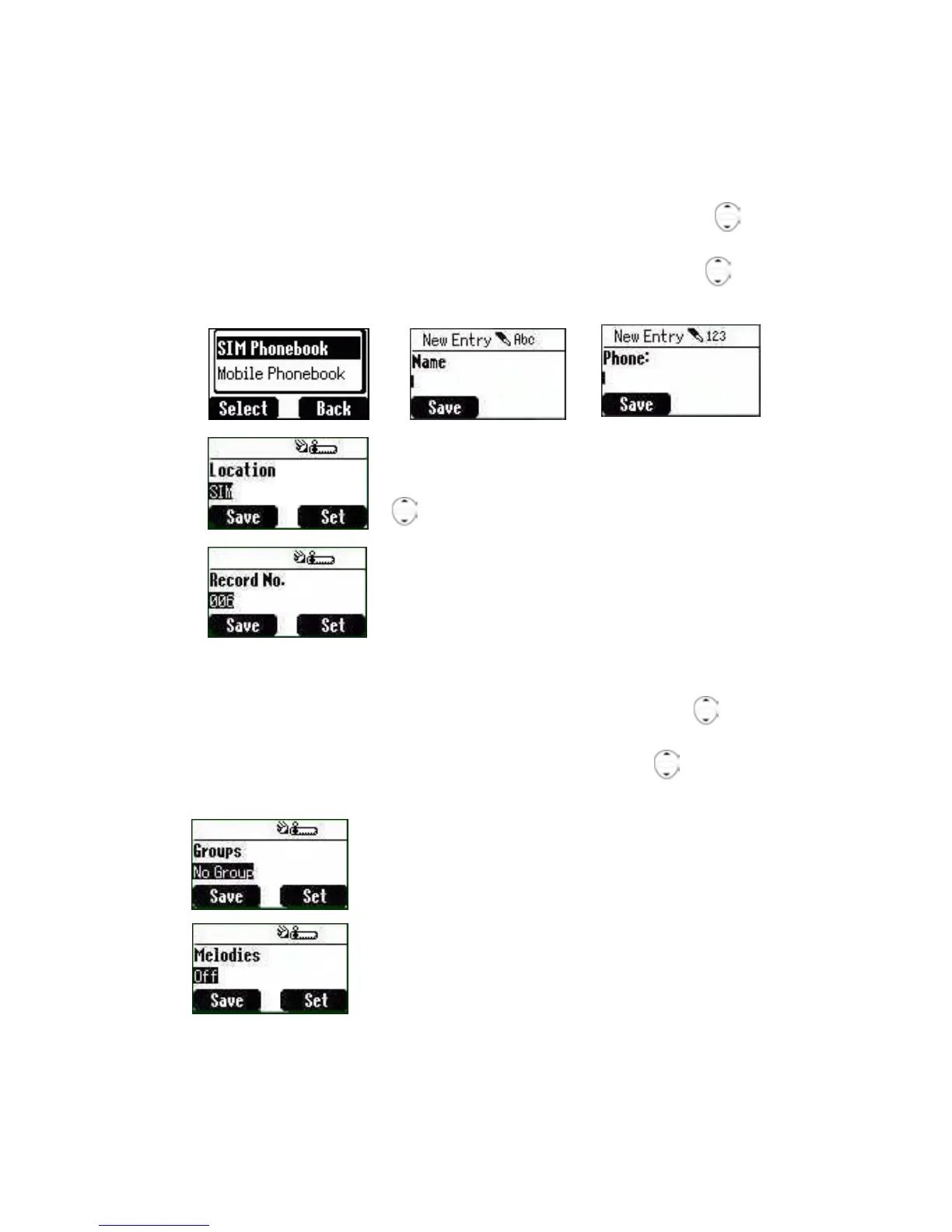
2 The other option to create a number is Idle > Menu > Phonebook >
Create > SIM Phonebook or Mobile Phonebook.
3A Choosing SIM Phonebook
3A-1 Enter the Name --- see “Text Input” on page 24. Press down
to the next screen.
3A-2 Enter Phone numbers using the keypad. Then press
down to
the next screen.
3A-3 Select Location. You can choose a storing
location in SIM or FDN by pressing Set. Press
down to the next screen.
3A-4 Select Record No. You can choose a
location record number by pressing Set.
3A-5 Press Save.
3B Choosing Mobile Phonebook
3B-1 Enter the Name --- see “Text Input” on page 24. Press down to
the next screen.
3B-2 Enter the Phone number using the keypad. Press
down to the
next screen.
3B-3 Select a Group. You can locate phonebook
contacts in different groups, such as Friends,
Family etc., by pressing Set.
3B-4 Select Melodies. You can define a specific
melody for each person.
3B-5 Press Save.











 To Next Page