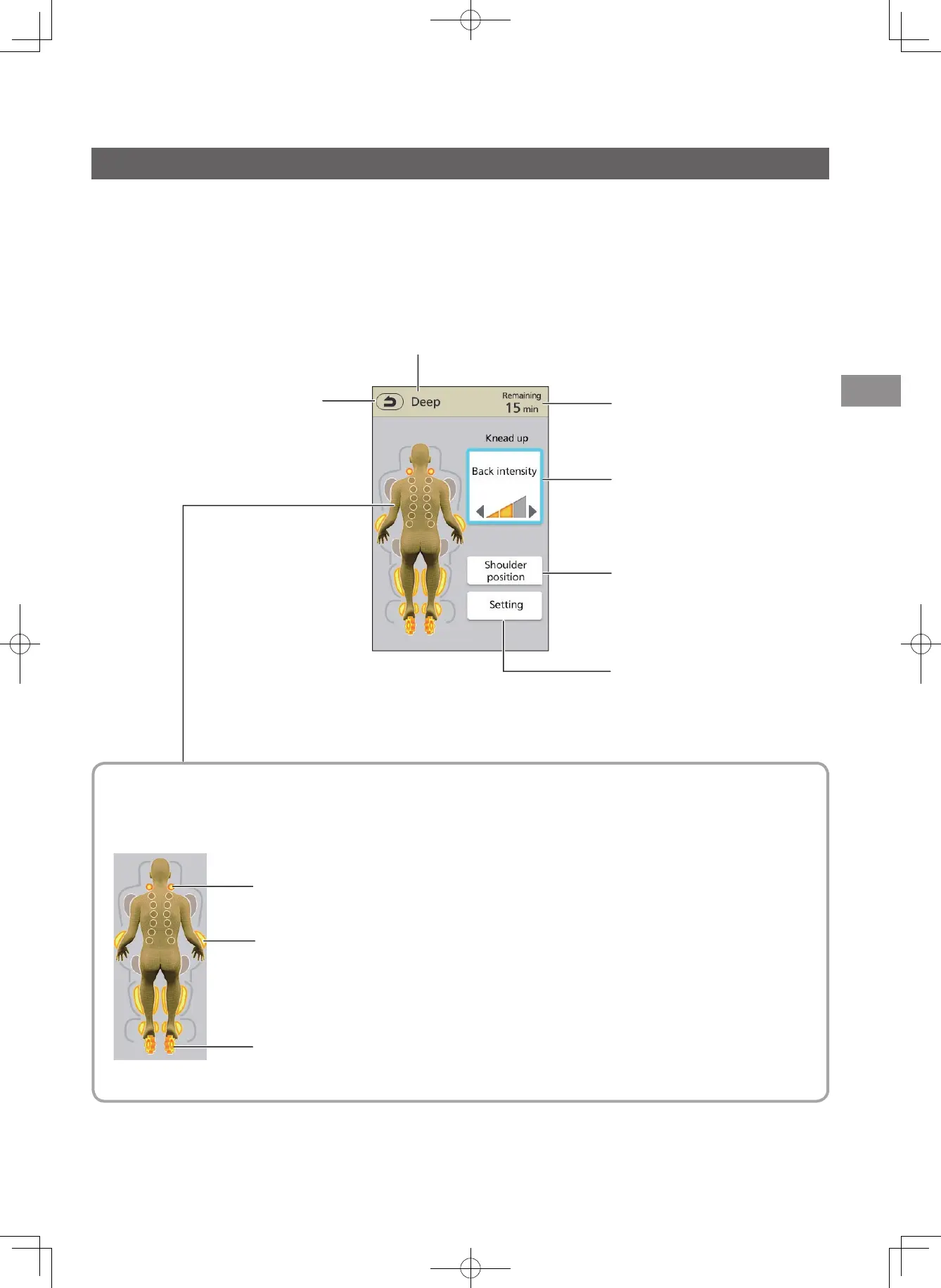
Screen displays during massaging operations
⁃
Select the displayed action or function to operate.
⁃
The power is turned OFF automatically if massage is not started and no operation is performed for about 3 minutes.
Display of the operation and position
⁃
The statuses of massage rollers in operation, as well as sole and air are displayed.
(The display indicates rough movements; Actual movements or sensations may vary.)
<Viewing screens>
The "Auto" course is used as an example for the screen displays shown below.
Massage rollers
• Flashes to display the position of the massage roller currently being performed.
Returns to the previous screen
Displays the course (EN22 to EN24)
Displays the remaining time
Shoulder position
(EN30)
Displays the back intensity
(EN28)
Air
• Lights up to display the currently selected air massage operation.
• Flashes to display the position of the air massage currently being performed.
Sole
• Flashes during operation.
Setting (Settings or
adjustments during
massage, etc.)
(EN28 to EN31)
Part names and functions of the controller
EN17


 To Next Page