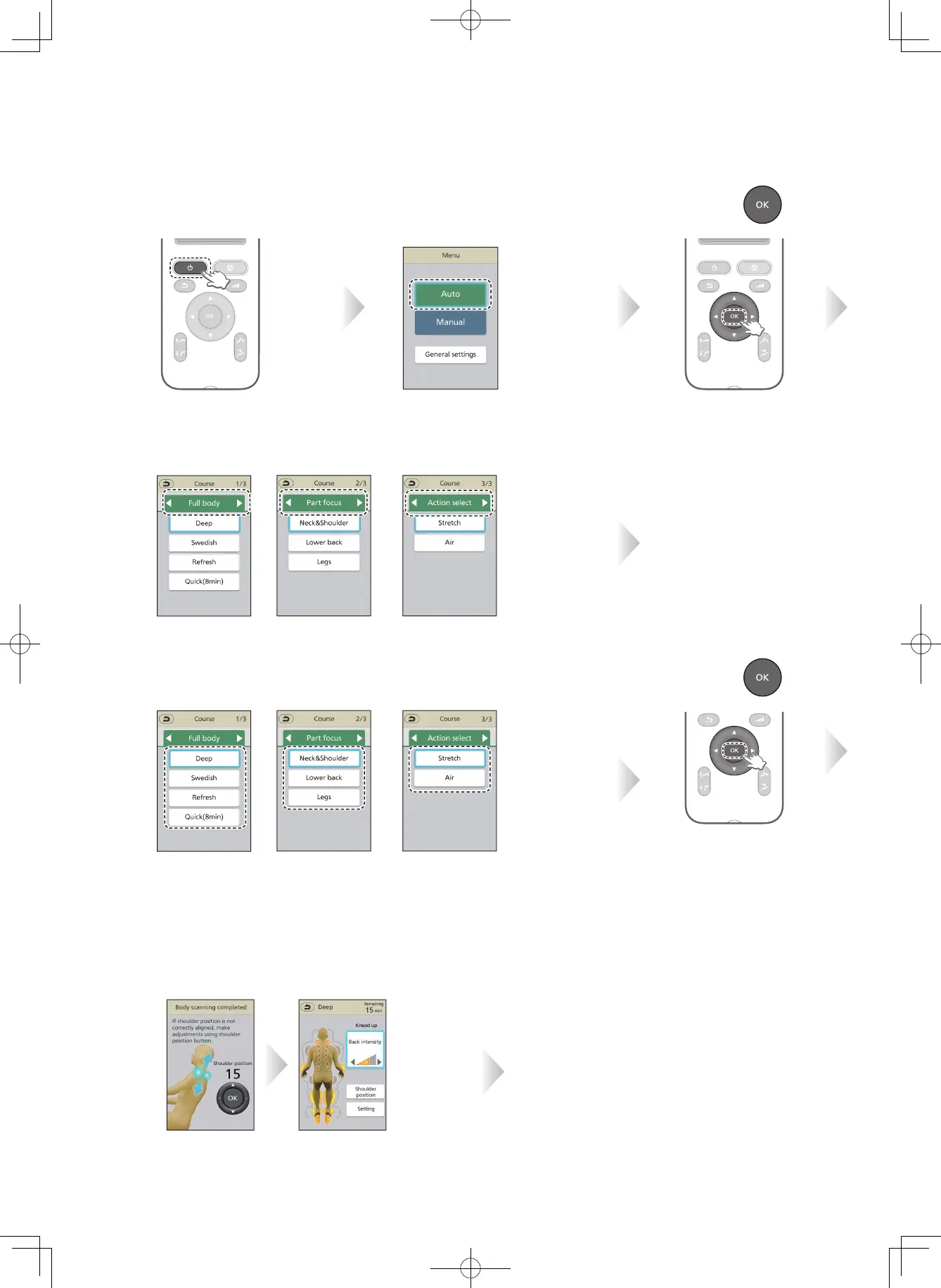
When you want a complete massage
⁃
The power is turned OFF automatically if massage is not started and no operation is performed for about 3 minutes.
1
Turn on the
power.
7
After body scanning ends,
massage starts.
4
Select the type of your desired auto course from
"Full body", "Part focus" and "Action select".
⁃
Start body scanning. (EN20 to EN21)
⁃
Body scanning may be skipped
depending on the selected course.
(EN19)
2
Select "Auto" from
the menu.
Select with
▲
or
▼
.
5
Select one course
from the type selected in Step 4.
Select with
▲
or
▼
.
Select with
◀
or
▶
.
8
After the massage is started, it will automatically
end in a maximum of approximately 15 minutes.
Massage finished
automatically.
⁃
Displays for massage action.
⁃
During the massage, you can create
favorite settings. (EN28 to EN32)
3
Press .
6
Press .
EN22


 To Next Page