Function name Description Settings & adjusting method
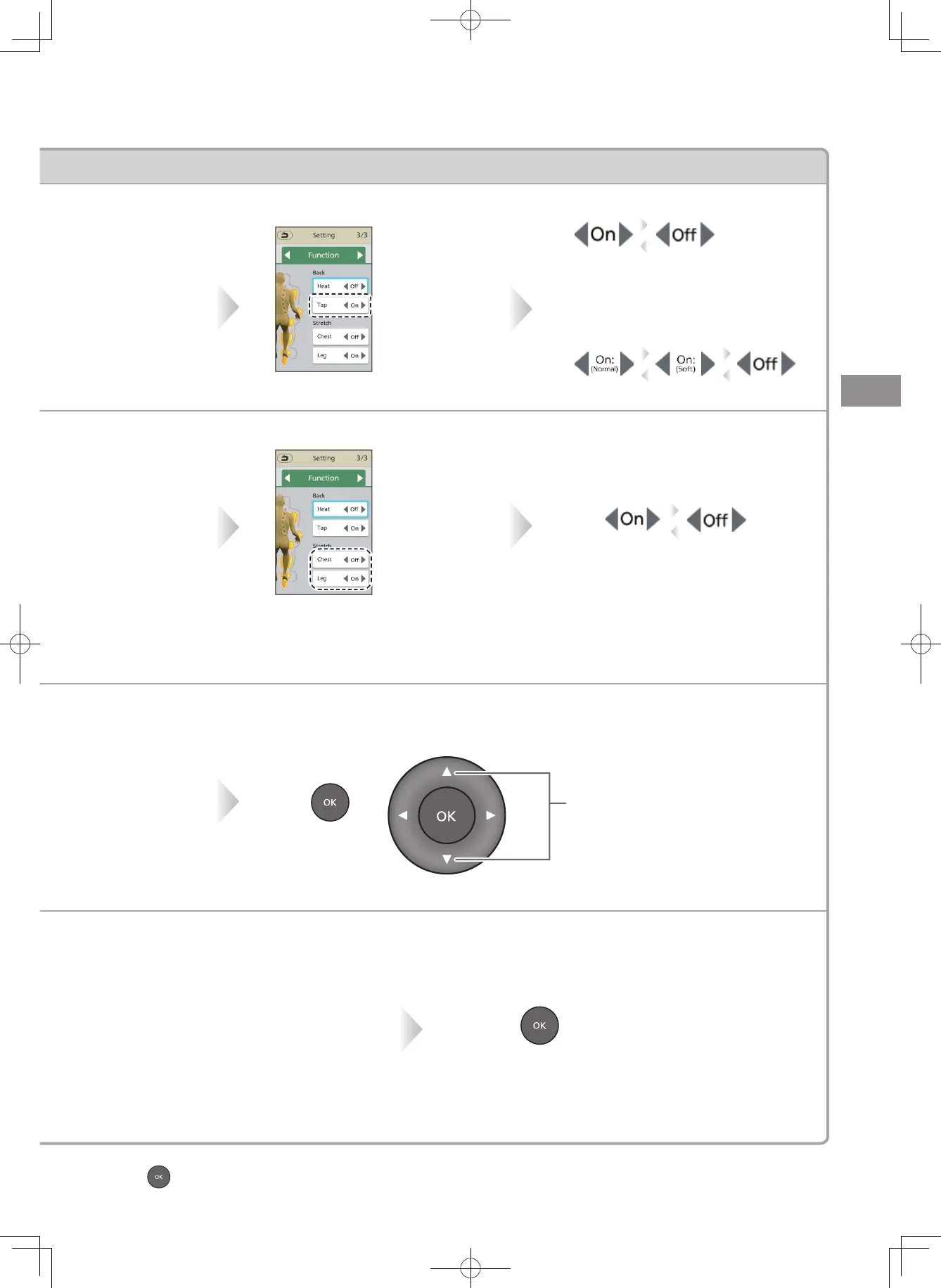
Tap action
Turn OFF/ON Tap action.
Stretch
Turn OFF/ON Stretching
operation.
Shoulder
position
(Only
)
Roller positions in vertical
directions can be adjusted.
Roller position
(Only
)
Roller operation positions
in vertical and horizontal
directions can be adjusted.
▶
Continued on the next page
⁃
Press before adjusting to return to the original screen.
Select Shoulder
position with
▲
or
▼
.
Select screen
of "Function"
with
◀
or
▶
.
Select
Stretching part
with
▲
or
▼
.
Switch each time when press
◀
or
▶
.
• The Stretch action is performed once
on the spot at the next "On".
• After it is completed, the previous
course resumes.
• For the content of the Stretch action,
please refer to EN26.
Select screen of
"Function" with
◀
or
▶
.
Select "Tap"
with
▲
or
▼
.
<Vertical adjustments>
• Adjust the position with
▲
or
▼
.
• Press and hold the button to move
until you release it.
<Horizontal adjustments>
• Adjust the position with
◀
or
▶
.
(
◀
: Narrow;
▶
: Wide)
• Such adjustments are applicable only to
"Neck&Shoulder roll", "Lower back roll",
"Normal tap/Soft tap" and "Roll/Partial roll".
Press .
Switch each time when press
◀
or
▶
.
If Tap is "On", you can choose from two
types: "Normal" and "Soft".
Switch each time when press
◀
or
▶
.
<For Auto>
<For Manual>
Moves approx. 1.5 cm up or
down for each press.
⁃
The shoulder position can be adjusted from 1 (for shorter persons)
to 20 (for taller persons).
Press .
Adjusting the intensity
EN31


 To Next Page
 Loading...