19
H RO SK CZ PL FIN DK S N P NL E I F D GB
Cleaning
•Always clean the heads and caps after use to keep them in a
hygienic state.
•Switch off and unplug the appliance before cleaning.
•Take care not to damage the skin protector, the frame, the fast
cap and the gentle cap during cleaning.
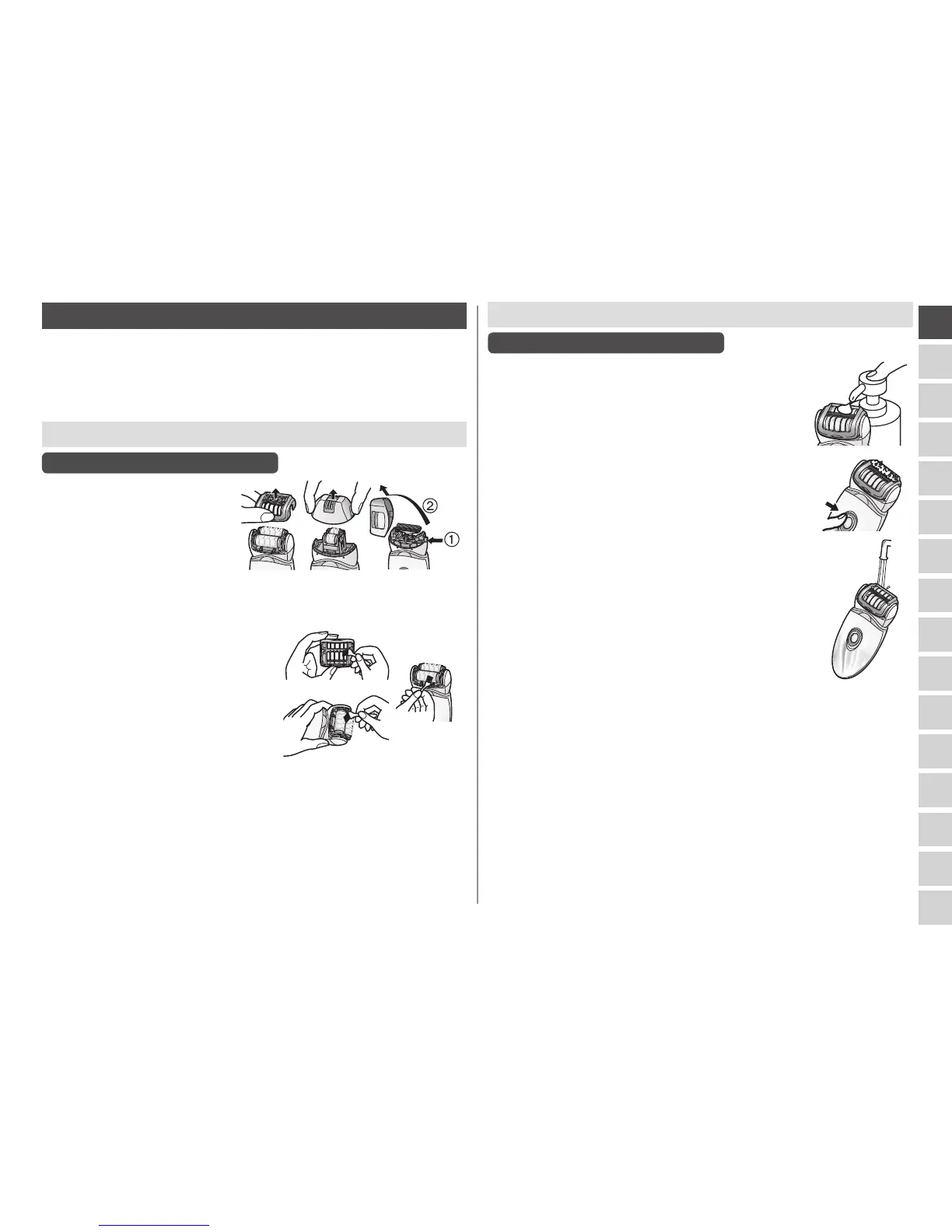
Dry cleaning [BCDFH]
Epilation head/Shaver head
1. Lift fast/gentle caps,
the frame upward while
holding the cap release
rib [BC2]/the frame
release rib [F6] or
remove the frame by
pushing the frame
release button [H].
2. Clean the gentle cap [C], the
epilation head [D, F] and the
shaver head [H] with the
cleaning brush [M].
Wet cleaning [BCDFHJ]
Epilation head/Shaver head
1. Wet the discs and blades, and then apply
liquid hand soap.
2. Turn the switch on and then foam is
created.
3. Wash the head with water to wash out hair.
•Do not use hot water.
•If soap is not completely washed away, then a
white deposit can accumulate and prevent the
discs and the blades from moving smoothly.
•Rinse the shaver head with the frame
removed.
4. Turn the switch off, wipe the appliance with a dry cloth
and dry it well.


 To Next Page