14
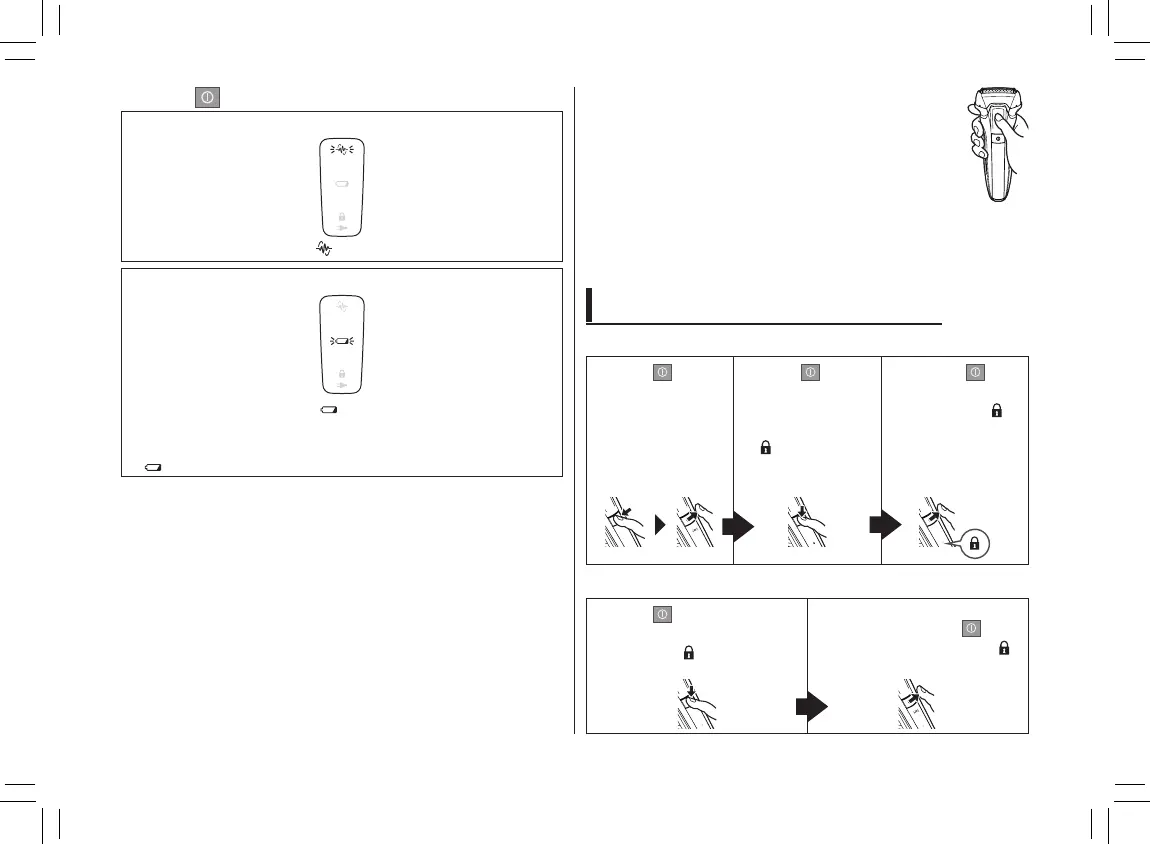
2. Press
when nished.
While using
The shaving sensor lamp ( ) blinks.
When the battery capacity is low
The battery capacity lamp ( ) blinks when operating the
shaver. The appliance beeps twice after switched off.
•Youcanshave2to3timesafterthebatterycapacitylamp
( ) blinks. (This will differ depending on usage.)
Notes
•Theappliancemaynotoperateinanambienttemperature
lower than approximately 5 °C.
•Theshavingsensormaynotresponddependingonthetype
and quantity of the shaving gel. This is not abnormal.
•Dependingonthebeardthicknessortheamountofbeard
trimmings in the shaver head, the shaving sensor may not
react and the driving sound may not change. This is not
abnormal.
•Topreventerroneousoperation,placeyour
ngersonthethumbrestwhileusingthe
shaver.
• Thesonicvibrationcleaningmodeisactivatedwhenthepower
switch is pressed for more than 2 seconds while the shaver
is not operating (the switch lock is unlocked). (See page 17.)
You cannot shave in this mode.
Locking/unlocking the power switch
Locking the power switch
1. Press once
and then
release.
• The shaver
starts
operating.
2. Press
for
more than 2
seconds until the
switch lock lamp
(
) turns on.
• The shaver will
stop operating.
3. Release .
• The switch
lock lamp (
)
will light up for
5 seconds and
turn off.
Unlocking the power switch
1. Press for more than
2 seconds until the switch
lock lamp (
) turns off.
2. Once the shaver starts
operating, release
.
• The switch lock lamp (
)
will turn off.
ES‑LL21������.indb14 2018/6/1911:47:38







 To Next Page