17
TR RO H SK CZ PL FIN S N P DK E NL I F D GB
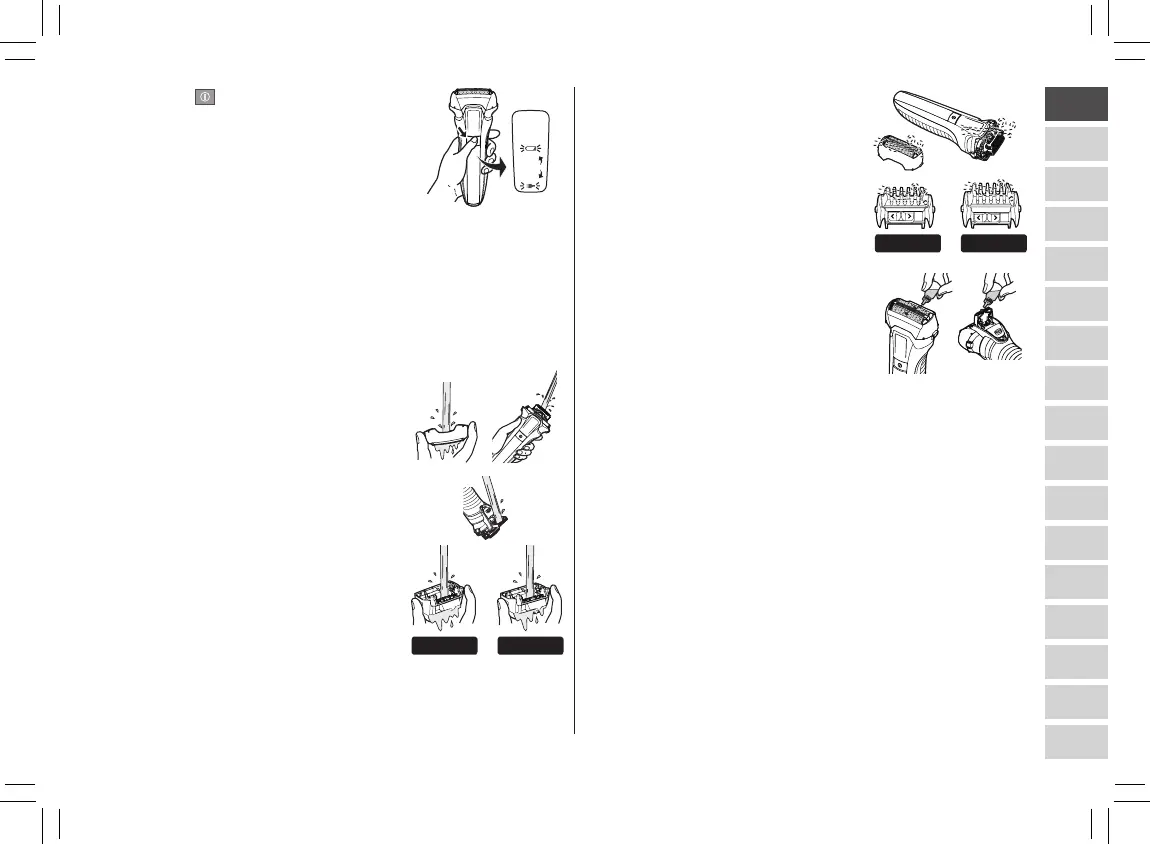
2. Press for more than 2
seconds to activate the sonic
vibration cleaning mode.
•Splashingoffoamissuppressed.
• Thebatterycapacitylampsblinkin
order.
•Afterabout20seconds,itwillbe
automatically turned off, or you can
turn it off by pressing the power
switch.
3. Remove the outer foil section.
•Seepage18forattachingand
removing the outer foil section.
4. Clean the shaver, the outer foil
section, the trimmer, and the
comb attachment with running
water.
•Splashingisreducedbyrinsingthe
shaver in sonic vibration cleaning
mode.
•Afterrinsingwithwater,shakethe
shaver up and down for a few times
to remove excess moisture and
then wipe off any drops of water
with a dry cloth.
5. Dry the outer foil section, the
shaver, the trimmer, and the
comb attachment completely.
•Allowtheshavertodryinthe
shade, avoid direct sunlight.
6. Lubricate the shaver.
It will keep the movement of the
blade smooth and maintain a comfort
shave.
1. Apply one drop of oil to each of the
system outer foils.
2. Raise the trimmer and apply a drop of oil.
3.Switchtheshaveron,andrunitforapproximatelyve
seconds.
4. Switch off the shaver, and wipe off any excess oil from
the system outer foil with a soft cloth.
Notes
•Becarefulnottohitthemainbodyonthesinkoranyother
object while draining the water.
Failure to do so may cause malfunction.
•Donotwipewiththinners,benzine,alcoholetc.
Doing so may cause malfunction, cracking or discoloration
of the parts.
Wipe with diluted soapy water.
•Donotuseanykitchenorbathroomdetergentsotherthan
hand soap.
Doing so may cause malfunction.
ES‑LL21������.indb17 2018/6/1911:47:46







 To Next Page