43
English
6 Power switch
• Can be locked
when carrying
around, or can be
set to the sonic
vibration cleaning
mode when
cleaning with water.
Ion level lamp (white)
8
Ion/mode select switch
Temperature level
lamp (white)
WARM switch
Appliance socket
Charge status lamp
(
)
Switch lock lamp (
)
Mode indicator
c. MOISTURIZING
lamp [MOIST]
(white)
d. PURIFYING lamp
[CLEAR] (blue‑
green)
Foil frame
System outer foil
release buttons
Outer foil section
Inner blades
Foil frame release
buttons
Trimmer
Trimmer handle
Ion panel
B AC adaptor (RE7‑87)
Adaptor
Power plug
Cord
Appliance plug
Accessories
C Cleaning brush
D Oil
Preparation
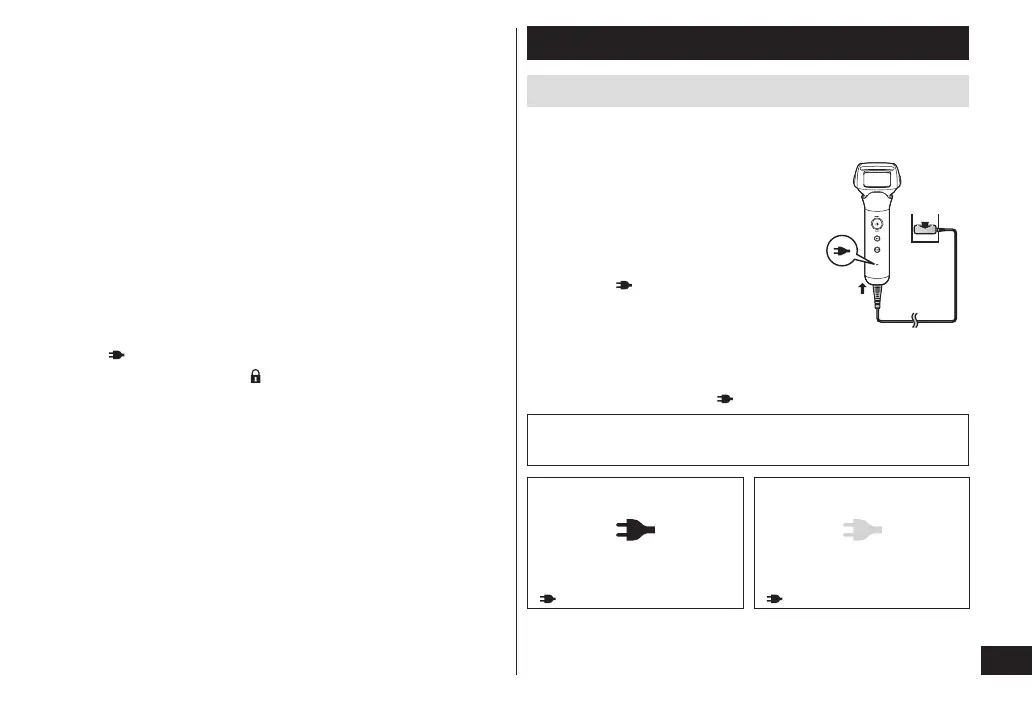
Charging the shaver
• Turn the shaver off.
• Wipe off any water droplets on the appliance socket.
1
Insert the appliance plug into
the shaver�
2
Plug the adaptor into a
household outlet�
• Check that the charge status
lamp (
) is glowing.
• Charging is completed after
approx. 1 hour.
3
Disconnect the adaptor after
charging is completed and the
charge status lamp (
) turns off�
2
1
Note
You cannot operate the shaver while charging.
While charging
After charging is completed
The charge status lamp
(
) glows.
The charge status lamp
( ) turns off.







 To Next Page