45
English
4. Wait for 48 hours, and check if any reaction occurs in
the skin.
If any adverse reaction is found in the patch test,
stop using that lotion�
Switching modes
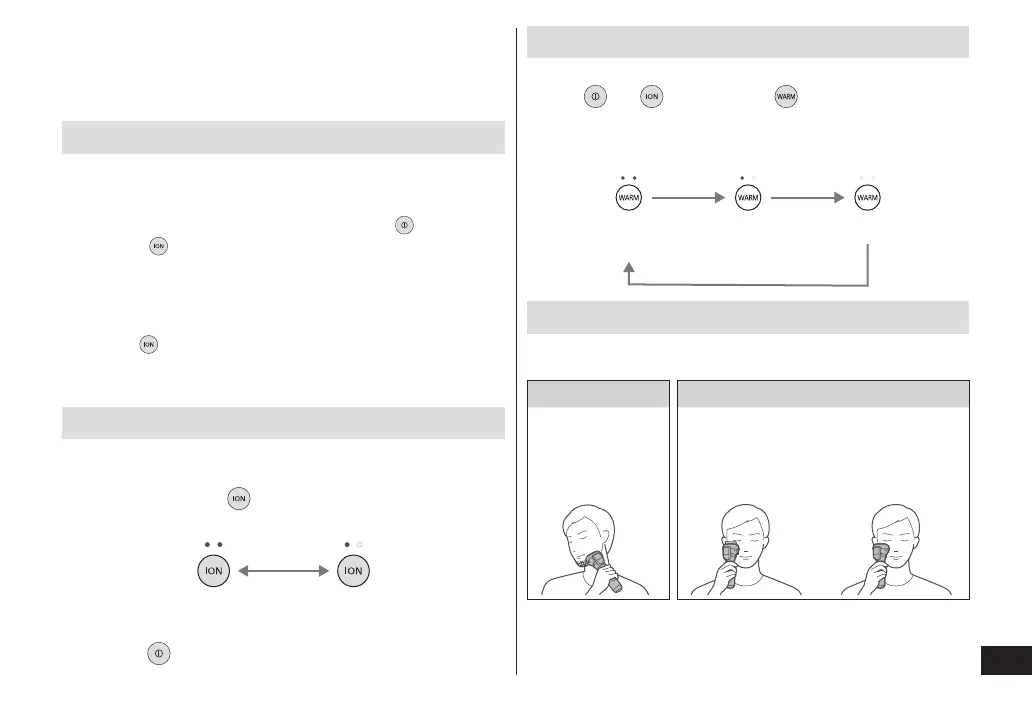
The mode changes with each press of the switch.
►Shaving beard
The appliance switches ON/OFF each time is pressed.
• Pressing with the main body power turned ON
switches between “LOTION shaving (Ion ON)” and
“Shaving (Ion OFF)”. (See page 46.)
►Moisturizing skin
Pressing each time switches between
“MOISTURIZING mode” (See page 48.) →
“PURIFYING mode” (See page 50.) → “OFF.”
Switching the ion level
If there is any discomfort during use, turn the level to “LOW.”
Perform this operation with the main body power turned OFF.
1
Press and hold for more than 2 seconds�
The ion level switches and the setting is stored.
HIGH
(default setting)
LOW
2
Press to turn the power OFF�
Switching the temperature level
Select a temperature level that feels comfortable.
Press
or , then press to select the
temperature level (ion plate temperature)�
The selected level is indicated with the temperature
level lamp (white).
HIGH
(default setting)
LOW OFF
Recommended skin care plan
►Recommended plan 1
Morning Night
Shaving
(3 minutes
every day)
PURIFYING
mode
(3 minutes
every day)
MOISTURIZING
mode
(3 minutes
every day)








 To Next Page