49
English
2
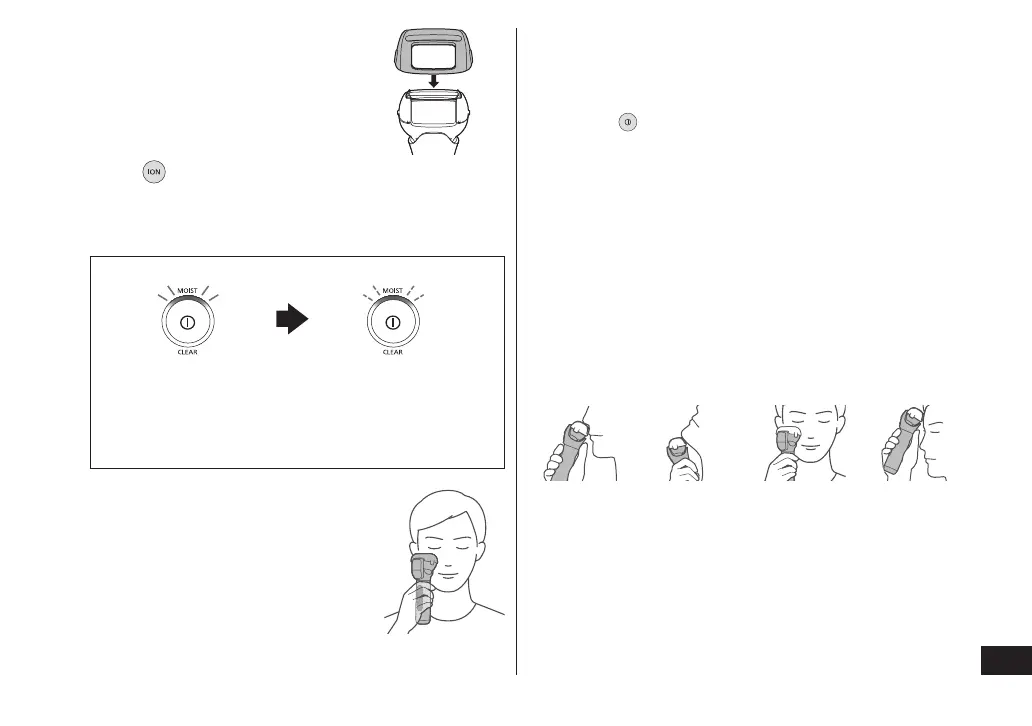
Attach the cap�
3
Press and select MOISTURIZING mode [MOIST]�
The MOISTURIZING lamp (white) blinks once
every second.
• See page 45 to change the temperature level.
MOISTURIZING lamp
Preheating Preheating nished
(once every second) (once every 2 seconds)
You can start using the
appliance even if
preheating has not nished.
4
Hold front of ion plate against
skin and move�
Hold the main body rmly to make
full contact with the ion panel (rear).
When contact with the skin is
detected, the MOISTURIZING lamp
(white) changes from blinking to
glowing, and the moisturizing
ingredients penetrate into the keratin layer.
• The penetrating effect will not be attained if it is
blinking once every 2 seconds.
Stops automatically after approximately 3 minutes.
• The appliance will beep once after it stops automatically.
• Press to stop the appliance during use.
• If there is insufcient water and the appliance
becomes difcult to slide or it has difculty
detecting the skin, apply more lotion.
• The appliance beeps twice if the ion plate and ion
panel are not making contact with skin. If there is
no contact for continuous 30 seconds, the
appliance beeps three times and the power turns
off automatically. (See page 42.)
• If there is any skin discomfort, apply more lotion or
turn the ion level to “LOW” when using the
appliance. (See page 45.)
►Holding the main body
Under nose Under chin Cheeks Forehead







 To Next Page