10
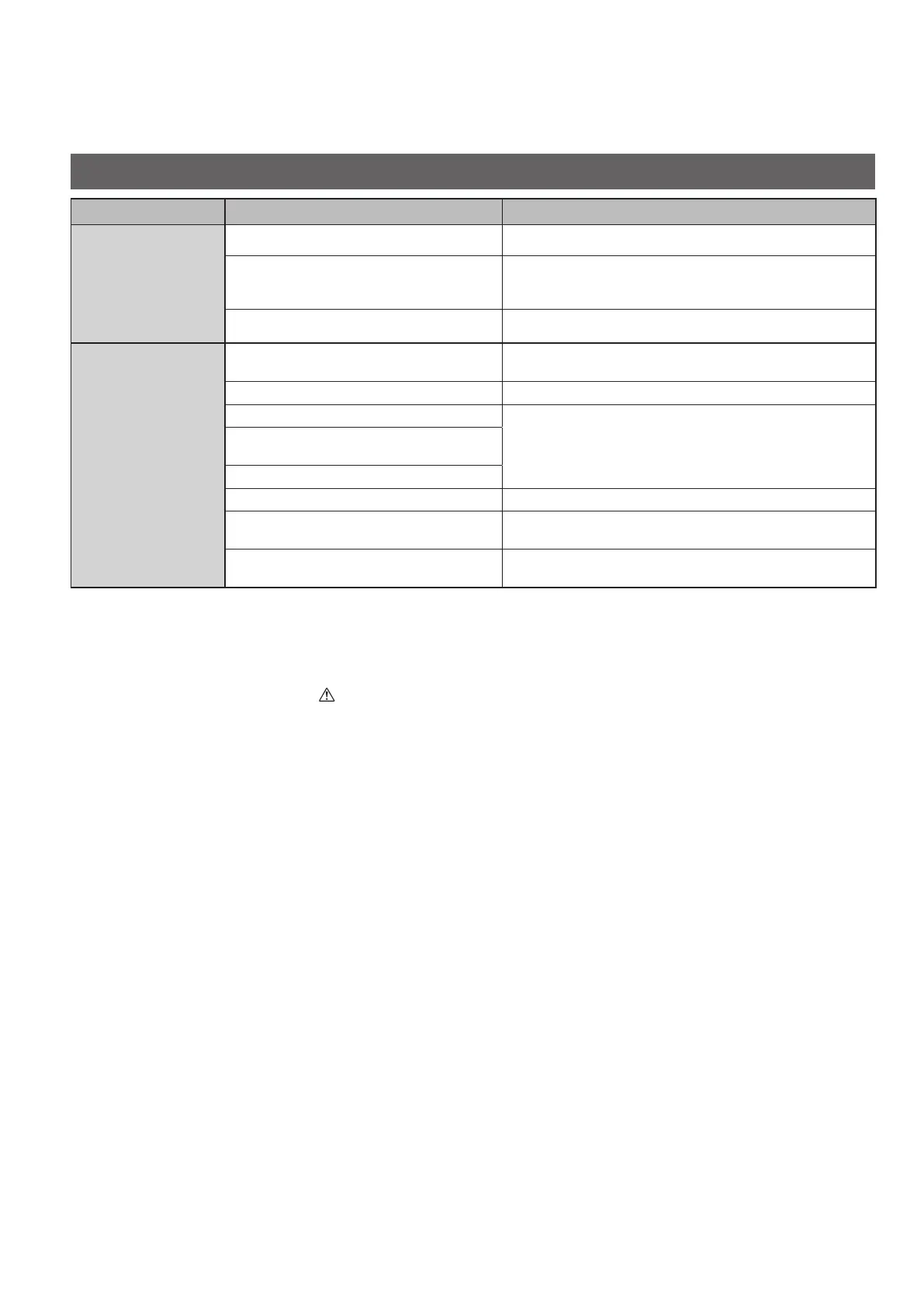
Symptom Cause Action
The air
conditioner does
not operate
although the
power is turned
on.
Power failure or after power failure Press the power ON/OFF button on the remote controller.
The operation (power) button is turned off.
• If the breaker is turned off, turn the power on.
• If the breaker has been tripped, consult your dealer
without turning it on.
Fuse blow out. Contact your dealer.
Poor cooling
or heating
performance
The air intake or air outlet of indoor and
outdoor units is clogged with dust.
Remove the dust.
The fan speed switch is set to “Low”.* Change to “Medium” or “High”.*
Improper temperature settings
See “Tips for Energy Saving”. (P.5)
The room is exposed to direct sunlight in
cooling mode.
Doors or windows are open.
The air lter is clogged. See “Maintenance”. (P.7)
Too many heat sources in the room in
cooling mode.
Use minimum heat sources and in a short time.
Too many people in the room in cooling
mode.
Lower the temperature setting or change to “Medium” or
“High”.*
* Regarding the remote control display, see the page 12.
If your air conditioner does not work properly even after checking each item of
“Before Requesting Services” and “Troubleshooting”
Stop the operation immediately and turn the power off. Then contact your dealer and report the serial number and symptom.
You also report if the inspection mark
and the letters E, F, H, L, P in combination with numbers appear on the LCD of the
remote controller.
Never repair the air conditioner by yourself since it is very dangerous for you to do so.
Before Requesting Services
Troubleshooting
01_320325_Eng.indb 10 2020/01/24 14:35:51




 To Next Page