5-158
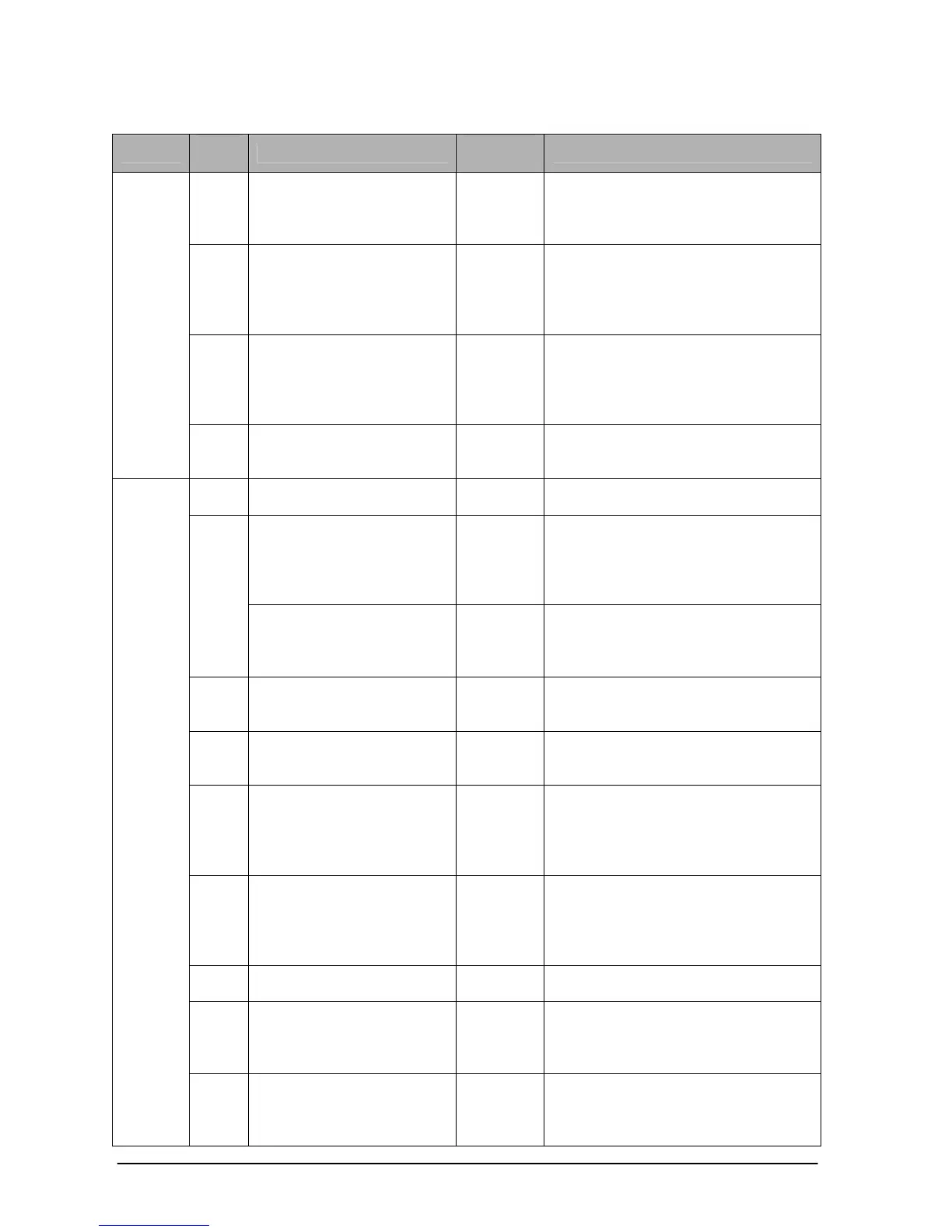
FP2/FP2SH/FP10SH
Item
Add-
ress
Name
Default
value
Descriptions
16
Hold type area starting
address setting for
MEWNET-H link relays
Available PLC: FP10SH
128 128 to 640
17
Hold type area starting
address setting for
MEWNET-H link data
registers
Available PLC: FP10SH
256 256 to 8448
18
Hold type area starting
address setting for index
register
Available PLC: FP2SH/
FP10SH
0 0 to 224
Hold/
Non-
hold
19
Hold type area starting
address setting for file
register (for bank 2)
0 0 to 32765
20
Disable or enable setting
for duplicated output
Disable Disable/enable
Operation settings when
MEWNET-TR
communication error
occurs
Available PLC: FP10SH
Stop Stop/continuation
21
Operation setting when
I/O error occurs
Available PLC: FP2SH/
FP2
Stop Stop/continuation
22
Operation settings when
an intelligent unit error
occurs
Stop Stop/continuation
23
Operation settings when
an I/O verification error
occurs
Stop Stop/continuation
24
Operation settings when
a system watching dog
timer error occurs
Available PLC: FP2SH/
FP10SH
Stop
Stop/continuation
Set the time-out time for watching dog
timer with system register 30.
25
Operation settings when
connection time error
occurs in the remote
slave station
Available PLC: FP2SH
Stop Stop/continuation
26
Operation settings when
an operation error occurs
Stop Stop/continuation
27
Operation settings when
communication error
occurs in the MEWNET-F
system
Stop Stop/continuation
Action
on error
28
Operation settings when
error occurs in the slave
station of the MEWNET-F
system
Stop Stop/continuation





 To Next Page