5-197
FP2/FP2SH/FP3/FP10SH (A: Available, N/A: Not available)
Address
FP3
FP2/
FP2SH
FP10SH
Name Descriptions
Read
-ing
Writ-
ing
- DT90401
First error alarm
relay which went
on (Available
PLC: FP2SH/
FP10SH)
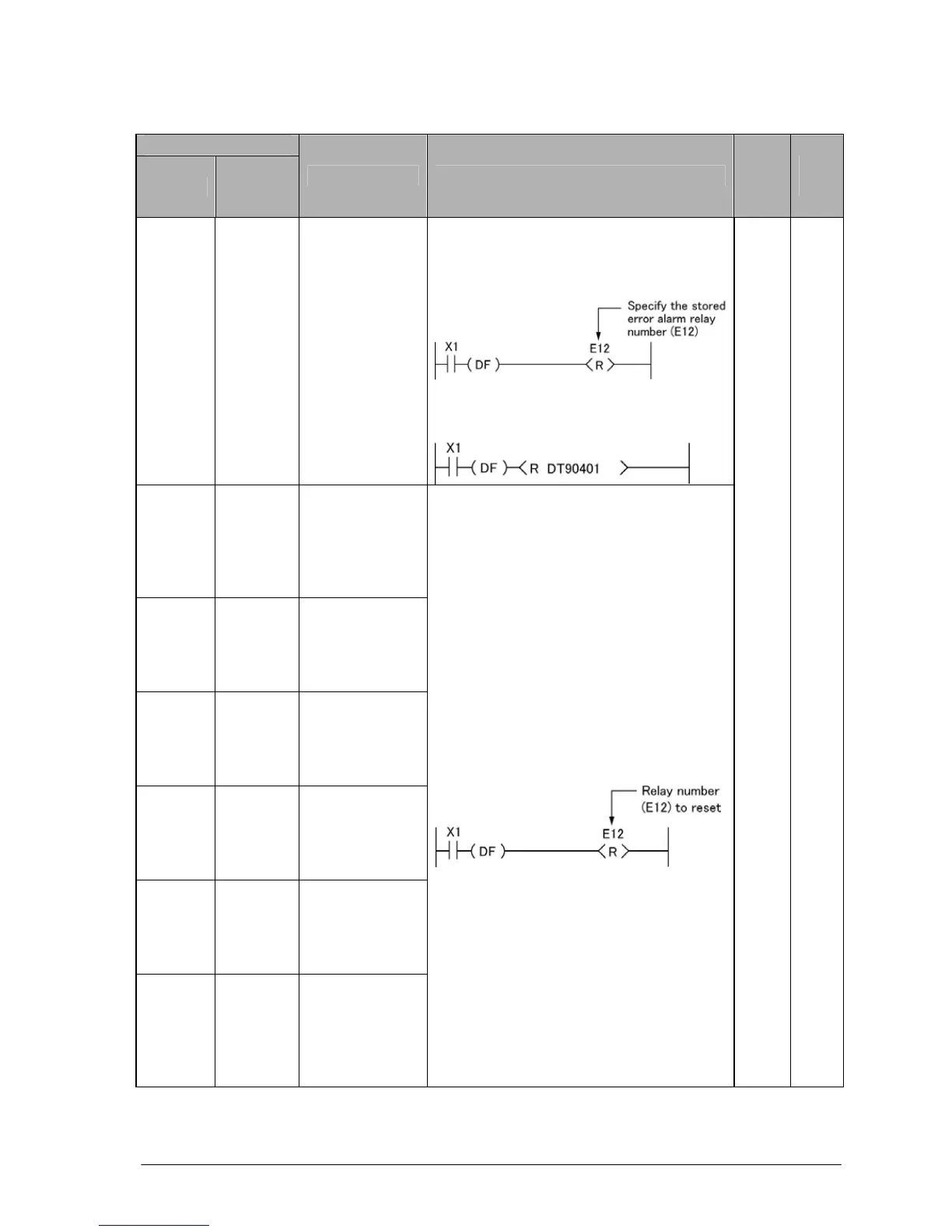
The first error alarm relay number which
went on is stored. The error has been
reset by executing a RST instruction.
Example 1: Using RST instruction
Example 2: Using RST instruction and
DT90401
- DT90402
Second error
alarm relay
which went on
(Available PLC:
FP2SH/
FP10SH)
- DT90403
Third error alarm
relay which went
on (Available
PLC: FP2SH/
FP10SH)
- DT90404
Forth error alarm
relay which went
on (Available
PLC: FP2SH/
FP10SH)
- DT90405
Fifth error alarm
relay which went
on (Available
PLC: FP2SH/
FP10SH)
- DT90406
Sixth error alarm
relay which went
on (Available
PLC: FP2SH/
FP10SH)
- DT90407
Seventh error
alarm relay
which went on
(Available PLC:
FP2SH/
FP10SH)
The error alarm relay number which went
on is stored. To reset the specified error
alarm relay, use an RST instruction only.
A N/A





 To Next Page