5-205
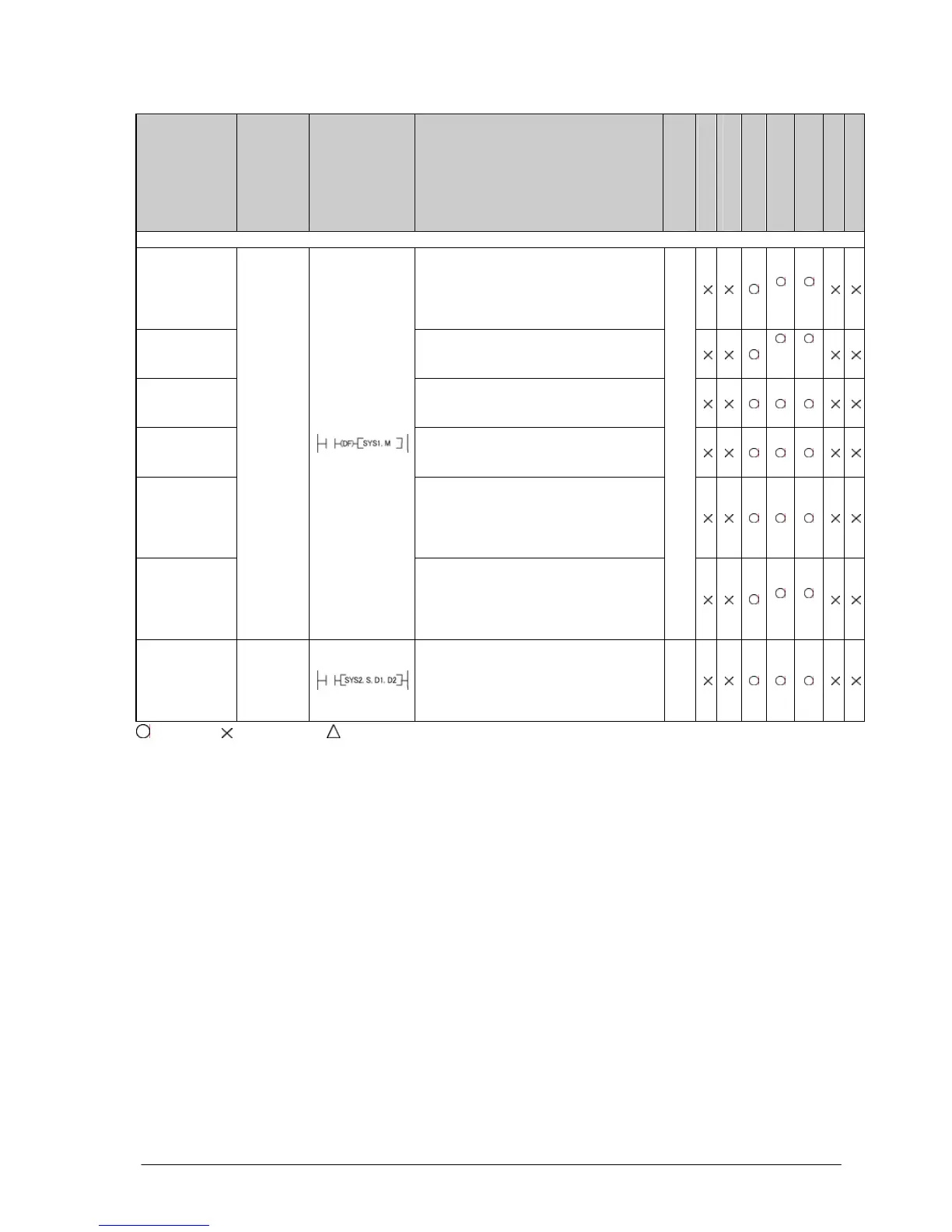
Name Boolean Symbol Description
Steps
FP-e
FP0
FP0
(FP0R mode)
FPΣ
FP-X
FP2
FP2SH/FP10SH
Special setting instructions
Communica-
tion condi-
tions setting
Change the communication conditions
for the
COM port or tool port based on the
contents specified by the character
constant.
*1 *1
Password
setting
Change the password specified by the
PLC based on the contents specified by
the character constant.
*2
*2
Interrupt
setting
Set the interrupt input based on the
contents specified by the character
constant.
PLC link time
setting
Set the system setting time when a PLC
link is used, based on the contents
specified by the character constant.
MEWTOCOL-
COM
response
control
Change the communication conditions of
the COM. port or tool port for
MEWTOCOL-COM
based on the contents specified by the
character constant.
High-speed
counter
operation
mode
changing
SYS1
Change the operation mode of the high-
speed counter, based on the contents
specified by the character constant.
13
*3
*3
System
registers
“No. 40 to
No. 47”
changing
SYS2
Change the setting value of the system
register for the PLC link function.
7
: Available, : Not available, : Not available partially
*1) With FP-X Ver2.0 or later, and FPΣ Ver 3.10 or later, the baud rate can be selected from 300, 600 or 1200 bps.
*2) With FPΣ 32k type, the 8-digit password can be selected.
*3) With FPΣ 32k type and FP-X Ver1.10 or later, it can be used.





 To Next Page