5-231
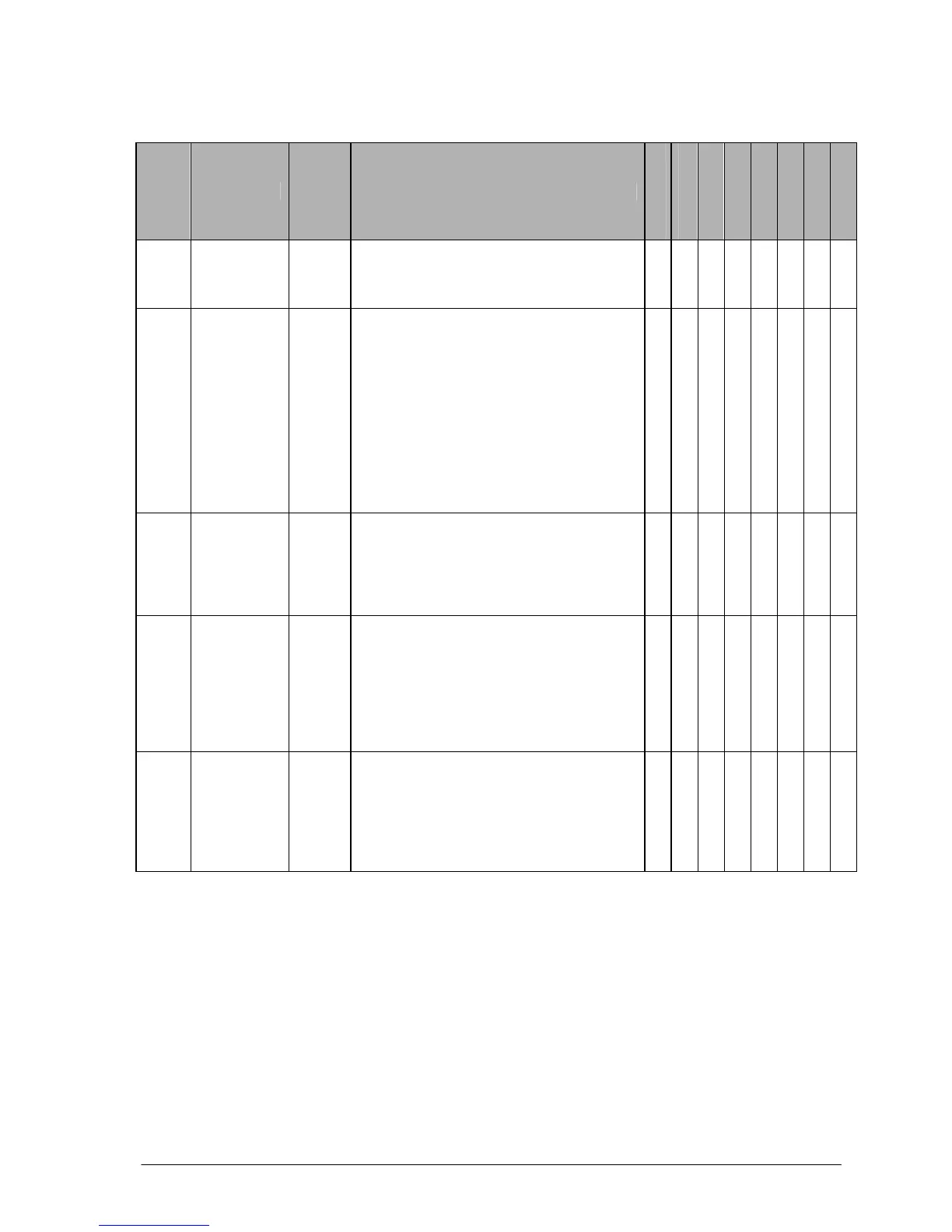
Table of Syntax Check Error
Error
code
Name
Opera-
tion
status
Description and steps to take
FP-e
FP0
FP0R
FPΣ
FP-X
FP2
FP2SH
FP10SH
E1
Syntax
error
Stops
A program with a syntax error has been
written.
⇒ Change to PROG. mode and correct the
error.
A A A A A A A A
E2
(Note)
Duplicated
output
error
Stops
Two or more OT(Out) instructions and
KP(Keep) instructions are programmed using
the same relay.Also occurs when using the
same timer/counter number.
⇒ Change to PROG. mode and correct the
program so that one relay
is not used for two or more OT
instructions,Or, set the duplicated output to
“enable” in system register20. A timer/counter
instructon double definition error will be
detected even if double output permission has
been selected.
A A A A A A A A
E3
Not paired
error
Stops
For instructions which must be used in a pair
such as jump (JP and LBL), one instruction is
either missing or in an incorrect position.
⇒ Change to PROG. mode and enter the two
instructions which must
be used in a pair in the correct positions.
A A A A A A A A
E4
Parameter
mismatch
error
Stops
An instruction has been written which does
not agree with system register settings. For
example, the number setting in a program
does not agree with the timer/counter range
setting.
⇒ Change to PROG. mode, check the
system register settings, and change so that
the settings and the instruction agree.
A A A A A A A A
E5
(Note)
Program
area error
Stops
An instruction which must be written in a
specific area (main program area or
subprogram area) has been written to a
different area (for example, a subroutine SUB
to RET is placed before an ED instruction).
⇒ Change to PROG. mode and enter the
instruction into the correct area.
A A A A A A A A
A:Available
Note) This error is also detected if you attempt to execute a rewrite containing a syntax error during RUN.
In this case, nothing will be written to the CPU and operation will continue.





 To Next Page