Basic Instructions
2 − 153
Eplanation of example
When X0 turns on or if (DT0, DT1) (DT100, DT101) by comparing the real number value of data registers
(DT0, DT1) with the real number value of data registers (DT100, DT101), the external output relay Y30 goes
on. If (DT0, DT1) < (DT100, DT101) and if X0 is in the off state, the external output relay Y30 goes off.
Description
Compares the real number data specified by S1 and S1 +1 with the real number data specified by S2 and
S2+1 according to the comparison condition.
The ORF instruction results in parallel connection as the liaison contact when the comparison result is a
specified status (=, >, <, etc.).
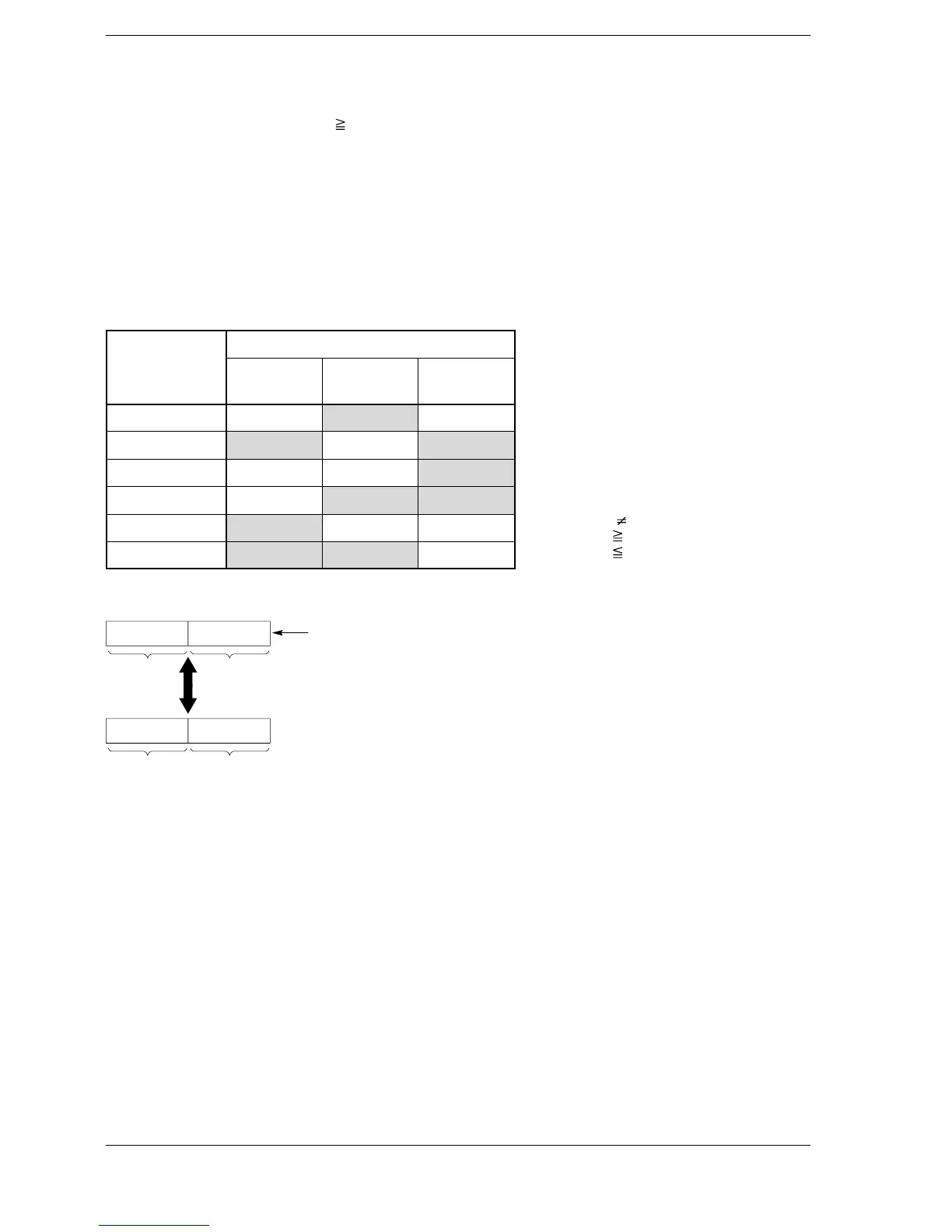
The result of the comparison operation is as follows:
Comparison
Condition
instruction
(S1+1, S1)<
(S2+1, S2)
(S1+1, S1) =
(S2+1, S2)
(S1+1, S1) >
(S2+1, S2)
ORF= off on off
ORF<> on off on
ORF> off off on
ORF>= off on on
ORF< on off off
ORF<= on on off
When processing 32-bit data, the higher 16-bit areas (S1+1, S2+1) are automatically determined once the
lower 16-bit areas (S1, S2) are specified.
S1S1+1
S2S2+1
Comparison
The specified data area and the following data area are handled
together as single precision real number data.
Precautions concerning usage
The OR comparison instructions ORF =, ORF <>, ORF >, ORF >=, ORF <, and ORF <= are programmedfrom
the bus line.
Multiple OR comparison instructions ORF =, ORF <>, ORF >, ORF >=, ORF<, and ORF <= can be used
consecutively.
Specifying the integer device with [S1] and [S2], the integer data is internally converted to real numbers
before operations continue.
When the constant K is specified in S1 and S2, the operations are the same as when a integer device is
specified.
Flag conditions
・Error flag (R9007): Turns on and stays on when:
・Error flag (R9008): Turns on for an instant when:
− The area specified using the index modifier exceeds the limit.
− If data other than real number data are specified in (S1+1, S1) and (S2+1,
S2).
< > indicates
>= indicates
<= indicates











 To Next Page