High−level Instructions
3 − 108
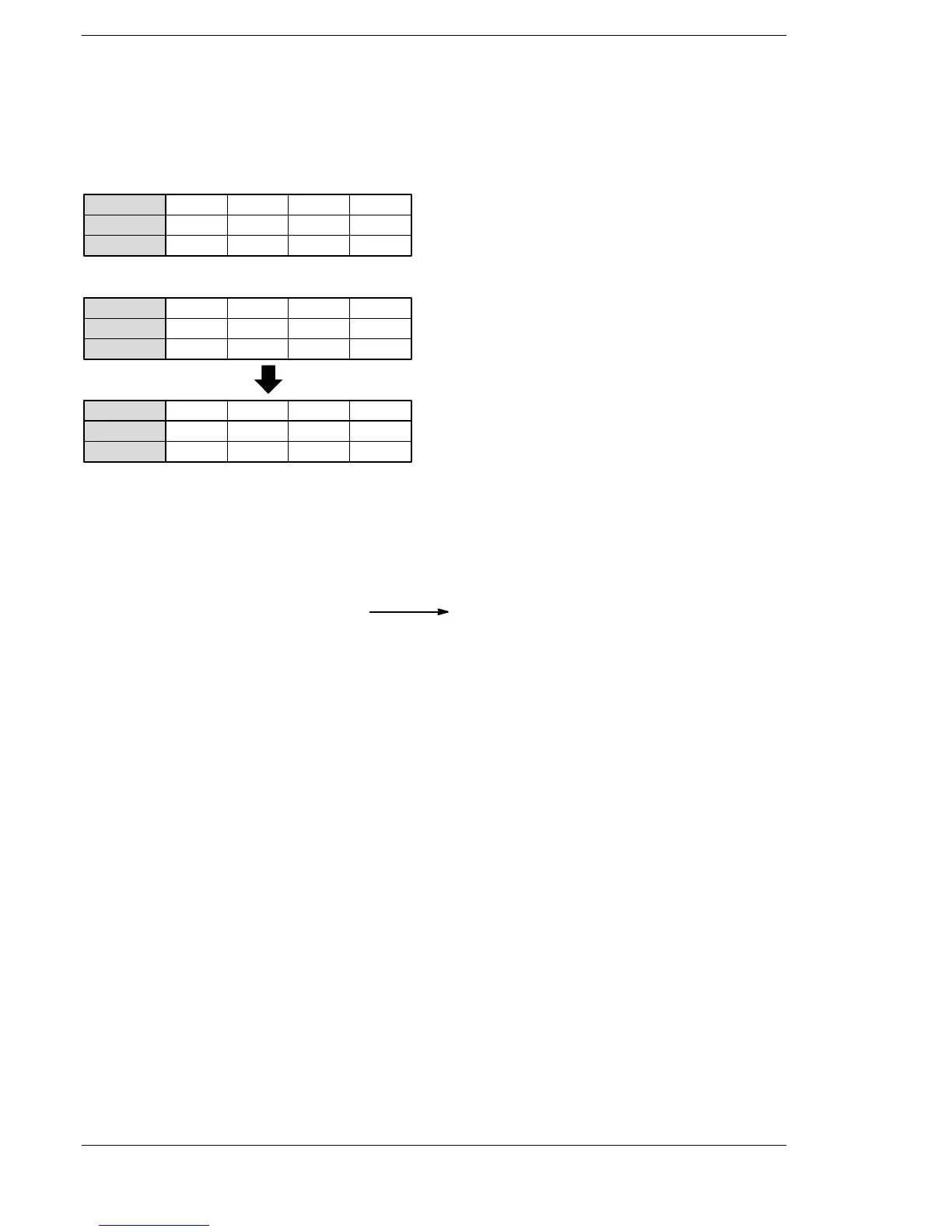
Explanation of example
Subtracts the contents of data register DT20 from the contents of data register DT10 when trigger R0 turns
on. The subtracted result is stored in data register DT30.
When H (BCD) 16 is in DT10 and H (BCD) 4 is in DT20, as shown below.
7
····
Bit position
·····
DT10
15
000
12
0
11
000
8
0
7
000
4
1
3
011
0
0
Minuend [S1]: H16 (BCD)
····
Bit position
·····
DT20
15
000
12
0
11
000
8
0
7
000
4
0
3
010
0
0
Subtrahend [S2]: H4 (BCD)
····
Bit position
·····
DT30
15
000
12
0
11
000
8
0000
4
1
3
001
0
0
Result [D]: H12 (BCD)
BCD H code
0016
BCD H code
0004
BCD H code
0012
−
(Subtraction)
Description
Subtracts the 4-digit BCD equivalent constant or 16-bit area for 4-digit BCD data specified by S2 from the
4-digit BCD equivalent constant or 16-bit area for 4-digit BCD data specified by S1.
The subtracted result is stored in D.
Minuend data Result
(S1) (D)− (S2)
Subtrahend data
Precautions during programming
If the result of an arithmetic operation instruction does not fall within the range of values which can be
handled, an underflow will result.
Under normal circumstances, do not allow an underflow to occur.
If the calculated result accidentally underflows, use of the F48 (DB−) instruction (8−digit BCD data
subtraction) is recommended.
If an underflow occurs, the carry flag (special internal relay R9009) will turn on.
Flag conditions
・Error flag (R9007): Turns on and stays on when:
・Error flag (R9008): Turns on for an instant when:
− The area specified using the index modifier exceeds the limit.
− The data is not BCD data.
・= flag (R900B): Turns on for an instant when the calculated result is recognized as “0”.
・Carry flag (R9009): Turns on for an instant when the calculated result exceeds the range of 4-digit
BCD data (underflows).





 To Next Page