High−level Instructions
3 − 167
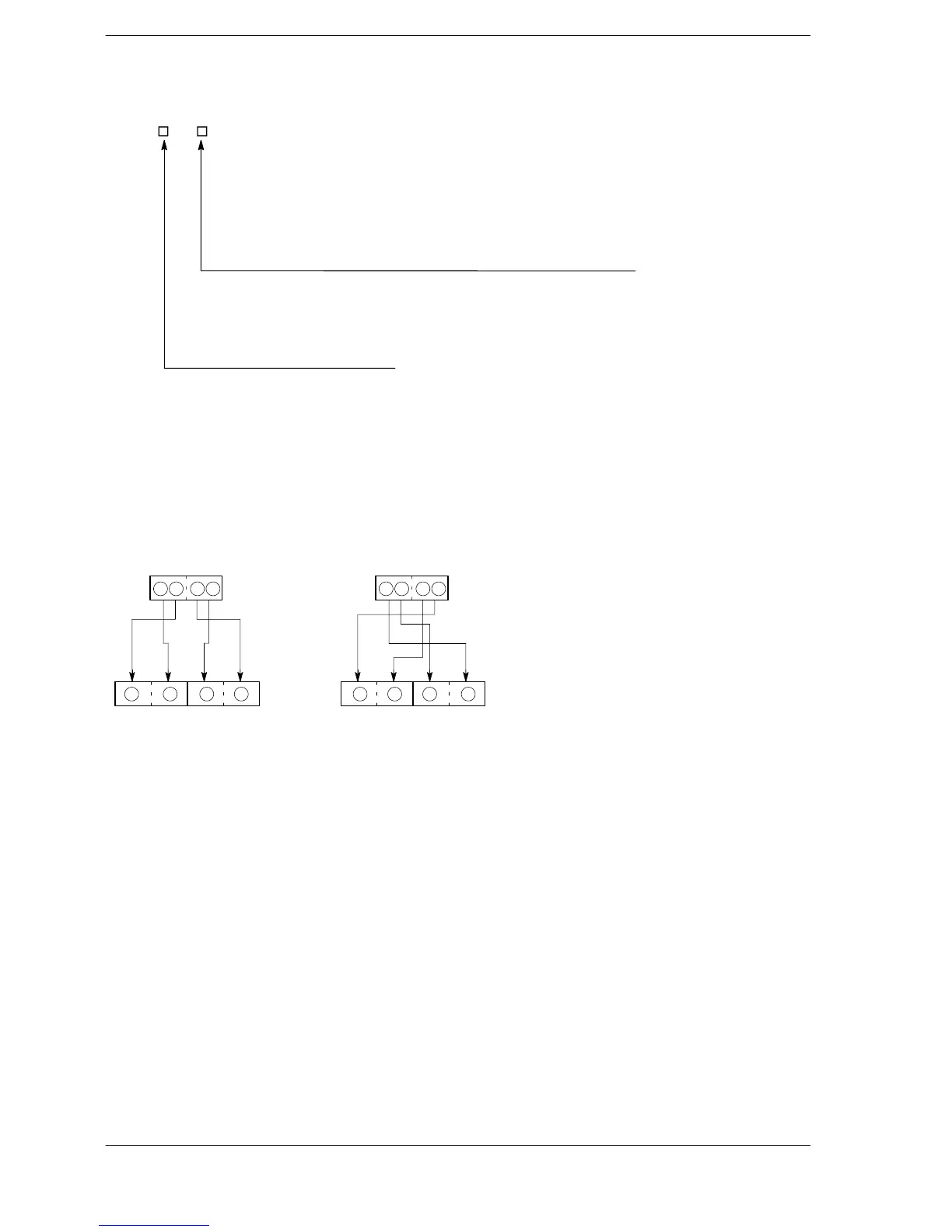
How to specify S2
S2 = H 0 0
Number of bytes for BCD data
H1: 1 byte (BCD code that expresses a 2-digit decimal)
H2: 2 bytes (BCD code that expresses a 4-digit decimal)
H3: 3 bytes (BCD code that expresses a 6-digit decimal)
H4: 4 bytes (BCD code that expresses a 8-digit decimal)
Direction of converted data
H0: Normal direction
H1: Reverse direction
Since you can specify source data in byte units, it is possible to convert only the lower byte of S1 to ASCII
code.
Precautions during programming
The two characters that make up one byte are interchanged when stored.
Two bytes are converted as one segment of data.
1 2 3 41 2 3 4
S1
D+1 D
S1
D+1 D
Normal direction Reverse direction
2 1 4 3 4 3 2 1
Converted
result
Flag conditions
Σ Error flag (R9007): Turns on and stays on when:
Σ Error flag (R9008): Turns on for an instant when:
− The area specified using the index modifier exceeds the limit.
− The data specified by S1 is not BCD data.
− The number of bytes specified by S2 exceeds the area specified by S1.
− The converted result exceeds the area specified by D.
− The data specified by S2 is recognized as “0”.
− The number of bytes specified by S2 is more than H4.





 To Next Page