Boolean
Ladder Diagram
Address Instruction
F156 STRG
Trigger
R10
10
10
11
ST R 10
F156 (STRG)
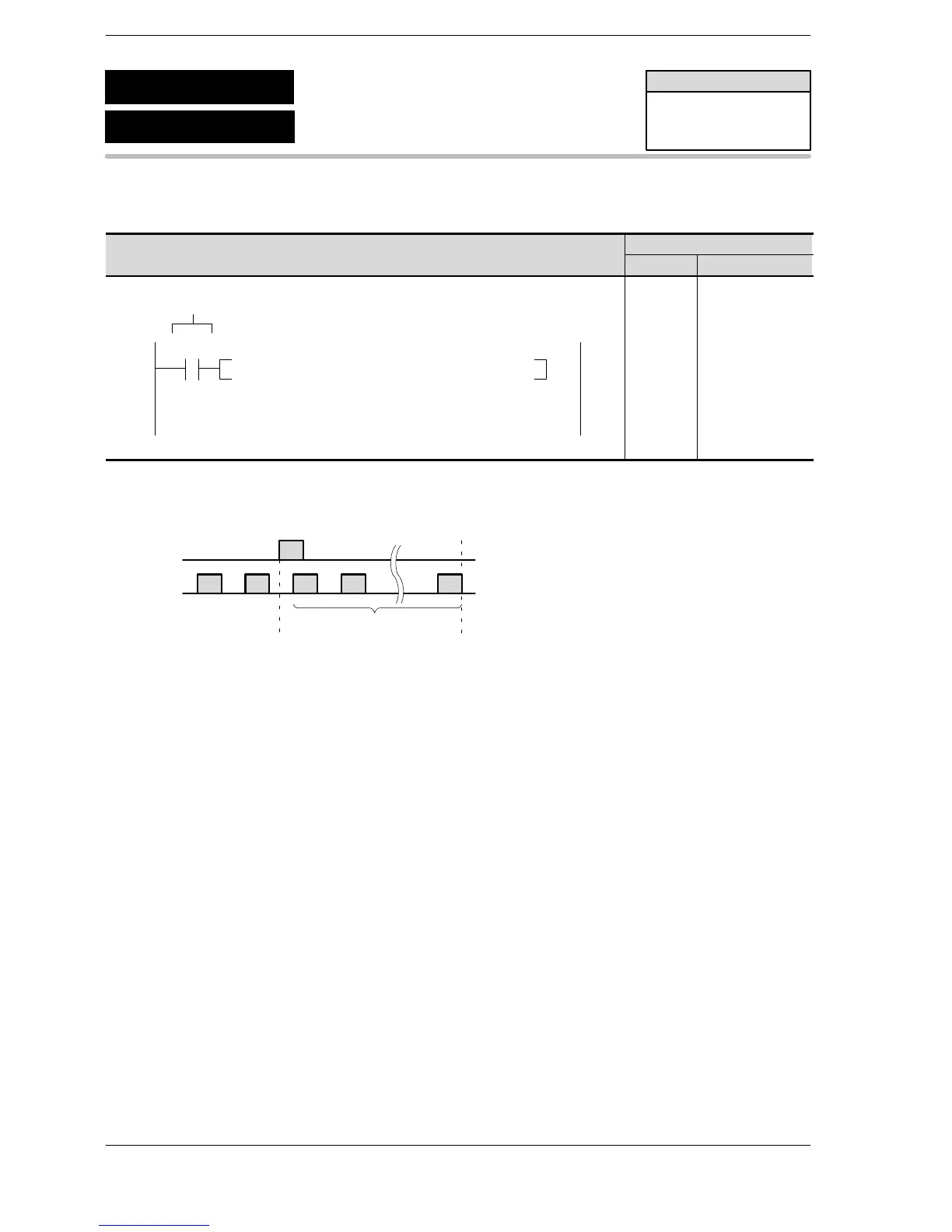
Explanation of example
When the execution condition (trigger) R10 turns on, a sampling trace stop command trigger is applied.
R10
Delay times
Sampling trace stops
Sampling
on
off
on
off
Stop command trigger
Registration of the data to be sampled, specification of the sampling method (such as the cable and the time
interval), and specification of the sampling trace can be done using only the programming tool software.
Description
This instruction applies a sampling trace stop command trigger. When a trigger is applied, sampling of the
specified delay is carried out, and then sampling trace stops.
If the sampling trace settings and the startup have not been specified using the programming tool software,
processing will not be carried out, even if the execution condition (trigger) is fulfilled.
F156
P156
(PSTRG)
(STRG)
Sampling stop
FP2/FP2SH/FP10SH
FP−X(V2.00ormore)
FPΣ (V3.10 or more)/FP0R
Availability





 To Next Page