High−level Instructions
3 − 668
Description
The bias value specified by S1 or S2 is added to the input value (double word data) specified by S3, and the
output value is stored in the area specified by D.
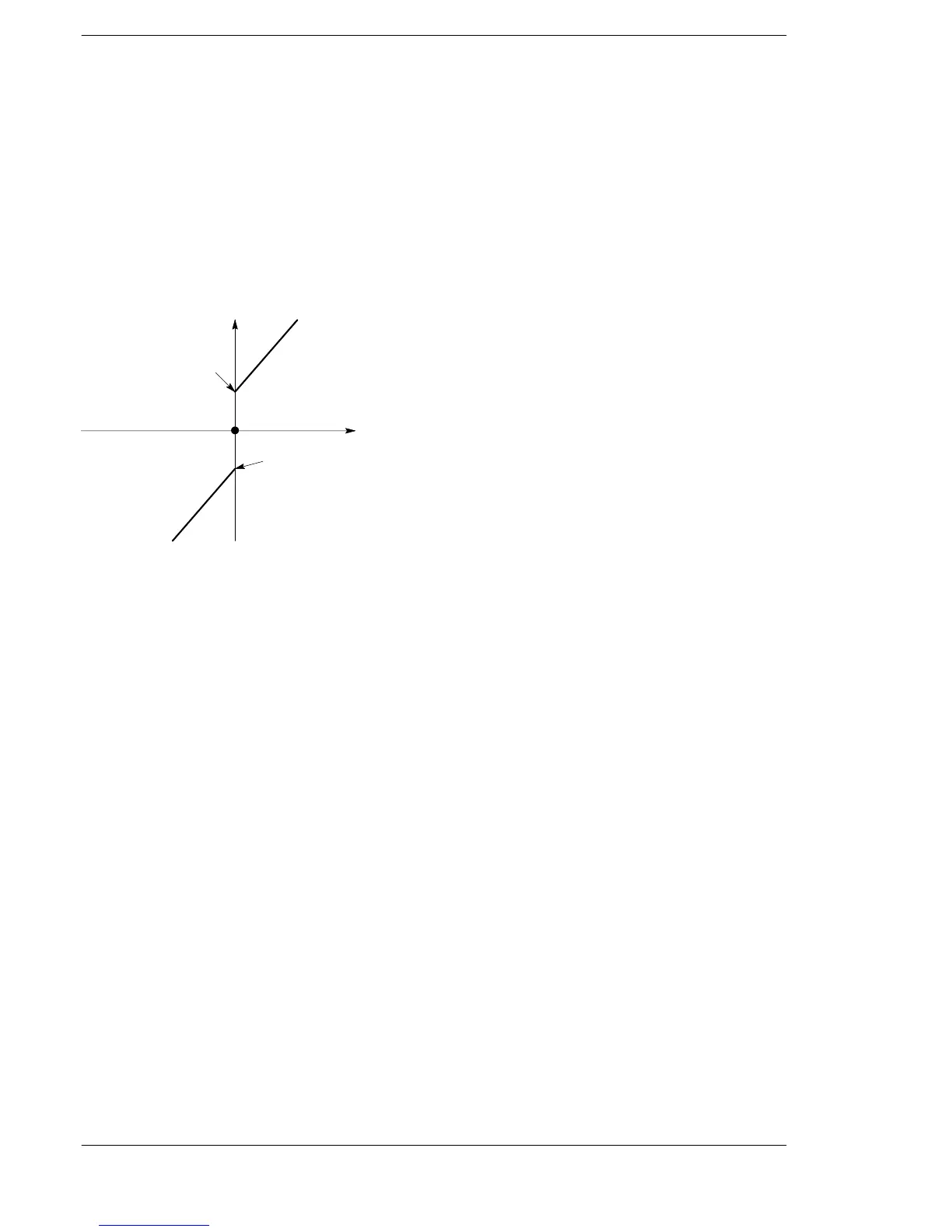
The output value is determined by the following conditions:
When the input value S3+1 and S3 are less than zero, the input value S3+1 and S3 plus the negative bias
value S1+1 and S1 are stored in D+1 and D as the output value.
When the input value S3+1 and S3 equals zero, zero is stored in D+1 and D as the output value.
When the input value S3+1 and S3 is greater than zero, the input value S3+1 and S3 plus the positive bias
value S2+1 and S2 are stored in D+1 and D as the output value.
Negative bias value S1+1 and S1
Positive bias value
S2+1 and S2
0
Output value D+1 and D
Input value S3+1 and S3
Flag conditions
・Error flag (R9007): Turns on and stays on when the area specified using the index modifier
exceeds the limit.
・Error flag (R9008): Turns on for an instant when the area specified using the index modifier
exceeds the limit.
・Carry flag (R9009): Turns on for an instant when the calculated result is overflowed or
underflowed.
・= flag (R900B): Turns on for an instant when the input value S3 is recognized as “0”.






 To Next Page