31Getting Started
B
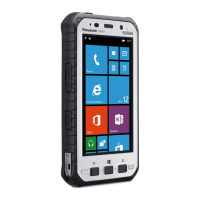
Ambient light sensor, proximity sensor
The ambient light sensor automatically adjusts the screen
brightness. The proximity sensor prevents accidental operations
on the touch panel during phone calls.
C
Earpiece
D
Front camera
E
Microphone
F
NFC antenna
(internal)
When using an NFC card or other NFC device, touch the card/
device to this area of the unit.
G
Display
Can also be operated while using gloves (glove touch mode).
H
Speaker
I
Back button
Press to return to the previous screen.
J
Start button
Press to display the Start screen.
K
Search button
*1
Press to search the web.
L
Headset jack cover
(page 33)
M
Headset jack
N
Barcode reader
(certain models only)
O
Power button
(page 42)
P
Interface cover
(page 34)
Q
DC input jack
(page 41)
R
micro USB port
(page 41)
S
Interface cover lock switch
T
Camera button
Press and hold to launch the camera app. You can take a picture
or record a video.
U
Cradle rail
Used when connecting the unit to an optional cradle.
*1 The registered function can be changed. See the Reference
Manual.


 To Next Page