25 (E)
Setting the menu items
Changing the format
When you change the currently selected recording format on
the “Output screen” (page 24), the Format change check
screen appears.
To change the format, you must perform the settings
using the service switches.
Note
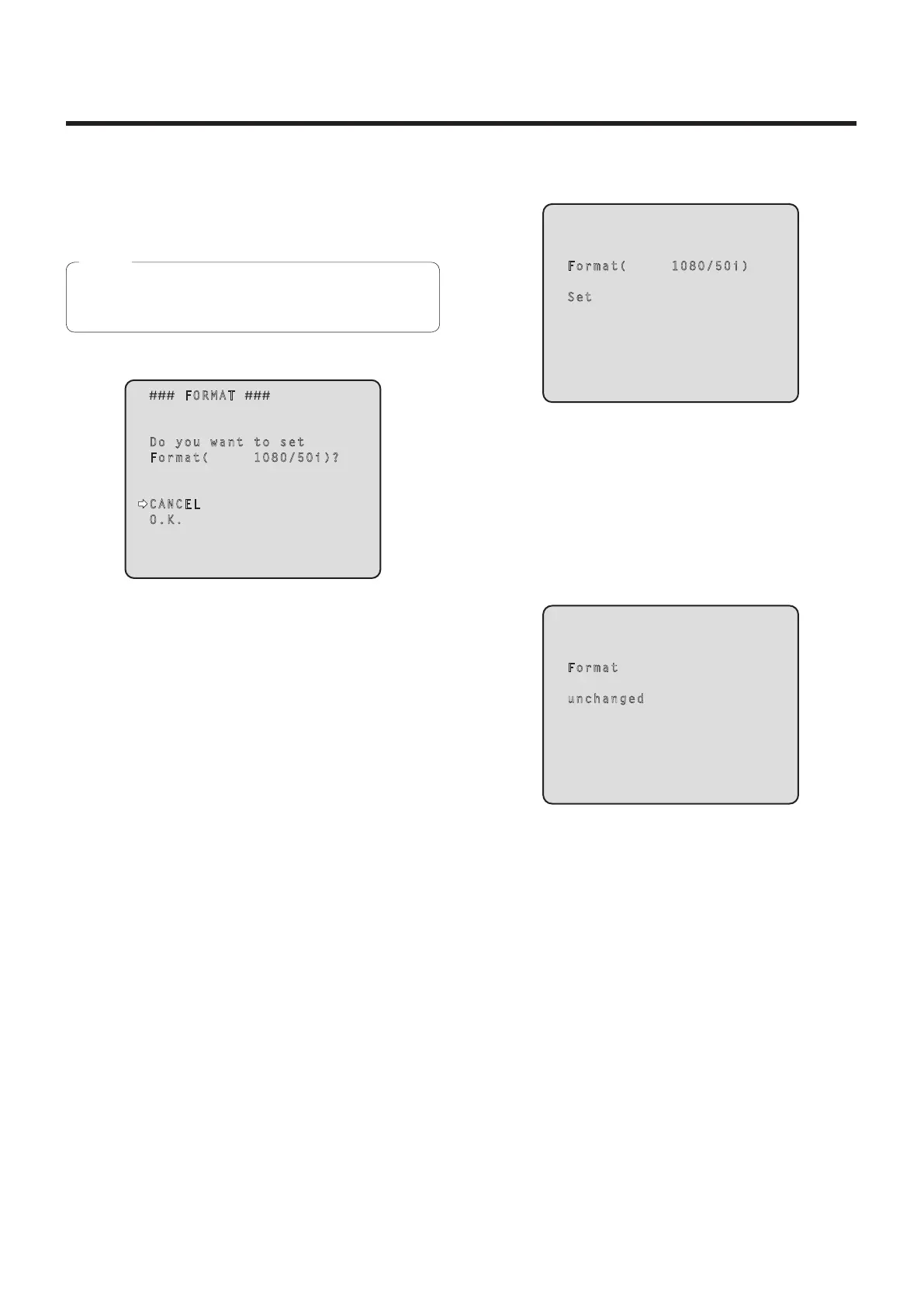
Format change check screen
FORMAT
Do you want to set
Format( 1080/50i)?
CANCEL
O.K.
The format to be set is displayed within the
parentheses on the screen.
When the cursor is moved to “O.K.” on the format
change check screen and the setting is entered, the
Format Set screen appears for a few seconds, and the
format is changed.
After the format has been changed, the display returns
to the Output screen.
With some types of monitors, the Format Set screen
may not be displayed.
Format Set screen
Format( 1080/50i)
Set
The format to be set is displayed within the
parentheses on the screen.
When the cursor is moved to “CANCEL” on the format
change check screen and the setting is entered, the
Format unchanged screen appears for 5 seconds, the
format is left unchanged, and the display returns to the
Output screen.
Format unchanged screen
Format
unchanged


 To Next Page