12
VQT2N35
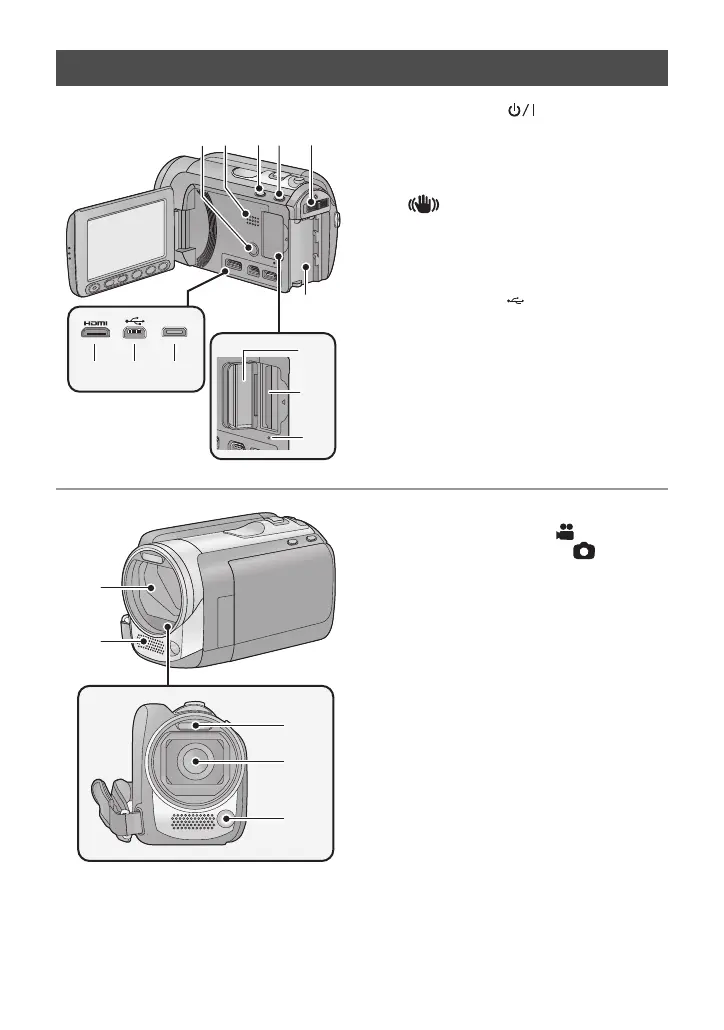
1 Power button [ ] (l 22)
2 Speaker
3 Intelligent auto/Manual button
[iA/MANUAL] (l 32)
4 Optical image stabilizer button
[ /O.I.S.] (l 46)
5 Mode switch (l 23)
6 Battery holder (l 16)
7 HDMI mini connector [HDMI] (l 89,
93)
8 USB terminal [ ] (l 98, 113)
9 AV multi connector [AV MULTI] (l 89,
104)
≥ Use the AV multi cable (only the supplied
cable).
10 SD card cover (l 21)
11 Card slot (l 21)
12 Access lamp [ACCESS] (l 21)
13 Lens cover
≥ The lens cover opens in Motion
Picture Recording Mode or Still
Picture Recording Mode. (l 23)
14 Internal stereo microphones
15 Built-in flash (l 52)
16 Lens
17 Video light (l 48, 68)
[HDC-HS60]
12 34
6
5
7 8 9
10
11
12
AV MULTI















 To Next Page