A&W Food Services of Canada Inc.
English Touch Screen Cable Kit Guide V970 2.2.docx QSR Solutions Page 5
Back Office
Com
uter
Front Counter
Drive-Thru
OCB Display
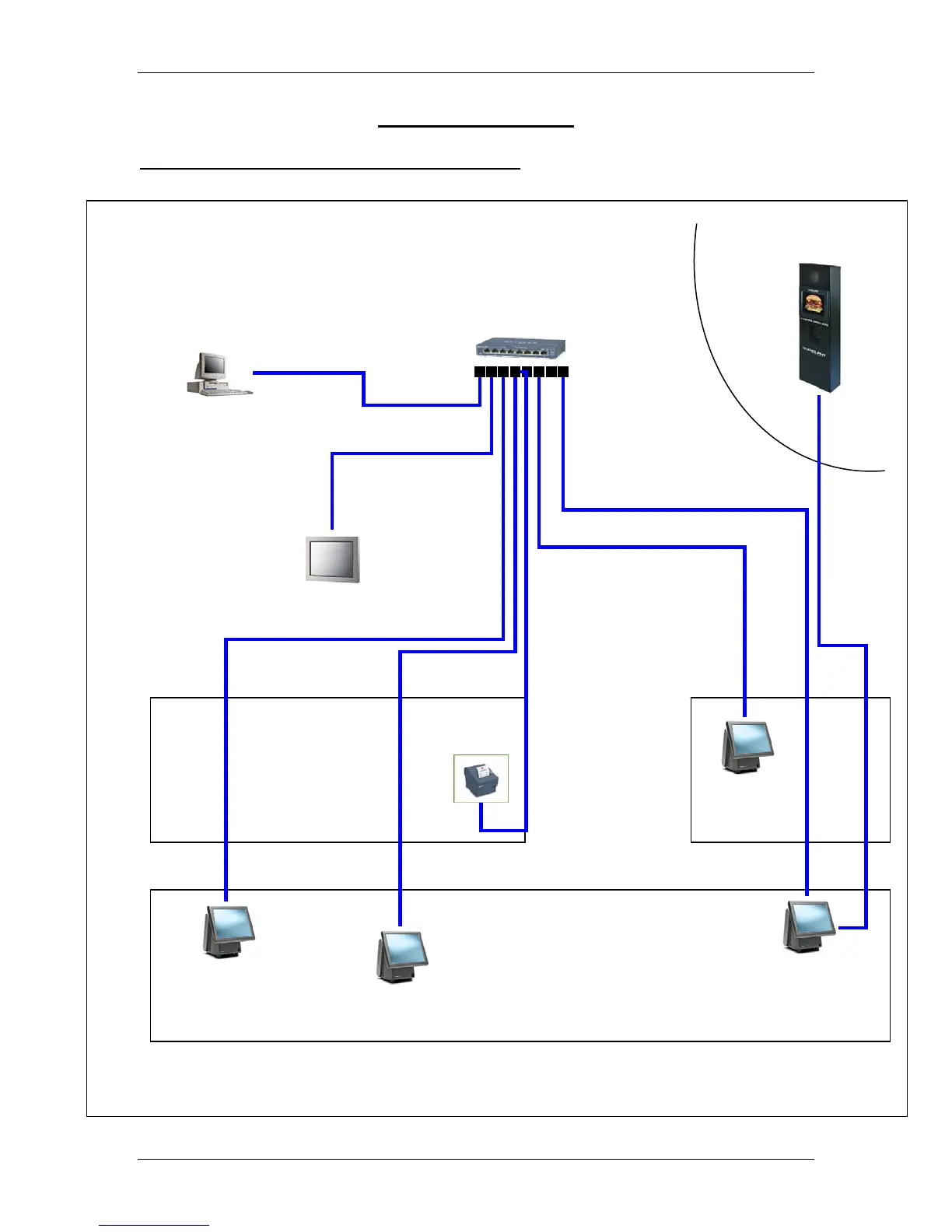
Equipment may be installed in different locations that are shown here. Please refer to your building plans for exact
system configuration and equipment placement.
CAT5e Communications Cable, BLUE WIRE
Leave 6’ of cable at each location for
termination. QSR will terminate the cables.
Kiosk T5
Patch Panel
Counter T1
Counter T2
Drive-Thru
Order Taker T4
Drive-Thru
Cashier T3
Burger Chute
Printer
The Network rack, patch panel is located
above the Manager’s desk on the top
shelf or on the top of the cabinet.
Wiring Diagrams
Diagram #1a – Touch Screen POS Network



 To Next Page