EasyManua.ls Logo

Panasonic KX-B620 - Page 20

Panasonic KX-B620
75 pages
Print Icon
To Next Page IconTo Next Page
To Previous Page IconTo Previous Page
Loading...
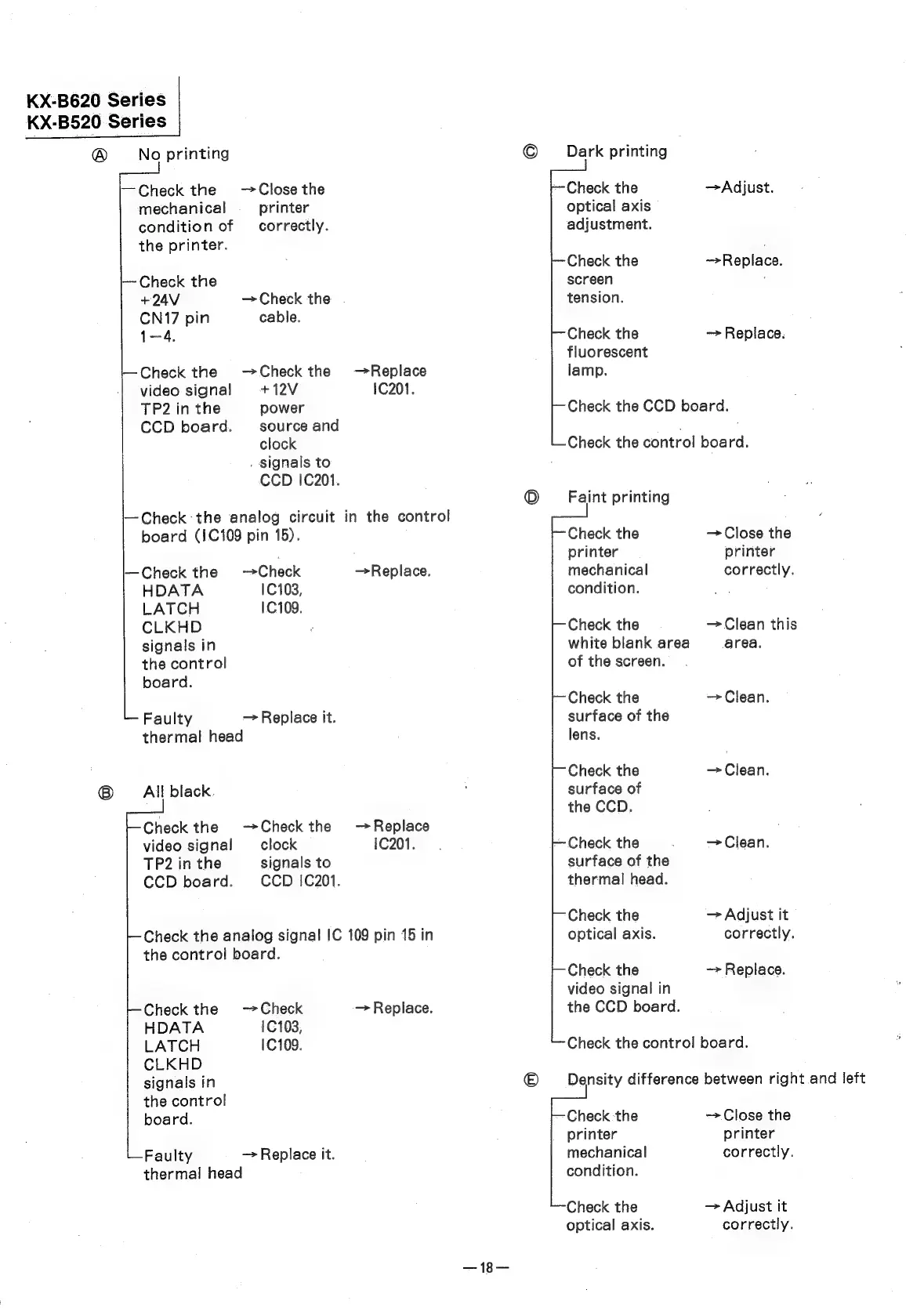
KX-B620
Series
KX-B520
Series
®
No
printing
I
Check
‘the
analog
circuit
in
the
control
Dark
printing
Faint
printing
—Check
the
Close
the
Check
the
Adjust.
mechanical
printer
optical
axis
condition
of
correctly.
adjustment.
the
printer.
:
Check
the
~>Replace.
—~-
Check
the
screen
;
+24V
Check
the
tension.
CN17
pin
cable.
1-4.
Check
the
—>
Replace.
fluorescent
Check
the
—Check
the
—Replace
lamp.
video
signal!
+12V
1C201.
TP2
in
the
power
Check
the
CCD
board.
CCD
board.
source
and
clock
Check
the
control
board.
.
Signals
to
CCD
1C201.
board
(1C109
pin
15).
Check
the
Close
the
printer
printer
Check
the
Check
—Replace.
mechanical
correctly.
HDATA
10103,
condition.
LATCH
10109.
CLKHD
Check
the
Clean
this
signals
in
white
blank
area
area.
the
control
of
the
screen.
board.
Check
the
~>
Clean.
Faulty
Replace
it.
surface
of
the
thermal
head
lens.
Check
the
Clean.
®
All
black.
surface
of
the
CCD.
Check
the
—Check
the
—Replace
video
signal
clock
1C201.
Check
the
Clean.
TP2
in
the
signals
to
surface
of
the
CCD
board.
CCD
!C201.
thermal
head.
Check
the
Adjust
it
Check
the
analog
signal
IC
109
pin
15
in
optical
axis.
correctly.
the
control
board.
Check
the
~>
Replace.
video
signal
in
Check
the
Check
Replace.
the
CCD
board.
HDATA
1C103,
LATCH
1C109.
Check
the
control
board.
CLKHD
signals
in
Density
difference
between
right.and
left
the
control
board.
Check
the
->
Close
the
printer
printer
Faulty
—>
Replace
it.
mechanical
correctly.
thermal
head
condition.
Check
the
Adjust
it
optical
axis.
correctly.
—18—