EasyManua.ls Logo

Panasonic KX-B620 - Page 27

Panasonic KX-B620
75 pages
Print Icon
To Next Page IconTo Next Page
To Previous Page IconTo Previous Page
Loading...
KX-B620:Series
KX-B520
Series
12.
ADJUSTMENTS
ccD
Adjustment
Procedure
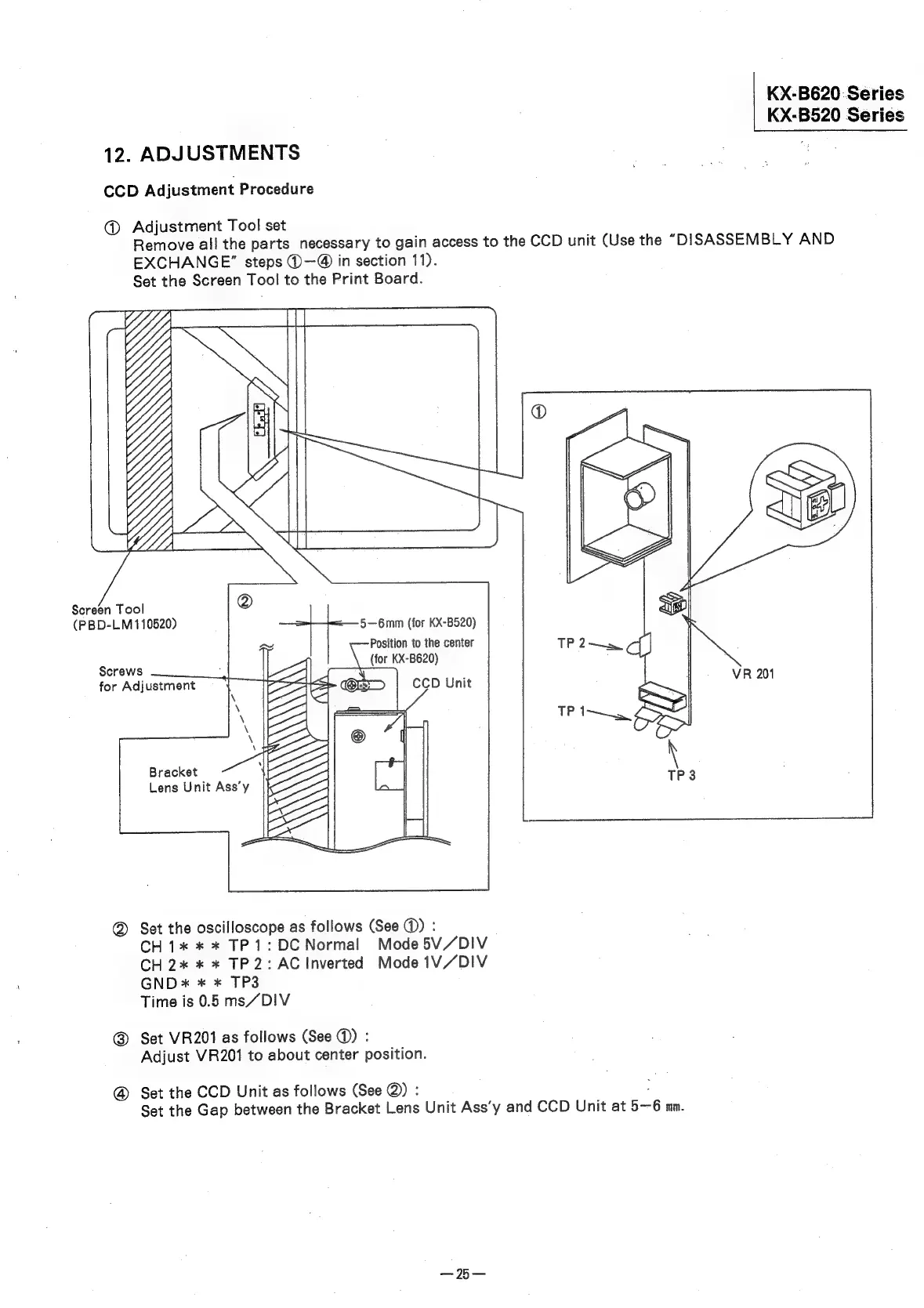
@
Adjustment
Tool
set
Remove
all
the
parts
necessary
to
gain
access
to
the
CCD
unit
(Use
the
“DISASSEMBLY
AND
EXCHANGE”
steps
®—@
in
section
11).
Set
the
Screen
Tool
to
the
Print
Board.
Screen
Tool
(PBD-LM
110520)
5—6mm
(for
KX-B520)
Position
to
the
center
(for
KX-B620)
Screws
for
Adjustment
Bracket
Lens
Unit
Ass’y
Set
the
oscilloscope
as
follows
(See
@)
:
CH1*
*
*
TP
1:
DC
Normal
Mode
5V/DIV
CH2*
*
*
TP2:AC
Inverted
Mode
1V/DIV
GND
x
*
*
TP3
Time
is
0.5
ms/DIV
@
Set
VR201
as
follows
(See
@)
:
Adjust
VR201
to
about
center
position.
@
Set
the
CCD
Unit
as
follows
(See
@)
:
.
Set
the
Gap
between
the
Bracket
Lens
Unit
Ass’y
and
CCD
Unit
at
56
mm.

Related product manuals