3. Preparation
8
3 Preparat ion
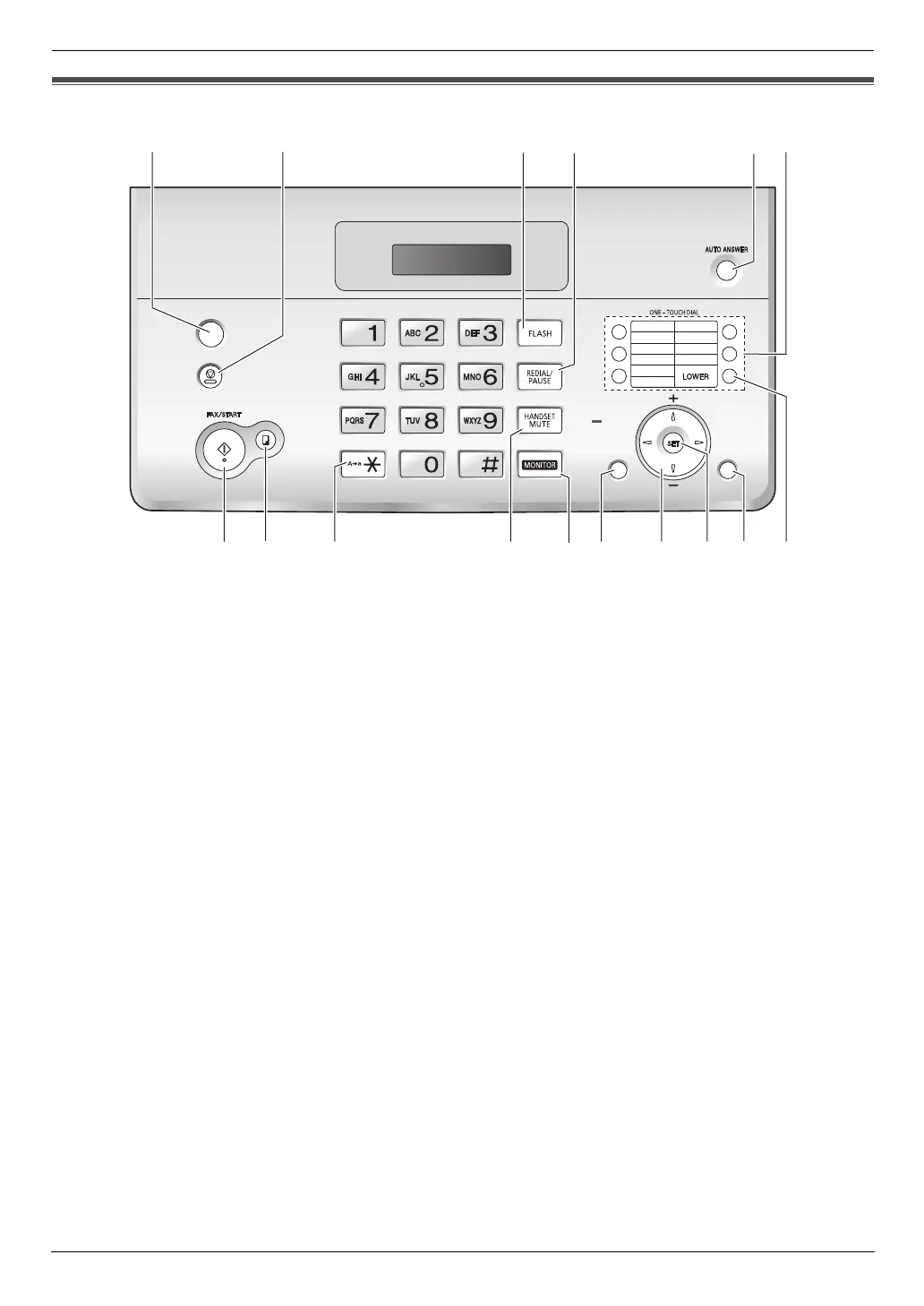
3.1 Location of Controls
A {CALLER ID}
L To use Caller ID features (page 15).
B {STOP}
L To stop an operation or programming session.
L To erase a character/number (page 11). Press
and hold to erase all characters/numbers.
C {FLASH}
L To access special telephone services or for
transferring extension calls.
D {REDIAL/PAUSE}
L To redial the last number dialled. If the line is busy
when you make a phone call using the
{MONITOR} button, the unit will automatically
redial the number up to 11 times.
L To insert a pause during dialling.
E {AUTO ANSWER}
L To turn the auto answer setting ON/OFF (page
22, 23).
F Station keys
L To use one-touch dial feature (page 14).
G {FAX/START}
L To start sending or receiving a fax.
H {COPY}
L To copy a document (page 27).
I {TONE}
L To change from pulse to tone temporarily during
dialling when your line has rotary pulse services.
J {HANDSET MUTE}
L To mute your voice during a conversation. Press
again to resume the conversation.
K {MONITOR}
L To initiate dialling without lifting the handset.
L {BROADCAST}
L To transmit a document to multiple parties (page
20).
M Navigator/{VOLUME}{PHONEBOOK}
L To search for a stored item (page 13, 19).
L To select features or feature settings during
programming (page 28).
L To adjust volume (page 9).
L To open a phonebook.
N {SET}
L To store a setting during programming.
O {MENU}
L To initiate or exit programming.
P {LOWER}
L To select stations 6-10 for the one-touch dial
feature (page 14, 17, 19).
1
6
2
7
3
8
4
9
5
10
COPY
MENU
PHONEBOOK
BROADCAST
TONE
VOLUME
CALLER
ID
STO
P
GJKI
P
ACDBE
H
F
L
N
M
O
FT982_984HK-PNQX1347ZA-OI-en.book Page 8 Friday, June 13, 2008 10:35 AM












 To Next Page