EasyManua.ls Logo

Panasonic KX-PRS120E - User Manual

Panasonic KX-PRS120E
60 pages
Print Icon
To Next Page IconTo Next Page
Loading...
Operating Instructions
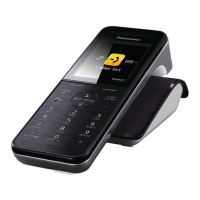
Premium Design Phone
Model No. KX-PRS120E
Before initial use, see “Getting Started”
on page 10.
Thank you for purchasing a Panasonic product.
Please read these operating instructions before using the unit and save them for
future reference.
Please access our online customer survey:
http://panasonic.net/pcc/tel/q
PNQX6032YA_0529_ver110.pdf 1 2013/05/29 12:39:38
Question and Answer IconNeed help?

Do you have a question about the Panasonic KX-PRS120E and is the answer not in the manual?

Summary

Important Information and Safety

Safety and Precautions

Covers general safety, operating safeguards, medical considerations, and cautions.

Important Safety Instructions

Key safety precautions to follow during product use.

Getting Started with Your Phone

Setting Up Your Phone

Step-by-step guide for initial phone setup and connections.

Making and Answering Calls

Basic Call Operations

Instructions for making, answering, and ending calls.

Phonebook Management

Adding and Finding Contacts

How to add, store, categorize, find, and call contacts.

Programming Phone Features

Caller ID Service

Using Caller ID Features

Overview of Caller ID, Talking Caller ID, and caller list management.

SMS (Short Message Service)

Setting Up and Using SMS

Steps for setting up SMS, using mailboxes, and sending messages.

Receiving SMS Messages

Information on how to receive and view SMS messages.

Reading and Replying to SMS Messages

Procedures for reading, replying to, and managing SMS messages.

Answering System Features

Answering System Overview

Introduction to the answering system, memory, and on/off controls.

Playing and Listening to Messages

How to play, listen to, and operate the answering system.

Remote Operation Guide

Comprehensive guide to operating the answering system remotely.

Useful Information and Troubleshooting

Error Messages and Solutions

Common error messages and their corresponding causes and solutions.

General Use Troubleshooting

Troubleshooting steps for common problems with handset and unit operation.

Troubleshooting Call and Intercom Issues

Resolving problems related to calls, intercom, and noise.

Troubleshooting Caller ID Issues

Solutions for problems with Caller ID display and announcement.

Troubleshooting SMS and Answering System Issues

Resolving issues with SMS messages and the answering system.

Liquid Damage and Safety Precautions

Guidance on handling liquid damage and associated safety measures.

Summary

Important Information and Safety

Safety and Precautions

Covers general safety, operating safeguards, medical considerations, and cautions.

Important Safety Instructions

Key safety precautions to follow during product use.

Getting Started with Your Phone

Setting Up Your Phone

Step-by-step guide for initial phone setup and connections.

Making and Answering Calls

Basic Call Operations

Instructions for making, answering, and ending calls.

Phonebook Management

Adding and Finding Contacts

How to add, store, categorize, find, and call contacts.

Programming Phone Features

Caller ID Service

Using Caller ID Features

Overview of Caller ID, Talking Caller ID, and caller list management.

SMS (Short Message Service)

Setting Up and Using SMS

Steps for setting up SMS, using mailboxes, and sending messages.

Receiving SMS Messages

Information on how to receive and view SMS messages.

Reading and Replying to SMS Messages

Procedures for reading, replying to, and managing SMS messages.

Answering System Features

Answering System Overview

Introduction to the answering system, memory, and on/off controls.

Playing and Listening to Messages

How to play, listen to, and operate the answering system.

Remote Operation Guide

Comprehensive guide to operating the answering system remotely.

Useful Information and Troubleshooting

Error Messages and Solutions

Common error messages and their corresponding causes and solutions.

General Use Troubleshooting

Troubleshooting steps for common problems with handset and unit operation.

Troubleshooting Call and Intercom Issues

Resolving problems related to calls, intercom, and noise.

Troubleshooting Caller ID Issues

Solutions for problems with Caller ID display and announcement.

Troubleshooting SMS and Answering System Issues

Resolving issues with SMS messages and the answering system.

Liquid Damage and Safety Precautions

Guidance on handling liquid damage and associated safety measures.

Panasonic KX-PRS120E Specifications

General IconGeneral
Frequency1.9 GHz
Answering MachineYes
DisplayLCD
Maximum Indoor Range50 meters
Maximum Outdoor Range300 meters
Caller IDYes
Polyphonic RingtonesYes
Number of Batteries Supported1
RedialYes
Handset SpeakerphoneYes
IntercomYes
Power Consumption (Standby)0.5 W
Power Consumption (Talk)0.7 W
DECTYes
TypeCordless phone
Battery TypeNi-MH

Related product manuals