This document is a reference manual for the Panasonic KX-T7135 proprietary telephone, designed for use with Panasonic Electronic Modular Switching Systems (EMSS), specifically the KX-TA624-2 Advanced Hybrid System and KX-TD series Digital Super Hybrid Systems.
Function Description:
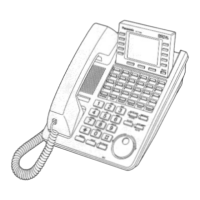
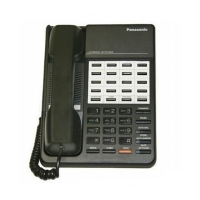
The Panasonic KX-T7135 is a proprietary telephone designed to integrate with Panasonic's EMSS, offering a range of communication functionalities tailored for business environments. It serves as a user interface for the EMSS, allowing users to make and receive calls, manage extensions, and utilize various system features. The telephone is equipped with a handset for traditional voice communication, and also supports hands-free operation via a speakerphone. Its primary function is to provide reliable and efficient communication within a networked telephone system. The device includes a Liquid Crystal Display (LCD) with backlighting for displaying information, which can be adjusted for contrast. It features dedicated buttons for common telephone functions, as well as programmable feature buttons that can be customized to access specific system features with a single touch. The telephone supports both intercom calls and external CO line calls, facilitating internal and external communication. It also includes features like call transfer, call hold, redial, and conference calling, enhancing its utility in a professional setting. The KX-T7135 is designed to be a robust and versatile communication tool within a Panasonic EMSS.
Usage Features:
The KX-T7135 offers several features to enhance user experience and communication efficiency.
- Volume Controls: The telephone includes separate selectors for handset volume (NORMAL/HIGH), ringer volume (HIGH/LOW/OFF), and speaker volume (MAX/MIN), allowing users to adjust audio levels to their preference.
- Handset/Headset Selector: A dedicated selector allows users to switch between using the handset or an optional headset for communication.
- Memory Switch: This switch has two settings: "SET" for normal operation and "PROGRAM" for station programming, enabling customization of the telephone's features.
- LCD Display with Contrast Control: The LCD provides visual information, and a contrast selector allows adjustment of its brightness, with a low position turning off the back light.
- Intercom Button and Indicator: Used for making or receiving intercom calls, with an indicator to show its status.
- Conference Button and Indicator: Facilitates speaking with three parties simultaneously, also with an indicator.
- Redial Button: Quickly redials the last number dialed.
- Flash Button: Sends the hook flash signal to the CO line.
- Programmable Feature Buttons: These buttons can be programmed to dial or access system features with one touch, offering quick access to frequently used functions.
- Flexible CO Line Buttons and Indicators: Used for dialing via CO line, Direct Station Selection, or as programmable feature buttons. Their functions are limited by the EMSS Control Units.
- Flexible Message Waiting Button and Indicator: Can be used for Message Waiting, Direct Station Selection, or as a programmable feature button, with functions limited by the EMSS Control Units.
- SAVE Button: Temporarily stores a number in the redial memory.
- TRANSFER Button: Transfers a call to any extension.
- PAUSE Button: Inserts a pause between the access number and the phone number, useful for dialing sequences.
- AUTO DIAL/STORE Button and Indicator: Used for dialing system speed dialing numbers and for storing functions into memory.
- AUTO ANSWER/MUTE Button and Indicator: Automatically answers intercom calls and mutes the user's voice in hands-free mode.
- SP-PHONE Button and Indicator: Used for making or receiving calls without using the handset (speakerphone function).
- HOLD Button: Places a call on hold.
- FWD/DND Button and Indicator: Sets or cancels Call Forwarding and Do Not Disturb features, with functions limited by the EMSS Control Units.
- Overlay Functionality: The manual highlights that the function of the KX-T7135 buttons can change when system programming data is set, indicating a customizable interface through the use of an overlay. This allows the physical buttons to correspond to different programmed functions.
- Wall Mounting: The unit can be mounted on a wall phone plate, with instructions provided for turning the handset hook upside down, removing the stand, rotating the stand for wall mounting, and placing the stand on the unit. A temporary handset hook position is also available for convenience during conversations.
- Card Holder Installation: The device includes a card holder for memory station cards, with clear instructions on how to align, insert, and remove it.
Maintenance Features:
The manual provides important safety and maintenance instructions to ensure the longevity and proper functioning of the KX-T7135.
- Cleaning: Users are advised to unplug the product from the wall outlet before cleaning and to use a damp cloth, avoiding liquid or aerosol cleaners.
- Environmental Precautions: The device should not be used near water, placed on unstable surfaces, or have its ventilation slots blocked to prevent overheating. It should also be kept away from heat sources like radiators and heat registers.
- Cord Management: Users are cautioned not to allow anything to rest on the telephone cord and to locate the product where the cord will not be abused.
- Electrical Safety: Overloading wall outlets and extension cords should be avoided. Objects should not be pushed into cabinet slots, and liquids should not be spilled on the product.
- Servicing: In case of malfunction, users are instructed not to disassemble the product but to refer servicing to qualified personnel. Specific conditions for servicing include damaged cords, liquid spills, exposure to rain or water, abnormal operation, physical damage (dropped or damaged cabinet), or a distinct change in performance.
- Lightning Protection: Users are advised to avoid using a non-cordless telephone during an electrical storm due to the risk of electric shock from lightning.
- Gas Leak Precaution: The telephone should not be used to report a gas leak in the vicinity of the leak.
- General Care: The unit should be kept away from heating appliances, electrical noise-generating devices, dust, moisture, and vibration. It should not be exposed to direct sunlight.
- Cleaning Agents: Benzine, thinner, or abrasive powders should not be used to clean the cabinet; a soft cloth is recommended.
- Handset Compatibility: Only Panasonic handsets should be used with the device.
- Troubleshooting: In case of trouble, users are advised to disconnect the unit and connect a known working phone to check the line. If the known working phone operates properly, the defective phone should be repaired by a specified Panasonic Factory Service Center. If the known working phone does not operate properly, the EMSS and internal extension wiring should be checked.
- FCC Compliance: The manual notes that the equipment has been tested and complies with Class B digital device limits, designed to provide reasonable protection against harmful interference. Troubleshooting steps for interference include reorienting the antenna, increasing separation from other equipment, connecting to a different circuit, or consulting a technician.
- Hearing Aid Compatibility: The telephone provides magnetic coupling to hearing aids.
- Installation Safety: Instructions for installation include never installing telephone wiring during a lightning storm, in wet locations (unless designed for it), or touching uninsulated wires/terminals unless the line is disconnected. Caution is advised when installing or modifying telephone lines.
- Emergency Numbers: When programming emergency numbers, users are advised to remain on the line to explain the call before hanging up and to perform such activities during off-peak hours.

 Need help?
 General










 To Next Page