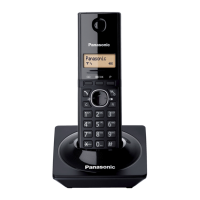
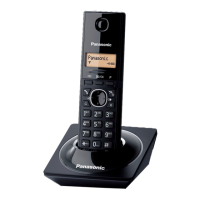
This document is an operating manual for the Panasonic Digital Cordless Phone, Model No. KX-TG1711TU.
Function Description
The Panasonic KX-TG1711TU is a digital cordless phone designed for home or small office use, offering basic telephony functions along with some advanced features. It allows users to make and receive calls, store contact information, and utilize various call management options. The phone operates wirelessly, providing flexibility in placement and usage within a certain range from the base unit.
Important Technical Specifications
General
- Model No.: KX-TG1711TU
- Type: DECT (Digital Enhanced Cordless Telecommunications), GAP (Generic Access Profile)
- Frequency Range: 1.88 GHz to 1.90 GHz
- RF Transmission Power: Approx. 10 mW (average power per channel)
- Power Source: 100–240 V AC, 50/60 Hz
- Power Consumption:
- Base unit: Standby: 0.6 W, Maximum: 1.5 W
- Rechargeable Battery: AAA (R03) Ni-MH battery (1.2 V, 550 mAh)
- Operating Conditions: 0 °C–40 °C, 20 %–80 % relative air humidity (dry)
Supplied Accessories
The phone comes with the following accessories:
- AC adaptor/PNLV226CE (1 unit)
- Telephone line cord (1 unit)
- Rechargeable batteries (2 units)
- Handset cover (1 unit)
- Operating Time:
- In continuous use: 15 hours max.
- Not in use (standby): 170 hours max.
- Note: Actual battery performance depends on usage and ambient environment.
Phonebook
- Can store up to 50 names (16 characters max.) and phone numbers (24 digits max.).
Caller ID
- Compatible with Caller ID service (subscription required).
- Stores information for the last 50 callers.
Usage Features
Getting Started
- Setting Up: Involves connecting the AC adaptor to the unit and a power outlet, fastening the cord, connecting the AC adaptor to the power outlet, connecting the telephone line cord to the unit and then to the telephone line jack, and optionally using a DSL/ADSL filter if required.
- Battery Installation: Requires using ONLY rechargeable Ni-MH batteries (AAA (R03) size). Alkaline/manganese/Ni-Cd batteries are not to be used. Polarity must be confirmed during installation.
- Battery Charging: The handset charges for about 7 hours. The display indicates charging status.
- Turning the Power On/Off: Press and hold the power button for about 2 seconds.
Controls
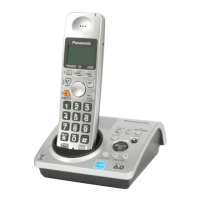
The handset features a keypad with numeric keys (0-9, *, #), navigation keys (up, down, left, right), and function keys such as Phonebook, Talk, Clear, Menu/OK, Pause, Off/Power, Recall/Flash, Microphone, and Ringer. The base unit has a charge contacts and a locator button.
Display Icons
The handset display shows various icons indicating:
- Signal Strength: Within range of a base unit.
- Handset Search: Handset is searching for the base unit.
- In Use: The line is in use.
- Call Status: When flashing slowly, the call is on hold. When flashing rapidly, an incoming call is now being received.
- Missed Call: Indicates a missed call.
- Ringer Volume: Shows if the ringer volume is off.
- Battery Level: Indicates the current battery charge.
- Privacy Mode: Indicates privacy mode is on.
- Phonebook: Phonebook is opened.
- New Voicemail Message: Indicates a new voicemail message.
Language Setting
Users can select their desired display language from the menu.
Date and Time
The current date and time can be entered and set through the menu.
Dialling Mode
The default setting is "Tone". For rotary/pulse dial service, "Pulse" can be selected.
Making/Answering Calls
- Making Calls: Lift the handset and dial the number, then press the talk button.
- Answering Calls: Lift the handset and press the talk button when the unit rings.
- Adjusting Receiver Volume: Use the up/down navigation keys during a call.
- Redial List: The last 10 phone numbers dialed are stored in the redial list.
- Erasing Numbers in Redial List: Numbers can be deleted from the redial list.
- Pause (for PBX/long distance service users): Allows inserting a pause in the dialing sequence.
- Adjusting Ringer Volume: The ringer volume can be adjusted.
- Hold: A call can be put on hold.
- Mute: The microphone can be muted during a call.
- Recall/Flash: Used for special features of a host PBX or accessing optional telephone services.
- Call Waiting or Call Waiting Caller ID: Requires subscription to the service. Allows answering a second call while on the phone.
- Temporary Tone Dialing: Used for rotary/pulse service users to dial numbers requiring tone dialing.
Phonebook
- Adding Phonebook Entries: Store names and numbers.
- Finding and Calling from Phonebook: Search entries by first character or scroll through the phonebook.
- Editing Entries: Modify existing phonebook entries.
- Erasing Entries: Delete individual or all phonebook entries.
- Chain Dial: Allows dialing phone numbers in the phonebook while on a call, useful for calling card access numbers or bank account PINs.
Programming
- Menu List: Access various settings and features through a hierarchical menu structure.
- Direct Command Code: Allows direct access to settings using specific codes.
- Alarm: Set an alarm to ring at a specific time, daily, or once.
Caller ID Service
- Using Caller ID Service: Requires subscription to Caller ID service.
- Caller ID Features: Displays caller information for incoming calls. Stores missed calls.
- Viewing Caller List: Review information for the last 50 callers.
- Editing Caller's Phone Number: Modify a caller's number from the caller list.
- Erasing Caller Information: Delete individual or all caller information from the list.
Voicemail Service
- Requires subscription to voicemail service.
- The handset displays an icon when new messages are available.
Character Entry
- The dial keys are used to enter characters and numbers.
- Supports Numeric (0-9), Greek (ABΓ), Extended 1 (AÅÄ), Extended 2 (SŠŠ), and Cyrillic (АБВ) character tables.
- Allows switching between uppercase and lowercase.
Maintenance Features
- Safety Instructions: Important safety instructions are provided to prevent injury, product damage, and ensure proper operation. These include warnings about power connection, battery usage, operating safeguards, medical considerations (RF exposure), and installation location.
- Graphical Symbols: Explanations of symbols used on the equipment and in the manual (e.g., alternating current, direct current, protective earth, caution, indoor use only, risk of electric shock).
- Environment: Guidelines for product disposal, recycling, and routine care.
- Routine Care: Wipe the outer surface of the product with a soft moist cloth. Do not use benzene, thinner, or any abrasive powder.
Troubleshooting
The manual provides a comprehensive troubleshooting section to address common issues:
- Base No Power/No Link: Check AC adaptor connection, reconnect base unit, reset adaptor, re-register handset.
- Memory Full: Erase unwanted entries from the phonebook.
- Wrong Batt.: Use only rechargeable Ni-MH batteries.
- Unit Does Not Work: Check battery installation, charge batteries, check connections, reconnect adaptor, register handset.
- Handset Display Blank: Handset is not turned on.
- Cannot Hear a Dial Tone: Check telephone line cord, AC adaptor, connections, contact service personnel.
- Cannot Use Intercom Feature: This feature is available between handsets; not for single handset models.
- Display in a Language I Cannot Read: Change the display language.
- Cannot Register a Handset to a Base Unit: Enter correct PIN, contact service centre if forgotten.
- Handset Beeps/Flashes: Battery charge is low, fully charge batteries.
- Fully Charged Batteries, but Battery Level Does Not Increase or Operating Time Seems Shorter: Clean battery ends and charge contacts, replace batteries.
- Handset Too Far from Base Unit: Move closer to base unit, reconnect AC adaptor, register handset.
- Noise Heard, Sound Cuts In/Out: Check handset/base unit area for electrical interference, reposition unit, use DSL/ADSL filter, reconnect adaptor.
- Handset Does Not Ring: Ringer volume is turned off, adjust ringer volume.
- Cannot Make a Call: Dialing mode may be set incorrectly, change setting. Handset too far from base unit.
- Caller Information Not Displayed: Subscribe to Caller ID service, check connections, use DSL/ADSL filter, other equipment interference.
- Caller Information Slow to Display: Check phone service provider, move closer to base unit.
- Time on Unit Has Shifted: Incorrect time information, adjust time setting.
- Liquid Damage: Disconnect AC adaptor and telephone line cord, remove batteries, dry for at least 3 days.
Registering/Deregistering Handsets
- Registering a Handset to the Base Unit: Press and hold the locator button on the base unit, then enter the base unit PIN (default: "0000").
- Deregistering a Handset: Select the handset to cancel from the menu.
Changing Base Unit PIN
- The PIN can be changed from the default "0000". If forgotten, contact an authorized service centre.
- Ecodesign information under EU Regulation (EC) No. 1275/2008 amended by (EU) Regulation No. 801/2013.
- "ErP Free Web Product Information" is available at https://www.ptc.panasonic.eu/compliance-documents.
- Power consumption in networked standby and guidance are mentioned on the web site above.
- More information about the energy efficiency of the product, visit Panasonic's website and enter the model number in the search box.
This manual provides comprehensive instructions for the safe and efficient use of the Panasonic KX-TG1711TU digital cordless phone.

 Need help?
 General

 To Next Page