48
KX-TG2521BXT/KX-TGA251BXT
11.4. The Setting Method of JIG (Handset)
This section explains the PC setting to use command required in Check Point (Handset)(P.39).
<Preparation>
• Serial JIG cable: PQZZ1CD300E*
• PC which runs in DOS mode
• Batch file CD-ROM for setting: PNZZTG2521BX
Note:
*: If you have the JIG Cable for TCD500 series
(PQZZ1CD505E), change the following values of
resistance. Then you can use it as a JIG Cable for both
TCD300 and TCD500 series. (It is an upper compatible JIG
Cable.)
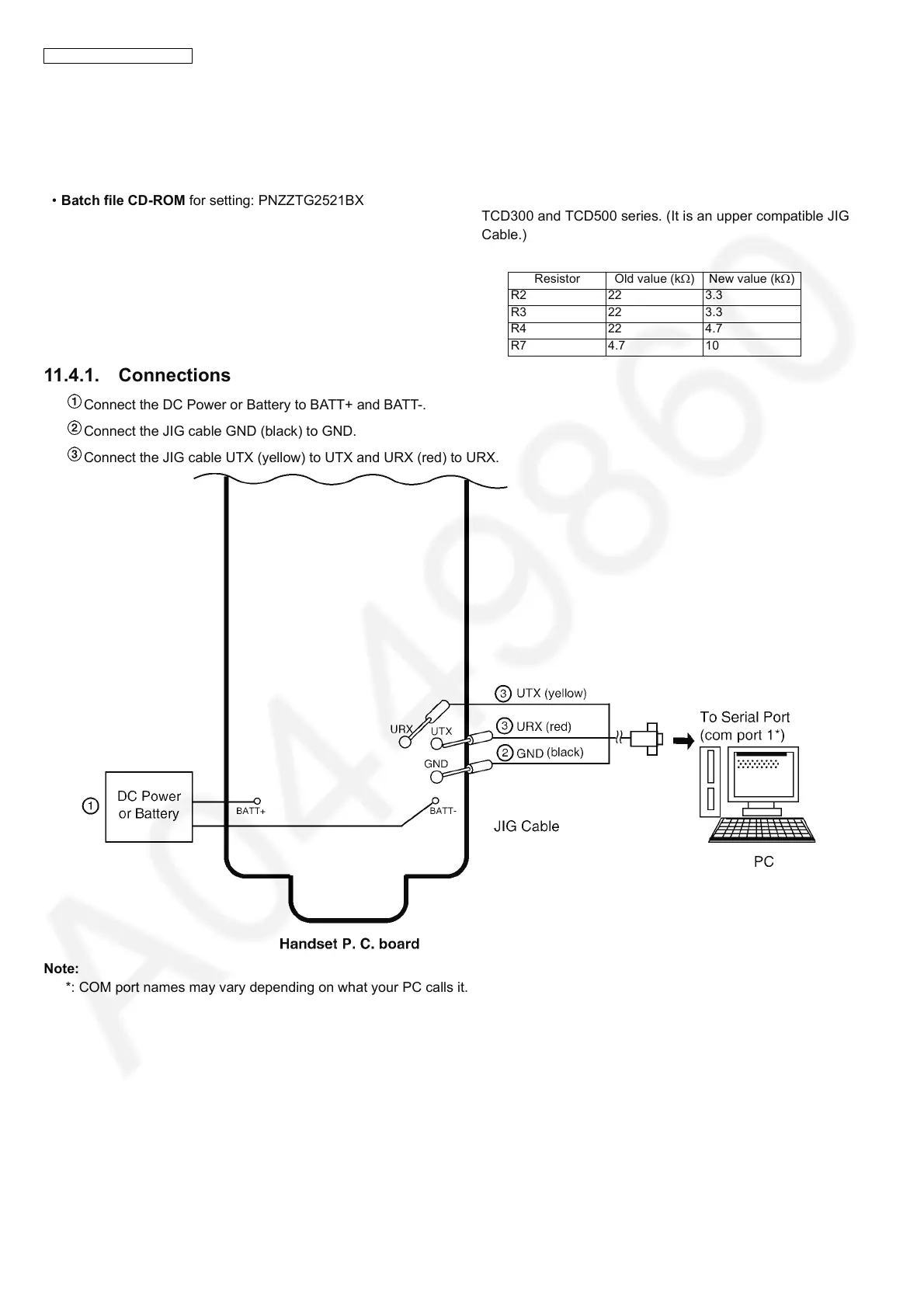
11.4.1. Connections
Connect the DC Power or Battery to BATT+ and BATT-.
Connect the JIG cable GND (black) to GND.
Connect the JIG cable UTX (yellow) to UTX and URX (red) to URX.
Note:
*: COM port names may vary depending on what your PC calls it.
Resistor Old value (kΩ)New value (kΩ)
R2 22 3.3
R3 22 3.3
R4 22 4.7
R7 4.7 10



 To Next Page