
 Need help?
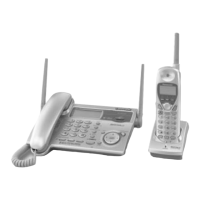
Do you have a question about the Panasonic KX-TG2770S and is the answer not in the manual?
Lists included accessories and provides information on how to order extras.
Instructions on charging the cordless handset battery before initial use.
Recommendations for optimal base unit placement to avoid interference and ensure range.
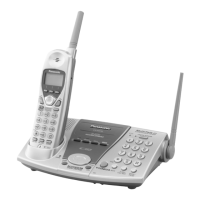
Details the controls, buttons, and indicators of the base unit.
Details the controls, buttons, and indicators of the cordless handset.
Identifies the components and connection points of the charger unit.
Explains the function and operation of the navigator keys and soft keys.
Describes the various display icons and messages shown on the base unit.
Describes the various display icons and messages shown on the cordless handset.
Details connecting the base unit and charger to power and the telephone line.
Step-by-step guide for inserting the handset battery correctly.
Instructions for charging the cordless handset battery before initial use.
Information on when and how to recharge the handset battery.
Instructions for replacing the handset battery with a new one.
Explains how to navigate and use the programming menus for customization.
Lists programmable functions and their corresponding page numbers for the base unit.
Lists programmable functions and their corresponding page numbers for the cordless handset.
Instructions for setting the date and time on the unit.
How to select between Pulse or Tone dialing modes.
Instructions for setting the line mode for the telephone connection.
How to adjust the ringer volume for the base unit and handset.
How to select the ringer tone for incoming calls.
How to enable or disable the auto-talk feature for answering calls.
How to adjust the contrast level of the LCD screen.
How to record a personal greeting message for callers.
Setting the duration allowed for caller messages.
Setting how many times the unit rings before the answering system answers.
Guide for making calls using the base unit handset or speakerphone.
Steps to dial a number after entering it on the keypad.
How to redial the most recently dialed number.
Accessing and redialing from the stored list of last dialed numbers.
How to place an active call on hold using the base unit.
Guide for making calls using the cordless handset.
Improves sound quality in areas with radio interference.
How to place an active call on hold using the cordless handset.
Instructions for answering calls using the base unit.
Instructions for answering calls using the cordless handset.
Steps to view received calls and call history entries.
How to initiate a call to a number from the caller list.
How to edit phone numbers stored in the caller list.
Feature to automatically format incoming Caller ID numbers.
Saving caller list entries into the phone's directory.
How to delete entries from the caller list.
How to add new contacts with names and numbers to the directory.
Guide to entering names using the dial pad characters.
How to make calls using stored directory entries.
Method to quickly find directory entries by first letter.
How to modify existing directory entries.
How to delete directory entries.
How to copy directory items between units.
Steps for copying a single directory entry to another unit.
Steps for copying all directory entries to another unit.
How to initiate intercom calls to other units.
Tips and considerations for managing intercom calls.
How to receive and answer intercom calls on the base unit or handset.
Steps for transferring an external call from the base unit to a handset.
Steps for transferring an external call from a handset to the base unit.
How to transfer calls between cordless handsets.
Performing a call transfer without prior announcement to the recipient.
Feature allowing the base unit or handset to join an existing external call.
How to use the base unit to monitor a room via intercom.
How to use a handset to monitor a room via intercom.
Information specific to using the 2-Way Radio feature with handsets.
Steps to initiate a direct communication call between cordless handsets.
How to temporarily silence your microphone during a call.
Enables tone dialing for services requiring it, for rotary/pulse users.
How to use the flash button to manage call waiting.
Using the pause button for dialing with PBX or long distance calls.
Setting alerts for incoming calls during other operations like intercom.
Using the flash button for PBX features and call waiting.
Adjusting the flash time for compatibility with PBX systems.
How callers interact with the answering system and specific mailboxes.
Securing personal mailboxes with a 2-digit password.
Turning the answering system on and off.
Listening to calls while they are being recorded.
Steps for playing back recorded messages from the base unit.
Playing messages remotely using the cordless handset.
Navigating message playback options via voice prompts.
Controls for adjusting speaker volume and playback speed.
Deleting individual recorded messages.
Deleting all recorded messages from a specific mailbox.
Controlling the answering system remotely via a touch-tone phone.
Setting a 2-digit remote access code for security.
Navigating the remote operation system via voice prompts.
Using direct commands to control the answering system remotely.
Instructions for wall mounting the charger unit.
Steps to deregister a cordless handset from the base unit.
Steps to register a cordless handset to a base unit.
Troubleshooting specific issues related to the telephone system's operation.
Further troubleshooting for telephone system problems.
Troubleshooting issues related to the answering system.
General troubleshooting for unit malfunctions and battery issues.
Compliance and regulatory information regarding FCC rules and phone usage.
Details of the product's warranty terms and coverage period.
Instructions for sending the product to a service center for repair.
Contact information for product support, inquiries, and dealer locations.
Information on how and where to purchase accessories.
Specific service information and contact details for Puerto Rico.
Technical specifications including dimensions, power, and frequency for the base unit.
Technical specifications for the charger unit.
Technical specifications including dimensions, power, and frequency for the handset.
Contact information for product service and authorized service centers.
Instructions for packing and shipping the product for service.
Fields for recording serial number, dealer, and date of purchase.
 General
| Type | Cordless Telephone |
|---|---|
| Number of Handsets | 1 |
| Expandable Handsets | Yes |
| Maximum Handsets Supported | 6 |
| Range | Up to 1000 feet |
| Caller ID | Yes |
| Talk Time | Up to 10 hours |
| Speakerphone | Yes |
| Answering System | Digital |
| Display | LCD |
| Backlit Keypad | Yes |
| Call Waiting | Yes |
| Intercom | Yes |
| Color | Silver |
| Phonebook Capacity | 50 entries |



 To Next Page
