EasyManua.ls Logo

Panasonic KX-TSC909CID - User Manual

Panasonic KX-TSC909CID
84 pages
Print Icon
To Next Page IconTo Next Page
Loading...
Answering System Useful Information
Preparation
Telephone System
PLEASE READ BEFORE USE AND SAVE.
Panasonic World Wide Web address: http://www.panasonic.com
for customers in the USA or Puerto Rico
Caller ID Compatible
Charge the battery for about 15 hours before initial use.
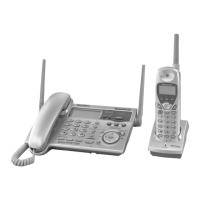
2.4GHz Expandable Cordless Phone System
Operating Instructions
Model No.
KX-TG2770S
Pulse-or-tone dialing capability

Table of Contents

Question and Answer IconNeed help?

Do you have a question about the Panasonic KX-TSC909CID and is the answer not in the manual?

Summary

Preparation

Location of Controls

Details the physical layout and buttons of the base unit and cordless handset.

Displays

Explains the meaning of icons and indicators shown on the base unit and cordless handset displays.

Installation and Connections

Guides on connecting the base unit, charger, and telephone line cord for initial setup.

Programmable Settings

Details how to customize various settings like ringer, date/time, dialing mode, and other functions.

Telephone System

Making Calls

Instructions for making calls using the base unit and the cordless handset, including speakerphone and hands-free operation.

Answering Calls

Procedures for answering calls on the base unit and cordless handset, including auto talk and call transfer.

Caller ID Service

Explains how Caller ID information is displayed, recorded in the Caller List, and used with the phone.

Using the Caller List

Guides on viewing, calling back, editing, storing, and erasing Caller ID entries from the list.

Answering System

Mailbox Features

Details the three voice mailboxes, their usage, setting passwords for security, and recording messages.

Automatic Answering Operation

How to set up and manage the answering system, including turning it on/off and monitoring incoming calls.

Listening to Messages

Instructions for playing back messages from the base unit, cordless handset, or remotely via touch-tone phone.

Erasing Messages

Procedures for deleting specific messages or all messages from mailboxes, and managing memory.

Useful Information

Belt Clip and Optional Headset

Instructions on attaching a belt clip for portability and connecting an optional headset for hands-free use.

Wall Mounting

Guides for mounting the base unit and charger unit on a wall plate for space-saving installation.

Canceling Registration;Re-registration

Steps to cancel a handset's registration from a base unit or re-register it to a different base unit.

Troubleshooting

Provides solutions for common problems, error messages, and system issues, with causes and remedies.

Summary

Preparation

Location of Controls

Details the physical layout and buttons of the base unit and cordless handset.

Displays

Explains the meaning of icons and indicators shown on the base unit and cordless handset displays.

Installation and Connections

Guides on connecting the base unit, charger, and telephone line cord for initial setup.

Programmable Settings

Details how to customize various settings like ringer, date/time, dialing mode, and other functions.

Telephone System

Making Calls

Instructions for making calls using the base unit and the cordless handset, including speakerphone and hands-free operation.

Answering Calls

Procedures for answering calls on the base unit and cordless handset, including auto talk and call transfer.

Caller ID Service

Explains how Caller ID information is displayed, recorded in the Caller List, and used with the phone.

Using the Caller List

Guides on viewing, calling back, editing, storing, and erasing Caller ID entries from the list.

Answering System

Mailbox Features

Details the three voice mailboxes, their usage, setting passwords for security, and recording messages.

Automatic Answering Operation

How to set up and manage the answering system, including turning it on/off and monitoring incoming calls.

Listening to Messages

Instructions for playing back messages from the base unit, cordless handset, or remotely via touch-tone phone.

Erasing Messages

Procedures for deleting specific messages or all messages from mailboxes, and managing memory.

Useful Information

Belt Clip and Optional Headset

Instructions on attaching a belt clip for portability and connecting an optional headset for hands-free use.

Wall Mounting

Guides for mounting the base unit and charger unit on a wall plate for space-saving installation.

Canceling Registration;Re-registration

Steps to cancel a handset's registration from a base unit or re-register it to a different base unit.

Troubleshooting

Provides solutions for common problems, error messages, and system issues, with causes and remedies.

Panasonic KX-TSC909CID Specifications

General IconGeneral
TypeCordless Telephone
Caller IDYes
Number of Handsets1
Phonebook Capacity50
DisplayLCD
Call Waiting Caller IDYes
SpeakerphoneYes
Ringer Volume ControlYes
RedialYes
Wall MountableYes
RangeUp to 1000 feet
Call WaitingYes
IntercomNo
ExpandableNo
Answering MachineNo

Related product manuals