16 17
1
Start cooking with the Heating menu
or Pan-frying menu, and then
Touch.
2
Touch to
set the time.
When the set time has elapsed,
the appliance beeps and heating stops automatically.
Note
• For Heating menu, the remaining time is displayed by touching while the
heat level is being displayed. (approx. 10 seconds.)
• For Pan-frying menu, the temperature is displayed by touching while the
remaining time is being displayed. (approx. 10 seconds.)
…………………………………………
►
Remaining timeLighting
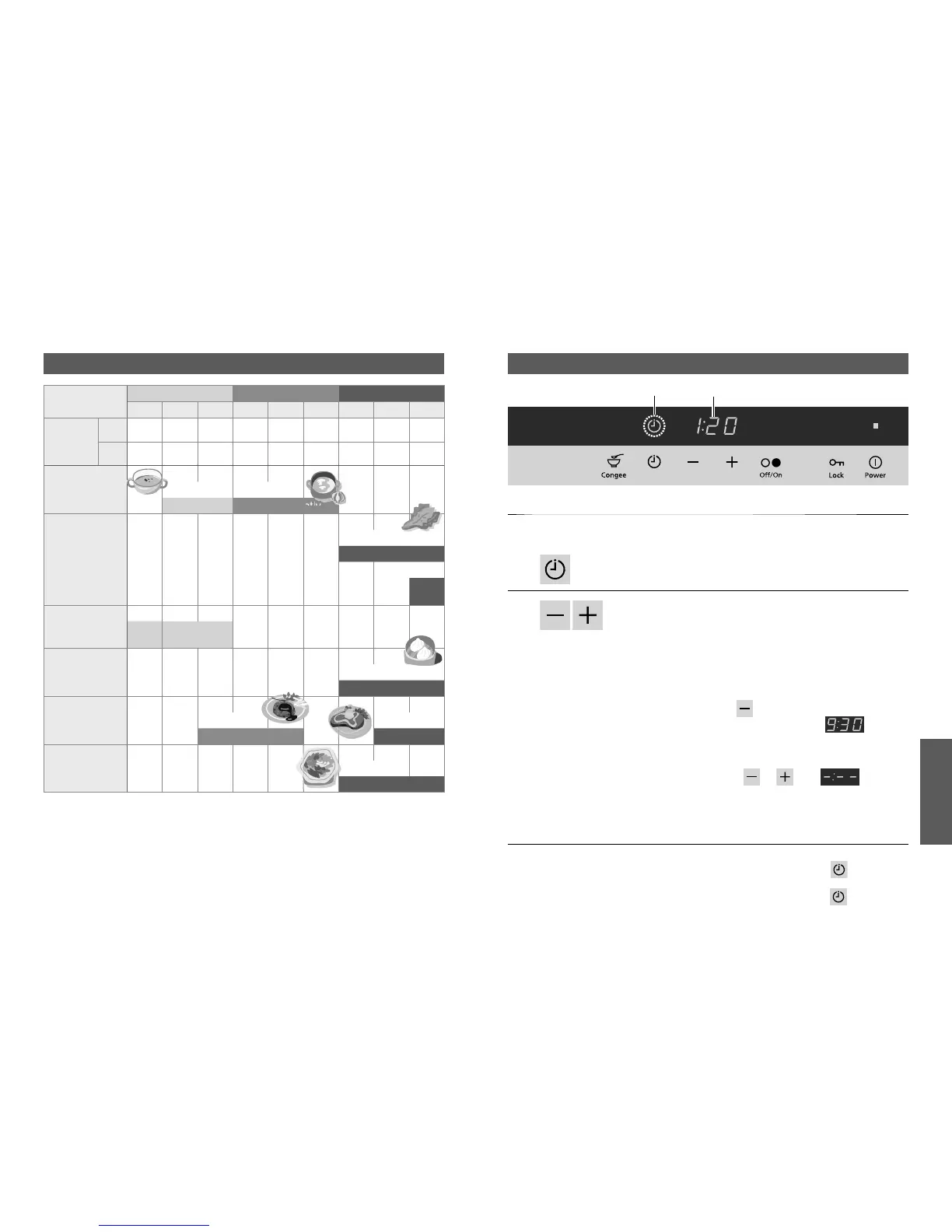
Heating Menu Timer
Operation
The timer can be set for the Heating menu and Pan-frying menu.
* This example uses
the right IH heater.
必要なとき
Usage
Heat level adjustment guideline
Heat level
Low Medium High
123456789
Power
consumption
[
W
]
KY-
E227D
120 235 370 500 700 1000 1450 2000 3000
KY-
C227D
120 235 370 500 700 1000 1450 2000 2800
Simmering Thick soup Light soup
Simmer
Simmer lightly
Boiling
Pasta, V
egetables
Boil
Hot water
Boil
quickly
Warming
Keep
warm
Reheat
Steaming Steamed meat bun
Steam with higher level
Pan-frying Hamburger Steak
Pan-fry slowly
Pan-fry quickly
Stir-frying
Vegetables
Stir-fry quickly
Note
• Heat values for cookware vary according to the material.
Check and adjust the heat levels frequently.
• Setting range:
1 minute to 9 hours 30 minutes.
• Setting unit
- to 30 minutes: by 1 minute
- to 1 hour: by 5 minutes
- to 3 hours: by 10 minutes
- to 9 hours 30 minutes: by 30 minutes
•
To change the time rapidly: Touch and hold.
• When is touched fi rst, the timer
can be set starting from (the
maximum time) to shorter time.
■
To cancel
Touch or until is
displayed.


 To Next Page