English - 18 -
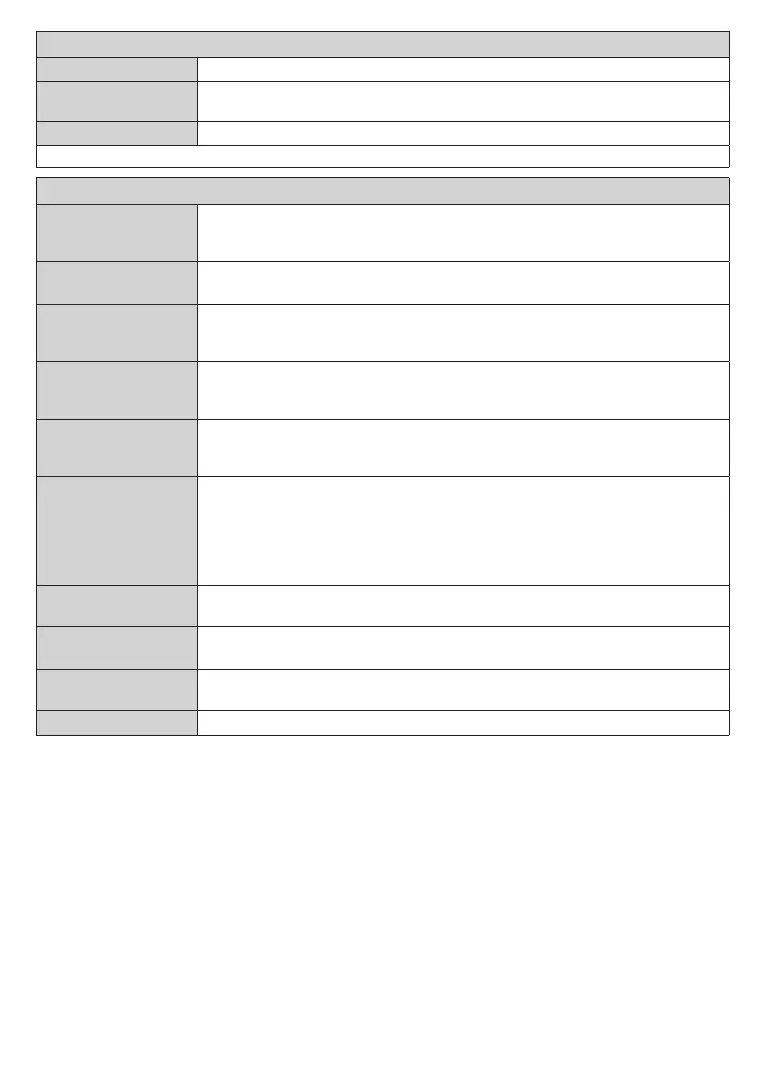
Disable or enable the wired network connection.
Internet Speed Test
Start a speed test to check your connection bandwidth. The result will be displayed on
Note: For detailed information on the options of this menu refer to the Wired Network Connection section.
Installation Menu Contents
Automatic channel
scan (Retune)
Displays automatic tuning options. D. Aerial: Searches and stores aerial DVB stations.
D. Cable: Searches and stores cable DVB stations. Analogue: Searches and stores
analogue stations.
Manual channel
scan
This feature can be used for direct broadcast entry.
Network channel
scan
Searches for the linked channels in the broadcast system. D. Aerial: Searches for aerial
network channels. D. Cable: Searches for cable network channels. Satellite: Searches
for satellite network channels.
if no analogue channels are stored and if currently watched channel is not an analogue
channel.
Satellite Settings
Displays satellite settings. Satellite list: Displays available satellites. You can Add,
Delete satellites or Edit satellite settings on the list. Antenna installation: You can
change satellite antenna settings and/or start a satellite scan.
Installation Settings
(optional)
Displays installation settings menu. Standby Search (*): Your TV will search for new or
missing channels while in standby. Any new found broadcasts will be shown. Dynamic
Channel Update(*): If this option is set as Enabled, the changes on the broadcasts
such as frequency, channel name, subtitle language etc., will be applied automatically
while watching.
(*) Availability depends on model.
Clear Service List
Use this setting to clear channels stored. This setting is visible only when the Country
option is set to Denmark, Sweden, Norway or Finland.
Select Active
This setting allows you to select only the broadcasts within the selected network to be
listed in the channel list. This feature is available only for the country option of Norway.
Signal Information
You can use this menu item to monitor signal related information such as signal level/
quality, network name etc for available frequencies.
Deletes all stored channels and settings, resets TV to factory settings.










 To Next Page