EasyManua.ls Logo

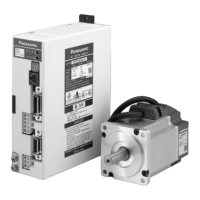
Panasonic MADDT1205P - User Manual

Panasonic MADDT1205P
232 pages
Print Icon
To Next Page IconTo Next Page
Loading...
Instruction Manual
AC Servo Motor and Driver
MINAS A4P Series
DV0P4490
Thank you for buying and using Panasonic AC Servo Motor and Driver, MINAS A4P Series.
Read through this Instruction Manual for proper use, especially read "Precautions for Safety" ( P.8
to 11) without fail for safety purpose.
Keep this Manual at an easily accessible place so as to be referred anytime as necessary.

Table of Contents

Question and Answer IconNeed help?

Do you have a question about the Panasonic MADDT1205P and is the answer not in the manual?

Summary

Instruction Manual

Safety Precautions

Essential instructions to prevent damages, injuries, and ensure safe operation.

Maintenance and Inspection

Routine checks and procedures for maintaining the driver and motor for proper operation.

Introduction

Overview of the MINAS-A4P Series servo motor and driver, its features, and applications.

Parts Description

Detailed identification and explanation of the driver and motor components and connectors.

Installation

Guidance on properly installing the driver and motor to prevent breakdowns or accidents.

Preparation

System Configuration and Wiring

Detailed wiring diagrams and instructions for connecting main circuits and peripheral equipment.

Setup with the Front Panel

Explains the console display, initial status, and analog signal outputs for operational setup.

Built-in Holding Brake

Information on the purpose, connection, and output timing of the motor's built-in holding brake.

Dynamic Brake

Details on the driver's dynamic brake function for emergency stops and setup options.

Setting

Parameter Setup

Comprehensive guide to setting up various parameters for driver characteristics and functions.

List of Servo Parameter

Detailed listing of servo parameters for functional selection, including setup ranges and content.

List of 16-bit Positioning Parameters

Parameters related to motor speed, acceleration, deceleration, homing, and jog operations.

List of 32-bit Positioning Parameters

Parameters for setting maximum movement in plus/minus directions and rotation coordinates.

List of Step Parameters

Parameters for operation mode, speed, acceleration, deceleration, and block settings.

Setup of Torque Limit

Information on setting torque limits for CCW/CW directions and maximum values based on motor model.

How to Use the Console

Instructions on operating the console for monitoring, parameter setup, and tuning functions.

Parameter setup mode

Explains how to access and set parameters using the console, categorized by parameter type.

EEPROM Write Mode

Procedure for writing parameters to EEPROM to save settings after modification.

Auto-Gain Tuning Mode

Details on real-time and normal mode auto-gain tuning for optimizing machine performance.

Auxiliary Function Mode

Explains how to use auxiliary functions like Alarm Clear and Absolute Encoder Clear via the console.

Copying Function (Console Only)

Procedures for copying parameters between the driver and the console using the console.

Outline of Setup Support Software, PANATERM

Information on the PANATERM® software for setup, monitoring, and analysis of the servo system.

Operation Setting

Overview of Operation Setting

Outlines the various operations that can be performed with the MINAS A4P servo driver.

Step Operation

Detailed explanation of how to perform positioning operations using step data and modes.

Jog Operation

Instructions on manually moving the motor in positive or negative directions for teaching or adjustment.

Homing Operation

Procedures for detecting the home position, including various homing modes and parameter settings.

Emergency Stop Operation;Deceleration-and-Stop Operation

How to interrupt and cancel active operations using emergency stop or deceleration commands.

Temporary Stop Operation

Procedures for temporarily stopping and restarting active operations.

Block Operation

Explanation of continuous and combined block operations for executing multiple step operations.

Sequential Operation

How to perform sequential operations by incrementing point numbers automatically with strobe signal input.

S-shaped Acceleration;Deceleration Function

How to set S-shaped acceleration/deceleration for smoother motion and reduced vibration.

Timing Chart

Visual representation of operation timing sequences after power-on and during errors.

Absolute System

Information on constructing an absolute system using absolute encoders and battery backup.

Outline of Full-Closed Control

Explanation of full-closed control using external scales for high-precision positioning.

Adjustment

Gain Adjustment

Guidance on adjusting servo gains for optimal machine performance, including automatic and manual methods.

Real-Time Auto-Gain Tuning Mode

How to use the real-time auto-gain tuning feature to automatically estimate and set gains.

Adaptive Filter

Explanation of the adaptive filter function for controlling vibration and resonance.

Normal Mode Auto-Gain Tuning

How to perform auto-gain tuning using the console or software for optimal gain settings.

Release of Automatic Gain Adjusting Function

Procedures for invalidating auto-gain tuning or adaptive filter functions and their cautions.

Manual Gain Tuning (Basic)

Methods for manual gain tuning using analog monitor output or waveform graphic function.

Adjustment in Position Control Mode

Step-by-step guide for adjusting parameters in position control mode for optimal performance.

Adjustment in Full-Closed Control Mode

Procedures for setting external scale ratio and hybrid deviation excess for full-closed control.

Gain Switching Function

How to manually set and switch between 1st and 2nd gains based on action conditions.

Suppression of Machine Resonance

Techniques for suppressing resonance using torque command filters and notch filters.

Instantaneous Speed Observer

Function for improving speed detection accuracy and reducing vibration by estimating motor speed.

Damping Control

Function to reduce vibration by removing frequency components from the command when the machine vibrates.

When in Trouble

What to Check?

Troubleshooting guide covering common checks for wiring, power, and connections when issues arise.

Protective Function (What is Error Code?)

Explains protective functions, error codes, and how to clear alarms using the console or software.

Protective Function (Detail of Error Code)

Detailed causes and measures for various protective functions and error codes, including warnings.

Troubleshooting

Common issues like motor not running, positioning errors, noise, vibration, and parameter problems.

Supplement

Conformity to EC Directives and UL Standards

Information on product compliance with EC Directives and UL Standards, including environmental and installation guidelines.

Options

Details on optional accessories like connectors, junction cables, and console kits for system expansion.

Recommended components

List of recommended peripheral equipment such as surge absorbers, noise filters, and breakers.

Dimensions (Driver)

Physical dimensions and mounting information for different driver frames (A, B, C, D, E, F).

Dimensions (Motor)

Mechanical dimensions for various motor models, including keyway dimensions and connector details.

Permissible Load at Output Shaft

Specifications for radial and thrust loads allowed on the motor output shaft based on motor output and reduction ratio.

Motor Characteristics (S-T Characteristics)

Torque-speed and continuous torque vs. ambient temperature characteristics for various motor series.

Motor with Gear Reducer

Model numbers and specifications for motors combined with gear reducers, including reduction ratios.

Block Diagram of Driver

Internal block diagrams illustrating the driver's circuitry for different frame types.

Block Diagram by Control Mode

Block diagrams showing signal flow for position control and full-closed control modes.

Specifications (Driver)

Technical specifications for the driver, including power, environmental conditions, control methods, and I/O.

Default Parameters (for all the models of A4 P Series)

A comprehensive list of default parameter values for various settings across all A4P Series models.

Summary

Instruction Manual

Safety Precautions

Essential instructions to prevent damages, injuries, and ensure safe operation.

Maintenance and Inspection

Routine checks and procedures for maintaining the driver and motor for proper operation.

Introduction

Overview of the MINAS-A4P Series servo motor and driver, its features, and applications.

Parts Description

Detailed identification and explanation of the driver and motor components and connectors.

Installation

Guidance on properly installing the driver and motor to prevent breakdowns or accidents.

Preparation

System Configuration and Wiring

Detailed wiring diagrams and instructions for connecting main circuits and peripheral equipment.

Setup with the Front Panel

Explains the console display, initial status, and analog signal outputs for operational setup.

Built-in Holding Brake

Information on the purpose, connection, and output timing of the motor's built-in holding brake.

Dynamic Brake

Details on the driver's dynamic brake function for emergency stops and setup options.

Setting

Parameter Setup

Comprehensive guide to setting up various parameters for driver characteristics and functions.

List of Servo Parameter

Detailed listing of servo parameters for functional selection, including setup ranges and content.

List of 16-bit Positioning Parameters

Parameters related to motor speed, acceleration, deceleration, homing, and jog operations.

List of 32-bit Positioning Parameters

Parameters for setting maximum movement in plus/minus directions and rotation coordinates.

List of Step Parameters

Parameters for operation mode, speed, acceleration, deceleration, and block settings.

Setup of Torque Limit

Information on setting torque limits for CCW/CW directions and maximum values based on motor model.

How to Use the Console

Instructions on operating the console for monitoring, parameter setup, and tuning functions.

Parameter setup mode

Explains how to access and set parameters using the console, categorized by parameter type.

EEPROM Write Mode

Procedure for writing parameters to EEPROM to save settings after modification.

Auto-Gain Tuning Mode

Details on real-time and normal mode auto-gain tuning for optimizing machine performance.

Auxiliary Function Mode

Explains how to use auxiliary functions like Alarm Clear and Absolute Encoder Clear via the console.

Copying Function (Console Only)

Procedures for copying parameters between the driver and the console using the console.

Outline of Setup Support Software, PANATERM

Information on the PANATERM® software for setup, monitoring, and analysis of the servo system.

Operation Setting

Overview of Operation Setting

Outlines the various operations that can be performed with the MINAS A4P servo driver.

Step Operation

Detailed explanation of how to perform positioning operations using step data and modes.

Jog Operation

Instructions on manually moving the motor in positive or negative directions for teaching or adjustment.

Homing Operation

Procedures for detecting the home position, including various homing modes and parameter settings.

Emergency Stop Operation;Deceleration-and-Stop Operation

How to interrupt and cancel active operations using emergency stop or deceleration commands.

Temporary Stop Operation

Procedures for temporarily stopping and restarting active operations.

Block Operation

Explanation of continuous and combined block operations for executing multiple step operations.

Sequential Operation

How to perform sequential operations by incrementing point numbers automatically with strobe signal input.

S-shaped Acceleration;Deceleration Function

How to set S-shaped acceleration/deceleration for smoother motion and reduced vibration.

Timing Chart

Visual representation of operation timing sequences after power-on and during errors.

Absolute System

Information on constructing an absolute system using absolute encoders and battery backup.

Outline of Full-Closed Control

Explanation of full-closed control using external scales for high-precision positioning.

Adjustment

Gain Adjustment

Guidance on adjusting servo gains for optimal machine performance, including automatic and manual methods.

Real-Time Auto-Gain Tuning Mode

How to use the real-time auto-gain tuning feature to automatically estimate and set gains.

Adaptive Filter

Explanation of the adaptive filter function for controlling vibration and resonance.

Normal Mode Auto-Gain Tuning

How to perform auto-gain tuning using the console or software for optimal gain settings.

Release of Automatic Gain Adjusting Function

Procedures for invalidating auto-gain tuning or adaptive filter functions and their cautions.

Manual Gain Tuning (Basic)

Methods for manual gain tuning using analog monitor output or waveform graphic function.

Adjustment in Position Control Mode

Step-by-step guide for adjusting parameters in position control mode for optimal performance.

Adjustment in Full-Closed Control Mode

Procedures for setting external scale ratio and hybrid deviation excess for full-closed control.

Gain Switching Function

How to manually set and switch between 1st and 2nd gains based on action conditions.

Suppression of Machine Resonance

Techniques for suppressing resonance using torque command filters and notch filters.

Instantaneous Speed Observer

Function for improving speed detection accuracy and reducing vibration by estimating motor speed.

Damping Control

Function to reduce vibration by removing frequency components from the command when the machine vibrates.

When in Trouble

What to Check?

Troubleshooting guide covering common checks for wiring, power, and connections when issues arise.

Protective Function (What is Error Code?)

Explains protective functions, error codes, and how to clear alarms using the console or software.

Protective Function (Detail of Error Code)

Detailed causes and measures for various protective functions and error codes, including warnings.

Troubleshooting

Common issues like motor not running, positioning errors, noise, vibration, and parameter problems.

Supplement

Conformity to EC Directives and UL Standards

Information on product compliance with EC Directives and UL Standards, including environmental and installation guidelines.

Options

Details on optional accessories like connectors, junction cables, and console kits for system expansion.

Recommended components

List of recommended peripheral equipment such as surge absorbers, noise filters, and breakers.

Dimensions (Driver)

Physical dimensions and mounting information for different driver frames (A, B, C, D, E, F).

Dimensions (Motor)

Mechanical dimensions for various motor models, including keyway dimensions and connector details.

Permissible Load at Output Shaft

Specifications for radial and thrust loads allowed on the motor output shaft based on motor output and reduction ratio.

Motor Characteristics (S-T Characteristics)

Torque-speed and continuous torque vs. ambient temperature characteristics for various motor series.

Motor with Gear Reducer

Model numbers and specifications for motors combined with gear reducers, including reduction ratios.

Block Diagram of Driver

Internal block diagrams illustrating the driver's circuitry for different frame types.

Block Diagram by Control Mode

Block diagrams showing signal flow for position control and full-closed control modes.

Specifications (Driver)

Technical specifications for the driver, including power, environmental conditions, control methods, and I/O.

Default Parameters (for all the models of A4 P Series)

A comprehensive list of default parameter values for various settings across all A4P Series models.

Panasonic MADDT1205P Specifications

General IconGeneral
BrandPanasonic
ModelMADDT1205P
CategoryPower Supply
LanguageEnglish

Related product manuals