EN10
Brewing Coffee
(continued)
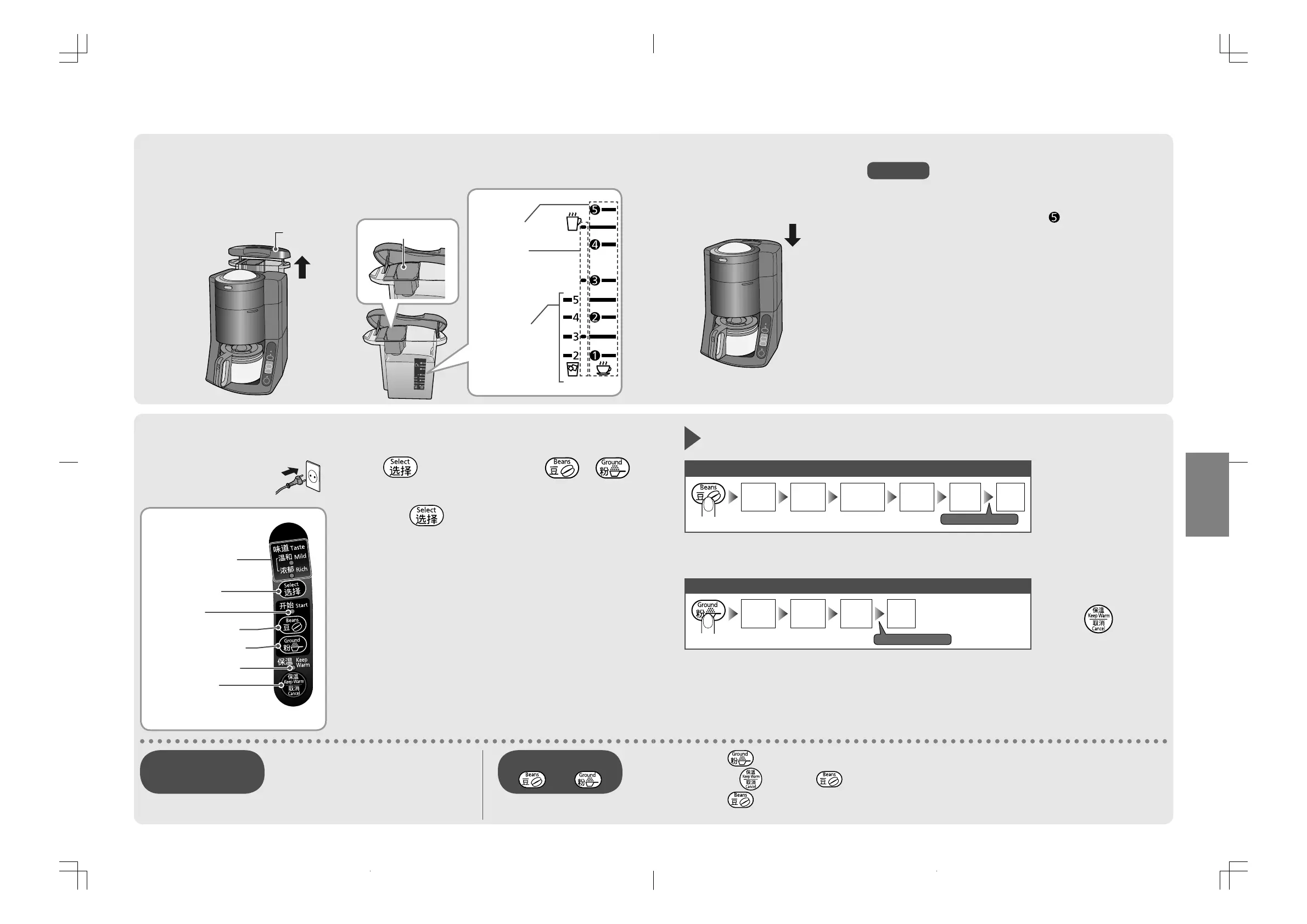
Pour the water to the water tank, place it to the
main unit.
■
˛#
Take off the water tank
from the main unit.
˛#
Plug the
power plug
firmly.
˛$
Pour the water using
the water level indicator.
Water tank Charcoal filter
Water level
Hot coffee
Hot coffee
(with a mug cup)
●
make up to
3 cups.
Iced coffee
Plug and start brewing by pressing the select button.
■
˛$
Press as desired.
(Selected lamp will flash.)
●
Pressing each time,
lamp will change “Mild”
or “Rich”.
˛%
Press or .
(Start lamp will be on.)
Course indicator
Select button
Start lamp
Button for Beans
Button for Ground
Keep-warm lamp
Keep Warm /
Cancel button
●
Cancel all operation
include keep-warm.
[ Control panel ]
Erroneous touch of
and
Change it while flashing Course
indicator (approx. 20 sec.)
Changing the course
in midstream
NC-TSC500.indb10NC-TSC500.indb10 2016/08/0913:54:582016/08/0913:54:58
EN11
English
˛%
Put the water tank back
in place.
●
Make sure the charcoal filter is attached.
●
Do not pour the water into the water tank higher
than 5 on the scale of Hot coffee “
”. (It may cause
malfunction.)
●
Make sure that the water tank is positioned toward
down to the bottom. (If not, it stops the operation, after
Indicating by beep sounds and lamps. P. EN17)
●
Do not put any water once the water tank has been
placed to the main unit. (Quantity of water will be
increased due to drain away to the water tube.)
●
Do not pour the water into the charcoal filter.
(Water leaks from the side of the appliance.)
●
Do not remove the water tank once it has been placed to
the main unit. (Water comes out from the appliance.)
●
Do not fill the water tank with hot water.
(A lot of steam may spurt out.)
Notice
Keep-warm automatically
˛&
Pour the coffee after
brewing.
●
After brewing, the
warming plate will
keep-warm the
coffee automatically.
(approx. 2 hours)
●
Do not tilt the glass
jug too much. Hot
coffee may spill out.
˛(
Press to cancel
keep-warm and unplug
after use.
●
Keep-warm will
automatically stop
in about 2 hours to
prevent forgetting to
switch off.
Using the coffee beans
Grinding
Heat
circulating
Auto
shower
*
1
Steaming
Brewing
Keep-
warm
●
The mechanical sound occurs during “Grinding” and “Auto shower”
process.
Using the ground
*
2
Heat
circulating
Steaming
Brewing
Keep-
warm
●
Sound of motor or water circulation over main unit occur during
brewing.
●
Press when using the coffee beans.
➡
Press then press again. (Re-start with the new coffee beans when your beans are wet.)
●
Press when using the ground.
➡
Stop the operation, after indicating by beep sounds and lamps. (P. EN17)
*
1 Coffee powder inside the bean hopper is dropped automatically
(by Auto shower).
*
2 Ground : pre-ground coffee beans
Beeps sound
Beeps sound
NC-TSC500.indb11NC-TSC500.indb11 2016/08/0913:54:582016/08/0913:54:58


 To Next Page