EN12
Brewing Coffee (for your taste)
#
Press to turn off.
$
Wipe a wet part of mesh filter, bean hopper or inside of the lid.
(When you use beans.)
%
Brew the coffee as step
to
(P. EN8 - EN11).
Wait for 2 to 3 minutes to place the water tank after turn off the unit.
(If it is placed soon, steam may spurt out.)
●
Up to the second coffee may stronger when you brew it consecutively.
●
Preheat the cup, jug and others with hot water.
●
We do not recommend keep-warm your coffee more than 15 minutes for its taste and flavor.
Preparation
Coffee beans or ground for iced coffee
Ice cube
Syrup, cream, etc.
#
Brew the coffee as step
to
(P. EN8 - EN11).
$
Put the ice cube to the glass, pour the coffee into the glass and stir well.
●
Do not put the ice cube to the glass jug.
(If the surface is damaged, it may cause fracture.)
●
Making a single cup of iced coffee is not possible.
Make iced coffee 2 to 5 cups.
To brew coffee consecutively
To make extra hot coffee
How to make iced coffee
NC-TSC500.indb12NC-TSC500.indb12 2016/08/0913:54:592016/08/0913:54:59
EN13
English
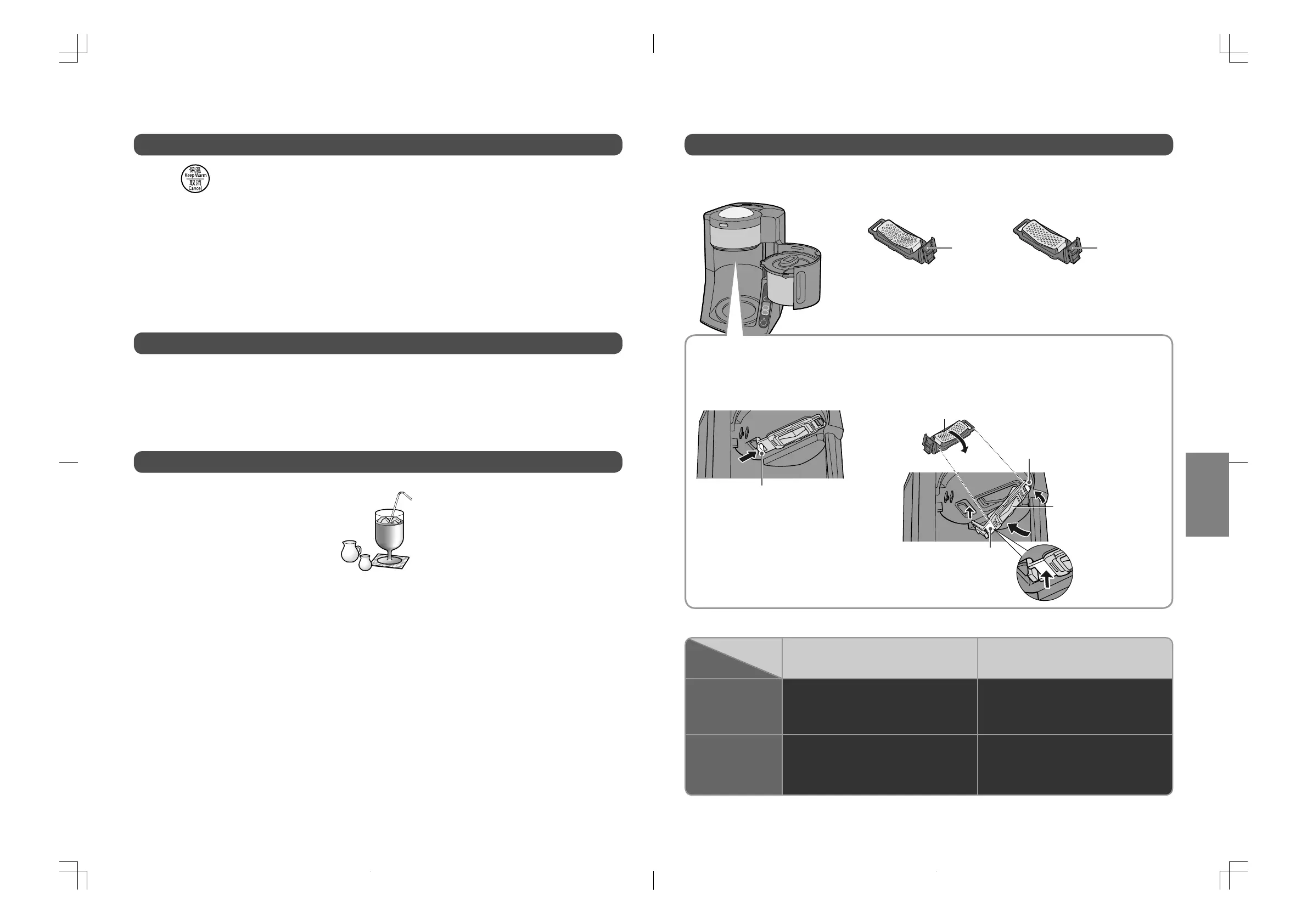
Make your coffee taste by using coarse/medium grind mesh filter and select the course.
●
Medium grind mesh filter is attached when you purchased.
Combination of the mesh filter and courses
●
The same combination may produce different results depending on the coffee beans used.
●
The coffee drink names mentioned above are examples.
Medium grindCoarse grind
(accessory)
■
Mesh filter
Green
Brown
Mesh filter is placed at the lower part of the bean hopper.
●
After unplug, be sure that appliance and mesh filter have cooled down before replacement.
■
Demounting
■
Mounting
Course
Mesh filter
■
Examples of combinations of grinds and courses
Move the knob toward to
➡
and pull down.
#
Hung to the flange part.
$
Lift it up.
%
Push it up firmly
until you hear a
“click” sound.
Front side of the mesh filter
Back side of the
mesh filter
●①
●②
●③
●③
NC-TSC500.indb13NC-TSC500.indb13 2016/08/0913:54:592016/08/0913:54:59


 To Next Page